Customer feedback gives you something to work with, but turning it into an offer still involves several jobs: understanding the responses, making business decisions, writing the launch materials, building a page and reviewing new evidence as it arrives. Asking ChatGPT for advice can help with each one. Work lets you connect those jobs to the files and tools where the work happens.
We will use Gentle Arc Studio, a fictional mindfulness business, to build that process from beginning to end. You will create its business files, analyze survey responses, develop a workshop offer and launch page, save the analysis method as a reusable skill, and schedule a recurring review that updates one living document. You keep the business decisions and review the results along the way.
The companion workshop follows this same business example. The prompts and sample files let you reproduce it without supplying customer information of your own. The studio, instructor and survey responses are fictional.
Set up the project
Use the ChatGPT desktop app for this walkthrough because we will connect a folder on your computer. Before preparing the files, open ChatGPT and check that you can select Work. If it is unavailable in your account, check OpenAI’s getting-started guide for access and setup. The screenshots use the interface available when this workflow was built; the current app may group some controls differently.
Work takes on jobs using connected tools and files. Regular Chat is still useful for thinking through the job before asking the agent to carry it out. We will start there, then move the conversation into Work when we want documents saved in the project folder.
Prepare the survey and local folder
Download the companion files and extract the ZIP. Open 01-start/initial-survey-responses.csv. CSV is a plain-text spreadsheet format: the first row names the columns, and the following rows contain the responses.
There are 30 responses, with an identifier for each one. The columns record the respondent’s role, current mindfulness practice, hardest moment, desired outcome, main concern and preferred time. For example, someone may struggle to move from one urgent task to another and want a way to pause between them. Those details give us more to work with than a count of people interested in mindfulness.
Import that CSV into a new Google Sheet. One route is to upload the file in Google Drive, then open it with Google Sheets, as described in Google’s spreadsheet setup instructions. Name the resulting Sheet Gentle Arc Studio - Workshop Survey Responses. Check that the column headings are separated into columns and the response IDs run from S-01 through S-30. Keep the eight additional responses in 03-new-responses/ aside; we will use them to test the review later.
Now create an empty folder named Gentle Arc Studio somewhere you can find it on your computer. In ChatGPT, open Projects, choose the control to create a project, and give it the same name. Select your new folder as its source folder, then create the project.
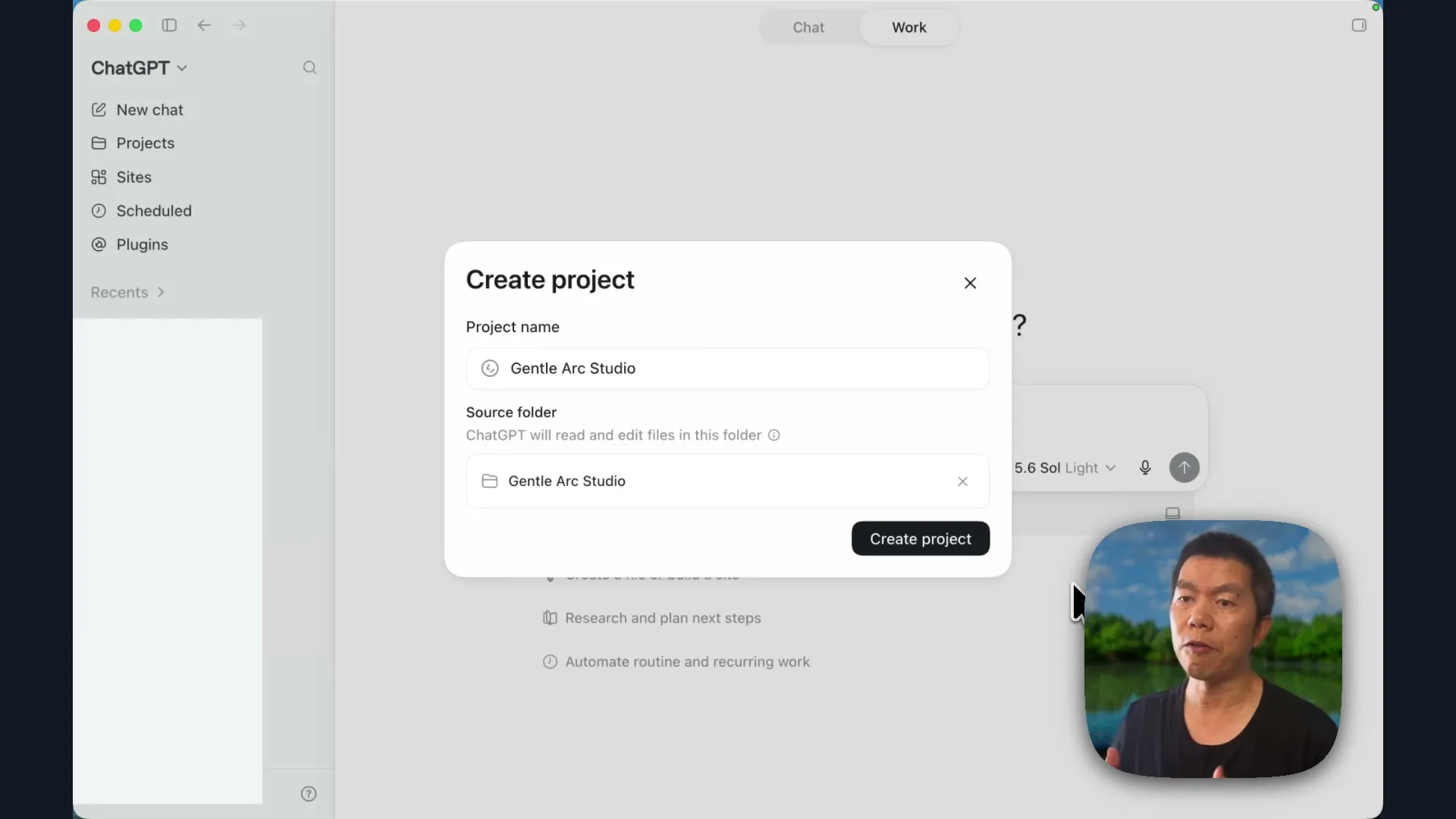
The ChatGPT project holds the working conversation; the selected folder gives Work a place to read and save local files. Confirm that the folder shown in the project is the one you created. We will connect the survey in Google Drive after establishing the business context.
Move from Chat to Work
Start a conversation in regular Chat inside the new project:
We are Gentle Arc Studio. We have collected 30 survey responses about a possible beginner-friendly mindfulness workshop. The responses are in a Google Sheet, and I want to turn what we learn into a useful workshop and a credible launch. Please help me define the outcome and ask me for the business information you need.
ChatGPT will ask for the information it needs to interpret the survey. This is where you supply the business’s purpose, what is already decided, and what the evidence should still challenge. For the fictional studio, use this answer:
Here are the answers in order.
The survey is in a Google Sheet. I will connect it after we save the business context, and before we ask you to analyze it.
By mindful, we mean practical, secular mindfulness. The workshop may use short attention and breathing practices, with simple reflection.
We hope to serve people who are new to mindfulness, find it difficult to slow down, and want something practical for daily life. Use the survey to identify the strongest starting group.
By the end, participants should understand one short mindfulness practice, experience it for themselves, and leave with a realistic plan for repeating it.
Our starting format is a live 90-minute online workshop for no more than 20 people. The survey can still challenge that starting assumption.
The pilot should be paid, but the price is not fixed. Recommend an accessible range from the survey evidence. Success means filling the pilot, learning what participants value, and deciding whether to run it again.
The instructor is Iris Fenwicke. She has six years of mindfulness teaching experience and teaches in a practical, secular style.
We would like to launch within four to six weeks. Our immediate audience is the people who answered the survey. We do not yet have a large email list or an established promotional channel.
One final boundary: do not make medical, therapeutic, or religious claims. Do not invent credentials, testimonials, or results.
Turn this into a concise working brief. Clearly separate what is confirmed from what the survey still needs to test.
The starting format is a hypothesis. We have supplied a 90-minute workshop for no more than 20 people, while leaving room for the survey to suggest a different format. The price is also open. Keeping those distinctions in the brief helps prevent a starting idea from becoming an assumed fact later.
Understand the skills and plugins it uses
As ChatGPT works, it may show the tools or skills it loads. A skill is a reusable set of instructions for a particular kind of job. It can describe the method, what to check and how to present the result. A plugin packages skills and capabilities, such as connecting to a service or working with a particular type of document.
In this example, ChatGPT selected a business-analysis workflow and loaded reporting instructions. The available plugins can differ between accounts. Expand the activity when you want to see which instructions and tools your own conversation uses; a familiar-looking answer alone does not tell you which method it followed.
We will use an existing plugin to connect the survey, then create our own review skill after completing the analysis once. For now, finish the business discussion and check that the studio’s name, instructor, goal and boundaries are right.
Save the business context as files
Continue the same conversation in Work. Ask it to create the files:
Using the working brief from this conversation, create two files directly inside this local project folder.
Create a file named studio-overview.md. Include the studio’s purpose, instructor, business goal, existing assets, and boundaries.
Create a file named pilot-workshop-brief.md. Include the current workshop idea, the intended result for participants, what we have already decided, and the questions the survey still needs to answer.
Use only information already established in this conversation. Clearly separate confirmed information from ideas that still need to be tested.
The .md extension means Markdown: a text format that uses simple marks for headings, lists and links. You can read the files as ordinary text, and Work can use them as inputs to later jobs.
Open the two documents from Work’s result. Use Show in Finder or open the project folder yourself to confirm that the files are saved there. Check the studio overview for the purpose, instructor, business goal and boundaries. Check the workshop brief for the starting format and the questions that remain unresolved.
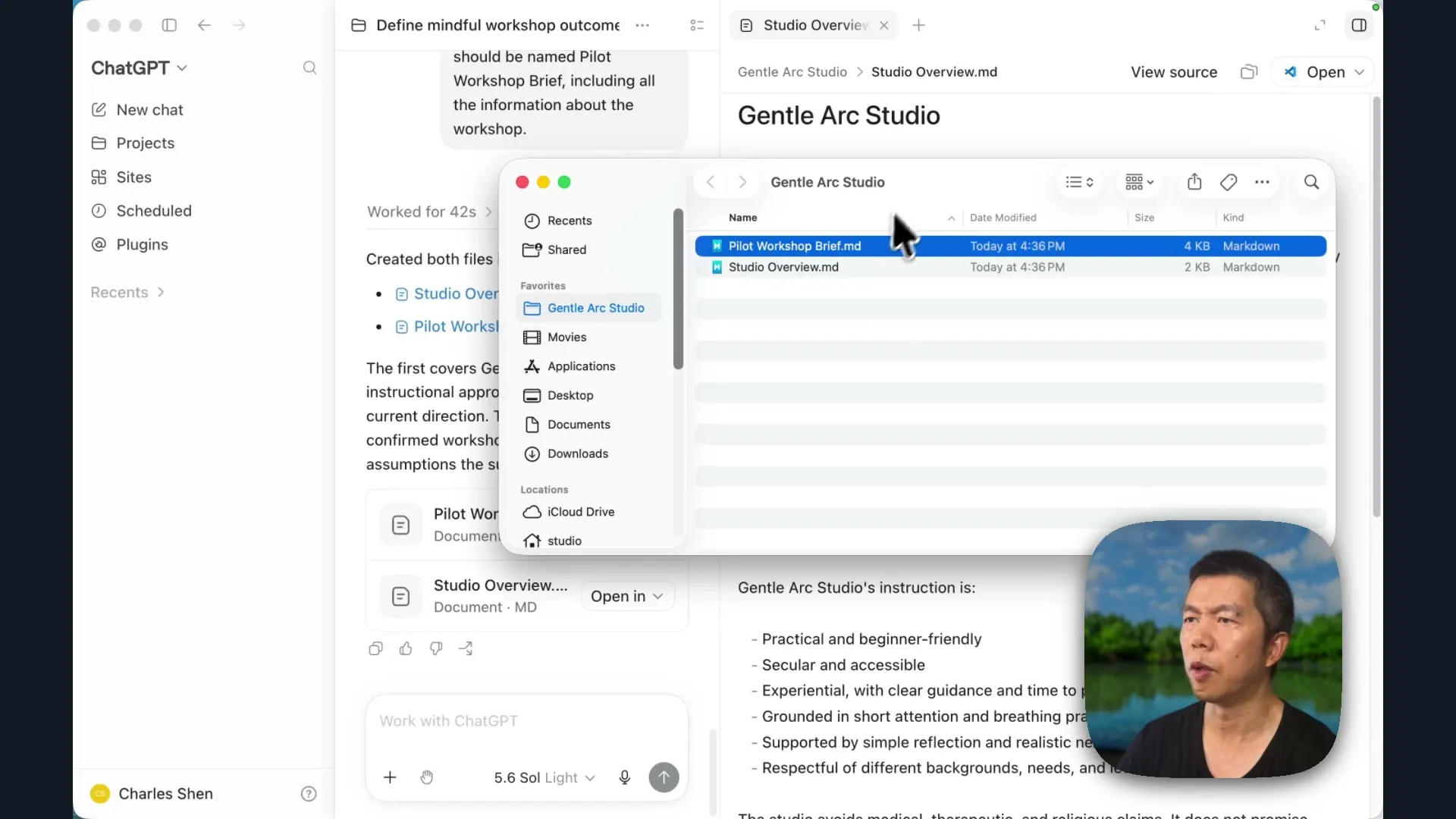
The saved filenames in this example are Studio Overview.md and Pilot Workshop Brief.md. The supplied prompt requests studio-overview.md and pilot-workshop-brief.md; use the actual filenames in your project folder whenever you refer to the saved documents.
Turn survey responses into decisions
The two files you created describe the studio and its starting workshop idea. Now give Work the customer evidence: the Google Sheet containing the 30 survey responses.
Connect Google Drive through Plugins and complete Google’s authorization process. Return to the same project conversation in Work. The connection lets Work find the Sheet; the two local files give it the business context for interpreting the answers.
Send this prompt:
Use Google Drive to open the Google Sheet named Gentle Arc Studio - Workshop Survey Responses, and analyze the 30 responses together with the two files in this project.
Based on the survey, recommend who the first workshop should serve, the problem it should address, its promise, format, timing, and price.
Show me the evidence behind your recommendations, and save the findings as customer-insights.md in this local project folder.
Check that Work finds the intended Sheet and reports 30 unique responses. When it finishes, open customer-insights.md in your project folder and inspect the evidence behind the recommendations.
In this example, Work identified a need to reset, recover or create a boundary between demanding moments in 20 of the 30 responses. Weekday lunch was the leading time preference, chosen by 15 respondents. Those findings support an offer aimed at busy working adults who want a practical pause during the day.
The suggested price needs a different kind of judgment. Work proposed $25, but the survey never asked about willingness to pay. It also did not establish the right workshop length. Treat these as ideas to test when choosing the offer. The report helps you make that decision; it does not supply evidence the survey never collected.
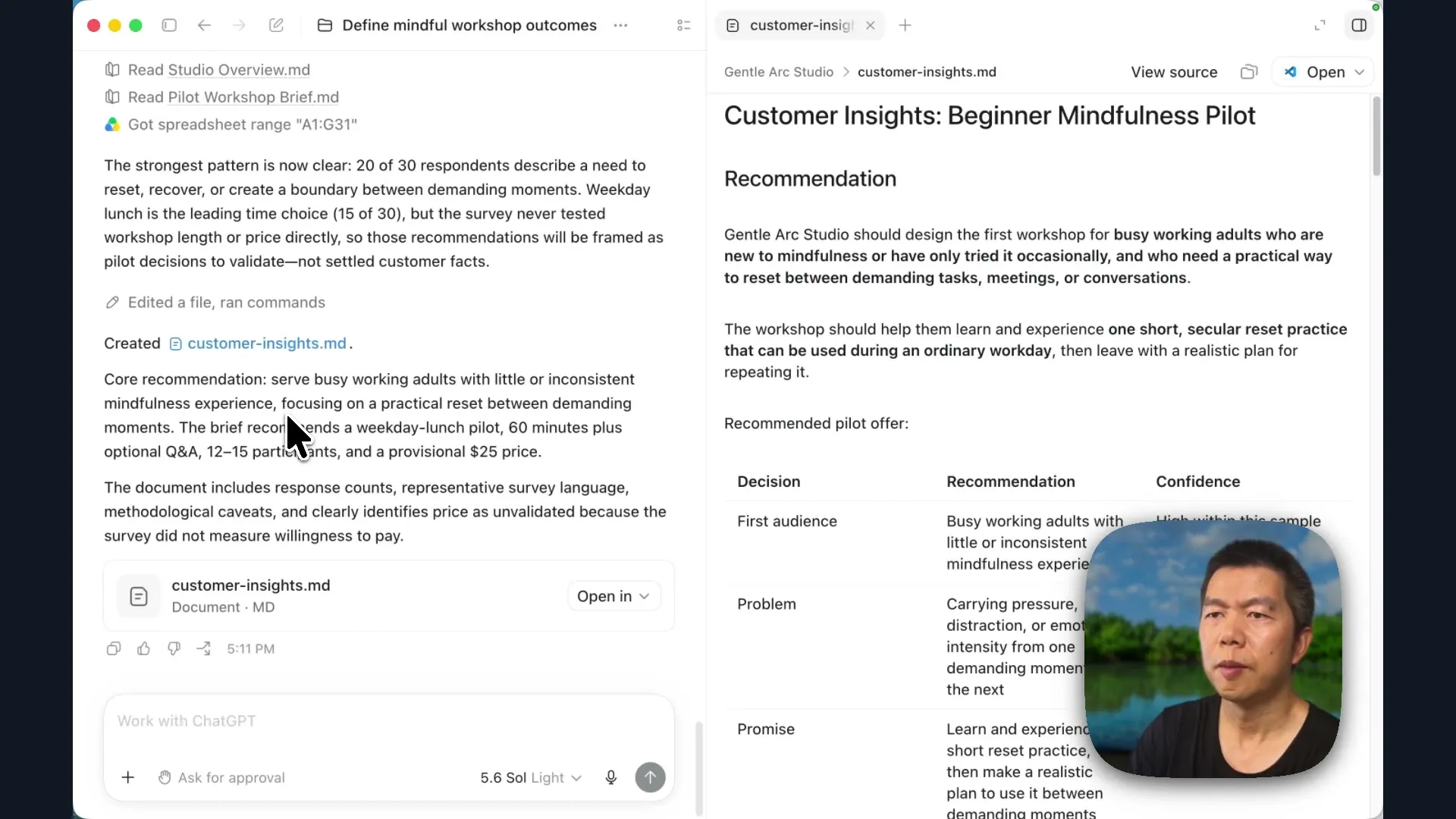
The resulting recommendation was a weekday-lunch pilot of 60 minutes plus optional questions, with 12–15 participants. Its promise was to help participants experience a short mindfulness reset and leave with a realistic plan for using it between demanding moments. Open the report’s rationale and confidence levels alongside the summary: a plausible offer is useful, and knowing which parts still need validation helps you decide what to try.
If Work cannot find the Sheet, check its exact title and which Google account you connected before asking it to analyze something else. If the response count differs, inspect the Sheet for repeated IDs or missing rows. The first analysis should use the original 30 responses; the additional eight belong to the later test.
Build the launch and Site
With the business context and customer insights saved, we can turn the proposed offer into launch materials. This is also where an owner makes decisions the survey cannot make alone.
For Gentle Arc Studio, I kept weekday lunch, chose 15 places and set the price at $49 rather than the suggested $25. The chosen session was Wednesday, August 26, from noon to 1:15 p.m. Eastern. These are the example’s business decisions. For your own run, replace that historical date with a future date before sending the prompt.
Using customer-insights.md and the two studio files in this project, create the launch package for Gentle Arc Studio’s first paid workshop.
The session will be Wednesday, August 26, from noon to 1:15 p.m. Eastern, online, with 15 places at $49 each. Create brand-guide.md, launch-plan.md, and landing-page-copy.md in this project, then build a Site from the landing-page copy.
Aim the offer at busy professionals who are new to mindfulness or use it inconsistently. Use practical, secular language, a clear “Reserve your place” call to action, verified information only, and no testimonials.
Work now has a connected job: use the source documents to create the brand guide, launch plan and landing-page copy, then build a Site, a website you can preview and share through ChatGPT.
For this job I selected a model with medium reasoning. Choose a model available in your account and allow time for the build; a job that creates files, images and a working page involves more steps than a conversational answer.
Decide what Work may do
During the build, Work may request permission to download packages or take other actions. Review the request in relation to the job you gave it. In this example I used Approve for me, which delegates approval decisions to the app’s review mechanism, rather than approving each request myself. Full access gives it broader freedom to act. Use the permission setting that fits what you are allowing in this project.
Work used Site-building instructions and image generation to produce the launch page. It also saved the source documents separately, so you can inspect the offer and its language without relying on the appearance of the website.
Open the three files when the job finishes:
brand-guide.mdestablishes the studio’s voice, messages and visual direction.launch-plan.mddescribes the offer, audience, capacity, price and promotion sequence.landing-page-copy.mdcontains the words used to build the page.
Then open the Site preview. The generated page led with “Move into your next task with a clearer pause” and a Reserve your place button. Its practical, secular language carried through from the business brief.
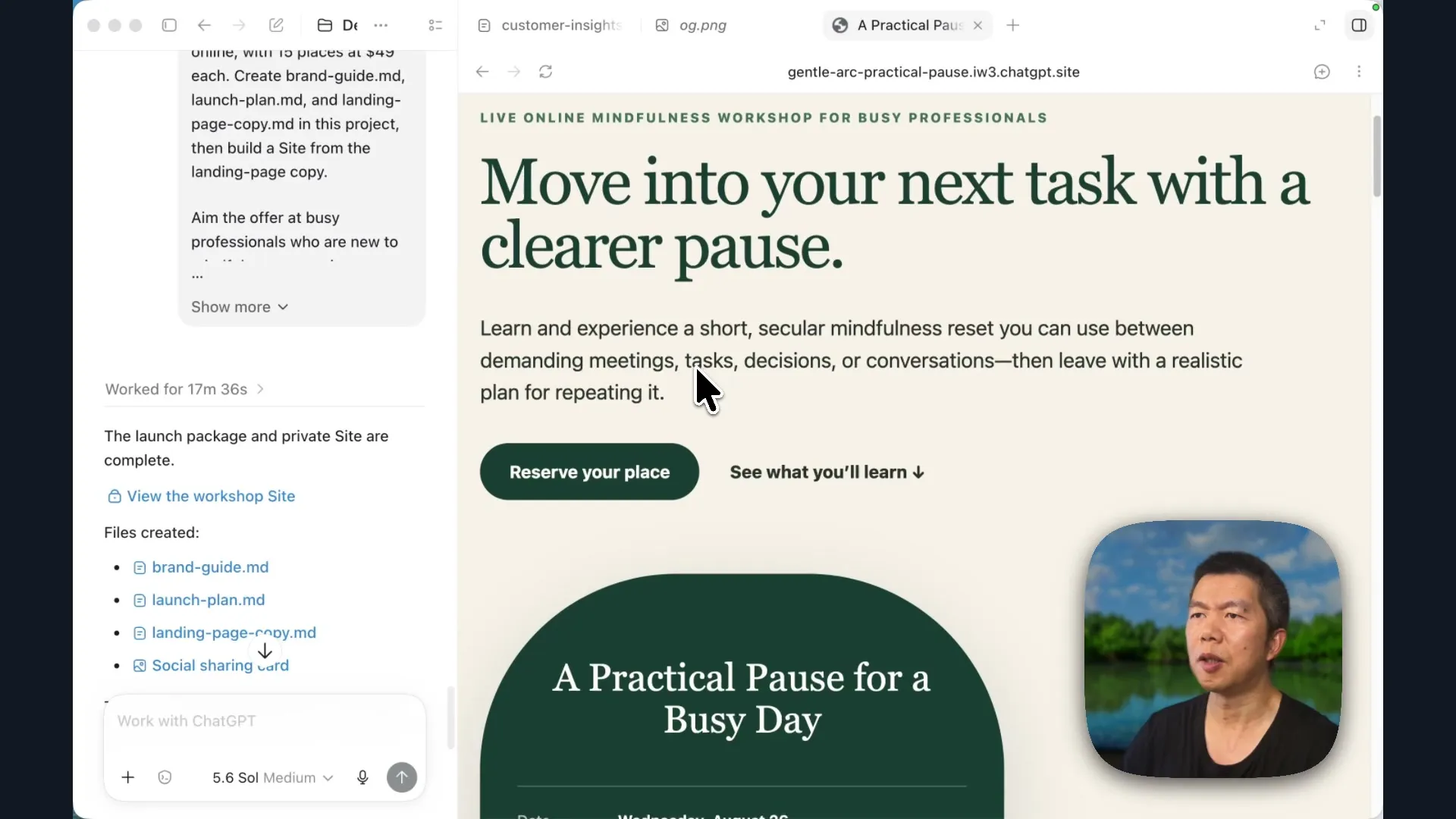
Read the page as a potential participant: can you tell who it is for, what you will do, when it happens and what it costs? Compare those details with the launch plan. Check the button too. In this example the booking link had not been connected, and the page said registration would open after the studio supplied a verified booking link. A finished-looking page still needs that connection before it can accept registrations.
Keep the Site in its private or preview state while reviewing it. Publishing the page and connecting a real booking destination are decisions you make when the offer is ready to share.
Create and test a reusable skill
The survey analysis is worth repeating as new customer evidence arrives. We want the next review to use the same distinctions: patterns supported by responses, recommendations that need judgment, and launch decisions that require approval to change.
Ask Work to save the method:
Turn the survey-analysis method you used here into a reusable skill called survey-to-offer-review.
Given a connected survey Sheet and a project’s business files, it should find the strongest patterns, separate evidence from judgment, recommend the audience and offer, and save a concise report. If earlier insights exist, compare them with the latest responses and explain what changed.
It may recommend changes to launch materials, but it must ask for approval before making them.
Work used its skill-creation instructions to turn the completed process into a personal skill. It set out the workflow, comparison rules, report structure and approval requirement. It also ran validation and a test using the connected Sheet and project context. One validation step encountered a missing YAML library, which Work addressed during creation.
Open the saved skill and read its name and description first. The description helps the model decide when the skill is relevant. Then inspect the actual instructions. Can you find the requirement to separate evidence from judgment, compare previous insights and ask before changing launch materials?
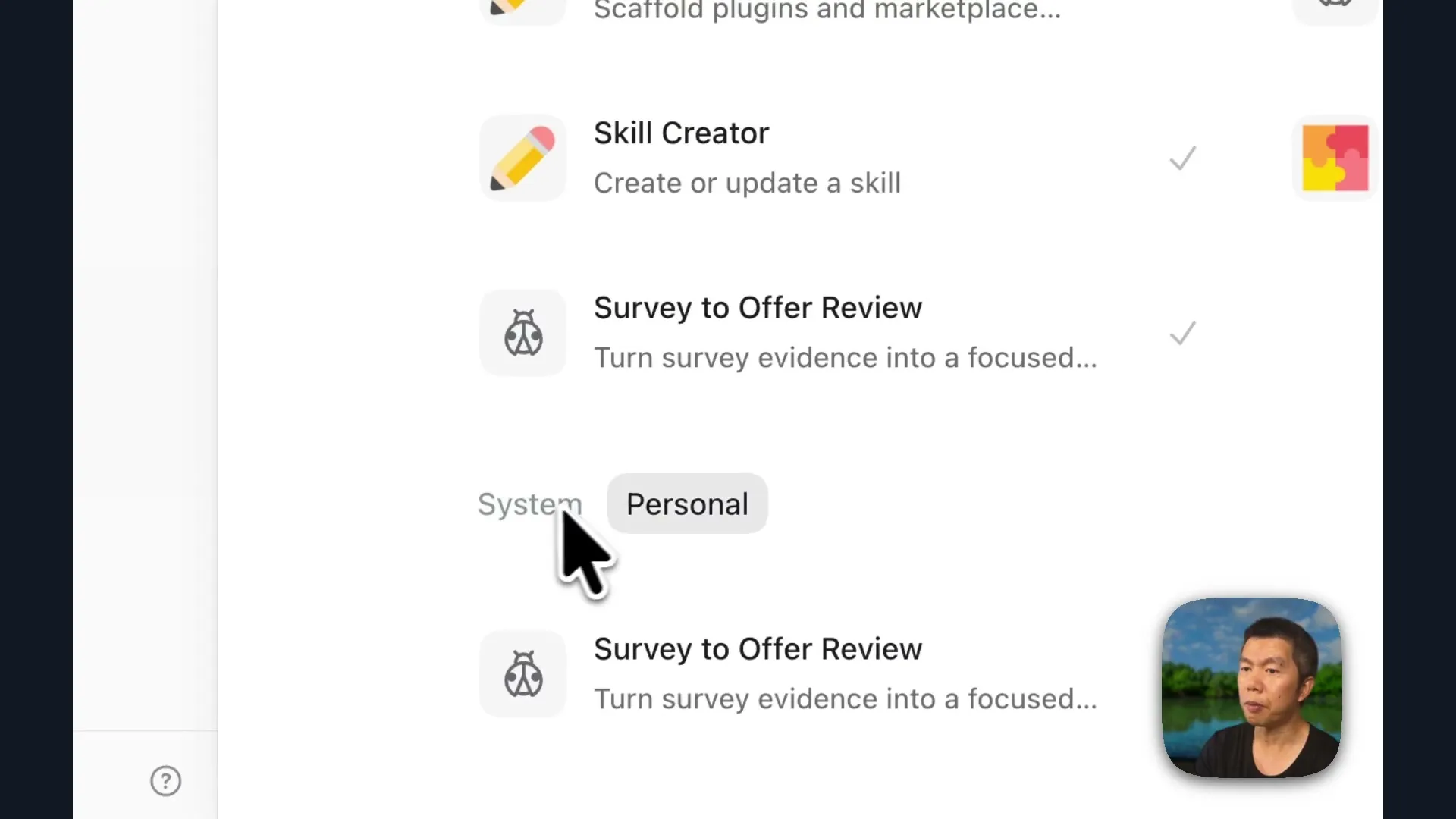
The skill is a method the agent can use. Its creation report is helpful, but we can learn more by giving it new data and observing what happens.
Add eight responses and ask for another review
Open 03-new-responses/new-survey-responses.csv from the companion files as a separate spreadsheet, using the same import route as before. Copy its eight data rows, without the column headings. Return to Gentle Arc Studio - Workshop Survey Responses and paste them below the original responses, starting at cell A32. The seven columns should line up with the existing headings. The new IDs are S-31 through S-38; check that this original connected Sheet now has 38 responses with unique IDs.
Return to the same Work project and ask:
Review the latest responses in the connected Gentle Arc Studio survey Sheet. Compare them with the local customer-insights.md and launch-plan.md files. Create a survey review file in the same project folder with your findings and any recommendations.
The request does not name survey-to-offer-review. Inspect Work’s activity to see whether it selects the skill from the job’s description. In this example it did, then compared the updated Sheet with the original insights and launch plan.
The broader pattern remained: people wanted a reset between demanding moments. Weekday evenings moved closer to lunch as a preferred time, and privacy and camera concerns became more prominent. The recommendation was to keep the first offer while recognizing that its noon timing and price still needed validation.
Check both the new report and the existing launch files. The report should explain what changed; the launch materials should still reflect your decisions unless you approve an update. In particular, the $49 price came from the owner’s choice, not from a survey question about willingness to pay.
If Work does not select the skill, open its saved entry and check that it is enabled and that its description fits survey-review work. You can invoke it explicitly to continue, while keeping that separate from whether the ordinary request selected it automatically.
Make the review easier to inspect
You can also ask Work to present the same findings differently. For example:
Can you turn this review into an HTML document with visuals so it is easier to inspect?
The resulting review used an executive summary, comparisons and charts. Lunch and evening preferences could be seen side by side, and the participation concerns were easier to find. Open the report and compare its numbers and recommendations with the written review. A different presentation should help you understand the evidence without changing it.
Schedule the weekly review
The reusable skill gives us a way to conduct the review again. A scheduled task gives it a time to run. Before scheduling, choose where the result should go.
The first review was saved as a dated local file. For ongoing work, I wanted one Google document that would be updated in place, so the current recommendation would be easy to find. Ask Work to create it from the review you have already inspected:
Create a Google Drive document named Gentle Arc Studio - Current Survey Review from the findings in the local survey-offer-review-2026-07-20.md report. This will be the living report for future survey reviews.
Use the actual filename Work created for your local review in place of survey-offer-review-2026-07-20.md. That date belongs to the example; it is not a file you should assume exists in your project.
Open the Google document Work creates. Check the title Gentle Arc Studio - Current Survey Review, the findings it contains and the decisions it leaves for you. This is the destination the schedule should update. Keep its link so you can find the current review without searching through dated files.
Now schedule the recurring job:
Schedule this survey review for every Monday at 9 a.m. Eastern. Use the connected Gentle Arc Studio survey Sheet and update the existing Google Drive document, Gentle Arc Studio - Current Survey Review, with the latest findings and recommendations.
Review the proposed task before activating it. It should identify the connected Sheet, use the survey-review method and relevant business context, run every Monday at 9 a.m. Eastern, and update the existing Google document. It should preserve the requirement to ask before changing the launch materials.
In the interface used here, preparing the schedule did not activate it. I clicked Create scheduled task, then opened Scheduled and confirmed that the task was active with a next run listed.
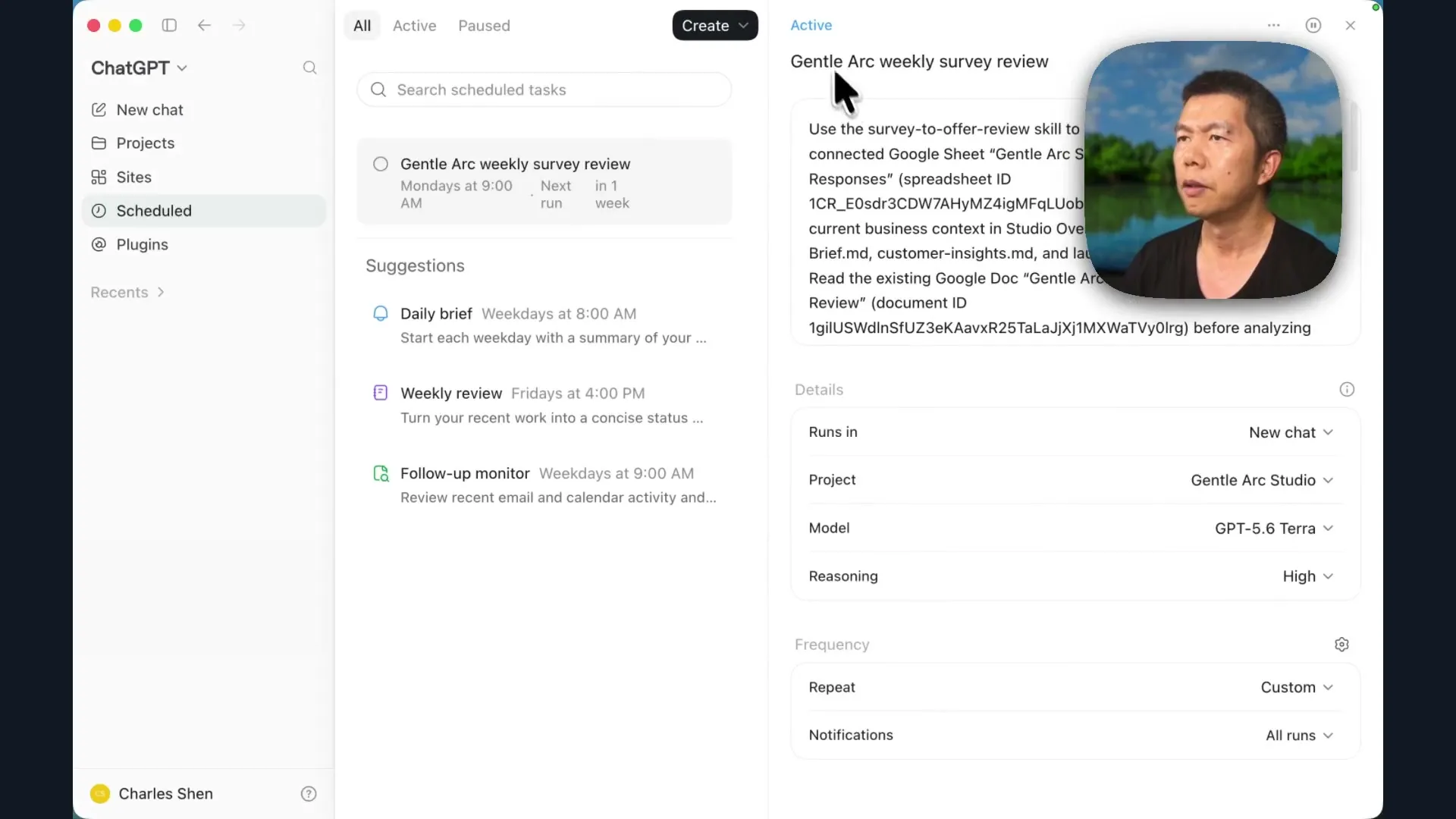
Your schedule is ready when you can find the active task and confirm its sources, destination and next run. After its first execution, open the task’s result and the existing Google document to check that it read the updated Sheet and changed the intended report. Creating a schedule and seeing a successful scheduled review are separate things to verify.
Keep the inputs available
This version uses business files on your computer. OpenAI’s scheduled-task documentation explains that local tasks need the computer and app available. A cloud task cannot read files from an offline computer merely because it has the same prompt.
The companion kit includes an optional cloud-based exercise: put the business context and launch documents in Google Drive, then have the recurring review use those connected documents and the Sheet, updating the same living review. If you take that route, run a review once and check the source documents and destination before relying on its schedule. The exercise changes where the inputs live; the evidence, recommendations and approval requirement should remain understandable.
ChatGPT Work, Codex and Claude Cowork
The business began with survey responses and a workshop idea. You now have inspectable business context, an evidence-backed offer recommendation, launch materials, a Site, a reusable review method and a recurring task pointing to one current report. The survey continues to inform the work while the business decisions remain yours.
OpenAI’s Work guide describes its relationship to Codex: Work brings many of the same underlying capabilities into an experience for everyday tasks. Codex is oriented toward software development; this workflow uses connected data and documents to carry a business job forward.
Claude Cowork is another option for this kind of work. The transferable questions are concrete: can it access the intended sources, save the deliverables where you can inspect them, reuse the method when the evidence changes, and give you a result you can judge?
Before adapting it to your own business, inspect the first recurring review. Confirm that it updates the right document, explains the new evidence and leaves consequential offer changes for your decision. That gives you a working basis for using the process with a real survey, a real offer and the next decision your business needs to make.