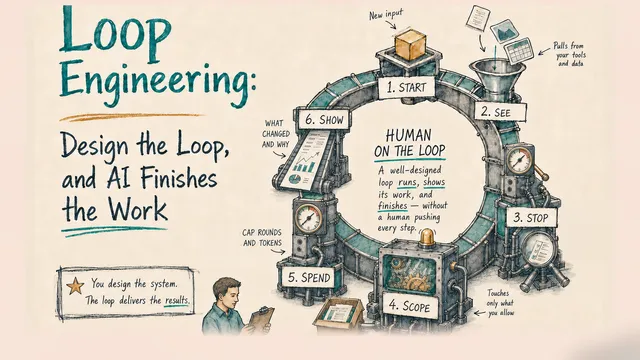
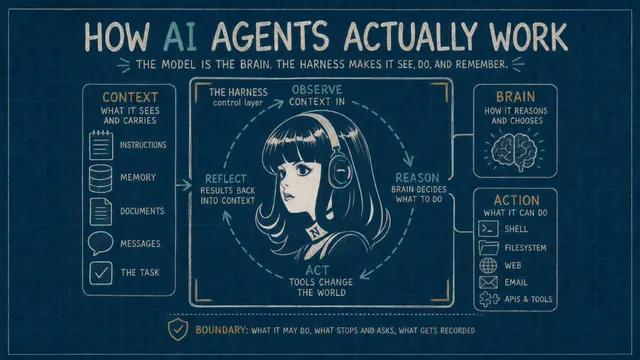
Look at any agent product and see the same three parts, the loop that runs them, and the one boundary that is yours.
You have used a chat assistant. You type, it answers, and when you close the window it is over: it will not remember you tomorrow, it cannot open a file on your computer, and it does not act unless you are there typing. An AI agent is built on the same kind of model, and it does all three of those things — it keeps working context across days, it acts on files and systems and the web, and it can run while you sleep. The difference is not a smarter model. It is what is built around the model.
In 2023 I proposed the Action-Brain-Context (ABC) framework as a simple picture of what a large language model (LLM) application — including an autonomous AI agent — is made of, and in AI Agent Engineering (2025, updated 2026) I carried it into the engineering of agentic systems that hold their value, with a continuous-improvement loop at its center. Those articles introduce the foundation. This one dives into detailed examples: how ABC is put to work in a real agent. The “around” that does that work has acquired a name in the last two years — the harness — and a vocabulary that comes with it: profile, gateway, bot, session, skill, sandbox, context window. Install any agent product and you meet these words in the first hour, usually unexplained, and often with one word meaning two or three things. This article explains them: what the parts are, which part of ABC each one serves, and where the boundaries fall. It is intentionally hands-on — there are commands and configuration files throughout, because that is where the parts actually live. However, it is written in a way that you don’t need to run a single one to follow it. If you build agents, the commands can be pasted and checked on your own machine. If you lead a product or a business that is about to depend on agents, the commands are still worth a glance — a real command makes a part concrete in a way a diagram can’t — but each one is followed by a plain sentence saying what it does, and that sentence is enough.
Once you have the shape, the products you meet read as variations on it, and you can place a new one by asking what it is made of and where it puts you.
As of August 2026 those products come primarily in two shapes, and the line between them is not the model but when the agent is awake. The coding agents are on demand: you open Claude Code, Anthropic’s — its own docs call it “an agentic coding tool that reads your codebase, edits files, runs commands”, in the terminal, an IDE, a desktop app, or the browser — or ChatGPT Codex, OpenAI’s, which runs one harness behind its terminal, IDE, and web versions; you give it work; in its local form it works while you watch and stops when you close it. The personal agents are always on: OpenClaw, the project that defined that category — started as a weekend project, now one of the most-starred repositories on GitHub, run by a foundation — and Hermes Agent from Nous Research, “the agent that grows with you,” live on a server, reachable from the messaging apps you already use, with memory that carries across days and a clock of their own. The two shapes are converging — the coding agents are growing schedules, chat integrations and cloud sessions, the personal agents are growing coding tools — so don’t read the split as permanent. Each is a model inside a harness, and what this article says about the parts applies to all four and to others like them.
Because it is hands-on, it needs a real agent to point at, not just a diagram or theory. In this article I’ll use Hermes Agent as that example. Like OpenClaw, Hermes Agent is open source, so we can trace each claim to a file anyone can open. I also have a complete tutorial on a three-agent customer-support team running on Hermes, if you are interested. Whichever agent product you end up using, the parts are similar; Hermes is where we open them up.
1. What an agent is
Start with what a chat assistant can’t do, because an agent is defined by doing it.
A chat assistant is a language model with a text box in front of it. What it knows arrived in training, and what it can do is produce text. An agent is built on the same kind of model, but it can see things the model was not trained on — your files, today’s email, what it learned last week — it can do things — run a command, send a message, open a pull request — and it keeps going, step after step, without you typing each one. So the useful way to look at any agent is to ask three questions of it:
- What can it see and carry? — its Context: the instructions you wrote for it, the memory it has built up, the documents and messages it can reach, the task in front of it.
- How does it reason and choose? — its Brain: the language model, which reads the context and decides what to do next.
- What can it do? — its Action: the tools it can use — a shell, a file system, a browser, an email account, an API — and through them, the world.
Context, Brain, Action — the ABC framework. In 2023 the live question was how to get useful work out of a language model at all, and the split has held up: the agent products since are arrangements of the three, and a confusing word you meet in one of them — profile, skill, memory, tool, sandbox — is a name for a piece of Context, Brain, or Action. It is also why I define an AI agent as an AI-driven system capable of autonomously pursuing goals through a continuous cycle of perception, reasoning, and action: perception is Context arriving, reasoning is the Brain, action is Action, and the cycle is the loop below.
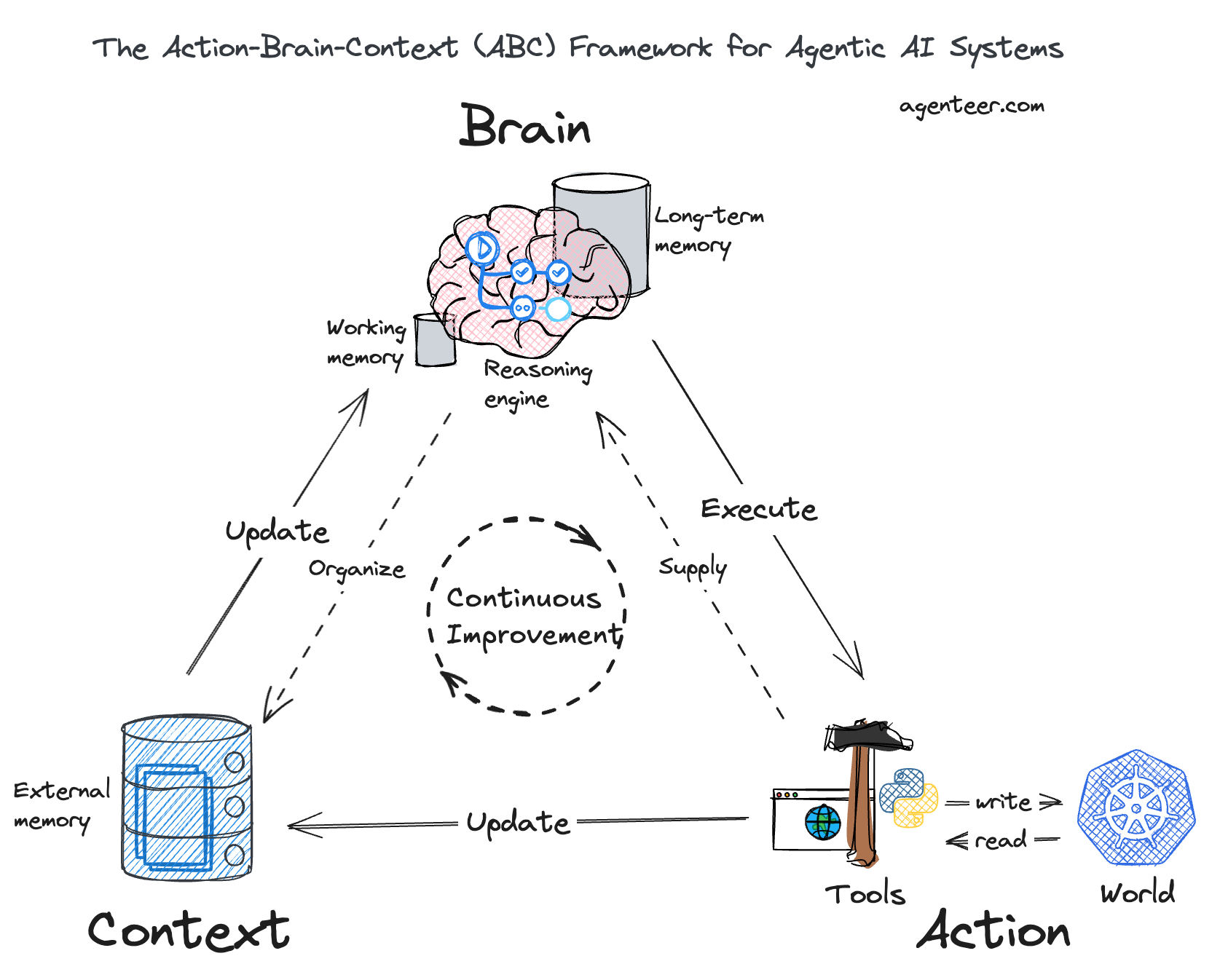
The ABC framework for agentic AI systems, from AI Agent Engineering (2025); the original 2023 triangle is here. In the diagram, the model’s own working and long-term memory sit with the Brain; the memory files an agent builds up are external memory, which this article counts as Context.
The loop sits at the center of ABC, and it runs at two scales. Close up, it is a turn: look at the context, reason, act, look at what changed, and go again — until the job is done or someone says stop. A single pass is a chatbot answering a question; the loop is what carries a task across twenty steps. From a distance, it is the same cycle across jobs: what one run leaves behind — memory, a refined procedure, a better-known tool — is context for the next, so the agent starts each job further along than the last. The second loop is made of the first; without turns there is nothing to accumulate. That cycle emerged step by step — reasoning in steps, then tools that turn the model’s closed-book exam into an open-book one, then ReAct, where observations from each action feed the next thought — and the products since have industrialized it rather than replaced it.
Agency is in the definition above: the capacity to make autonomous decisions and take independent actions in pursuit of goals. It is what separates an agent from a workflow or a chain of model calls that only executes steps you wrote in advance. It is also why limits matter. A script needs no approval rule, because you already know what it will do; the moment something can decide, you are trusting a judgment — so the loop runs inside a boundary you set: what it may do on its own, what stops and asks you, what gets recorded.
Two minutes with Hermes Agent, so the commands make sense
Before the first command, here is what Hermes is and how you talk to it.
Hermes Agent is an open-source agent harness from Nous Research. You install it on a computer — for the always-on shape, one that stays on: a small cloud server works, and so does a machine under your desk — with one command from its installation page. Once installed, it is a program on that machine called hermes, and one installation can run many agents: each agent is a folder of its own settings, identity, and memory, which Hermes calls a profile. You give each agent a name; this article uses two, sage for a support agent and atlas for its manager.
You talk to an agent in one of two ways. From a terminal on the machine, you type a command. Or, once the agent is connected to a messaging platform, you send it a message in Telegram, WhatsApp, Discord, Slack, or email, and it answers there. The commands in this article are the first kind, and they all have the same shape:
hermes -p sage chat -q "what's our refund window?"Read it left to right: hermes is the program; -p sage says which agent — Sage; chat means have a conversation; -q "…" is the question, asked once. What comes back is Sage’s answer, printed in the terminal — an answer from the same agent you would reach by typing that question to Sage in Telegram. That is what a command is here: a way of saying, in text, “this agent, this action, this input.”
If you run commands and have a Hermes agent installed, the ones in this article can be pasted as shown, and the comments beside them (# want: …) say what a good result looks like. If you don’t, each command is followed by a plain sentence saying what it does and what happened; read that and move on. The argument does not depend on the commands.
The parts, in one command. Now the same line, with the parts from section 1 visible in it:
hermes -p sage chat -q "what's our refund window?"-p sage selects Sage’s Context — its instructions, memory, and skills — and names which model is its Brain. chat -q starts the loop. Suppose the company’s refund rules live in a text file the agent is allowed to read. The model reads the context, decides it needs those rules, and asks to read the file. The read is an Action, its result goes back into the context, and the model answers. The question did not name a file — choosing to go and look is the agency. It did not ask permission, because reading is reversible; had it tried to send an email, the boundary would have stopped it there.
2. What a harness is
In my view, the harness is the control layer that operates Action, Brain, and Context in a loop within boundaries set by humans. It manages the context, calls the model, executes tools, and returns their results to the model. The model reasons and chooses what to do next; the harness controls how those choices are carried out. “Everything in the agent except the model itself” can serve as a rough shorthand for the harness. However, to define the harness more precisely, we should distinguish the control machinery from the information it manages. The rest of this article explains those parts on a real, open-source harness, where the machinery is files you can open.
Here is why the harness is needed. Ask a model to “fix the failing test” and it produces text that describes a fix. It cannot run the test, open the file, or remember this conversation tomorrow. For the model to fix the test, something has to: put the file contents in front of it, take its proposed edit and write it to disk, run the test, show it the result, ask what it wants to do next — around and around until the test passes or someone says stop. That something is the harness. When you install Hermes Agent, OpenClaw, Claude Code, or Codex, the harness is what you installed; the model is whichever one you point it at — a provider’s, called over the network, or one running on your own hardware; and the context is supplied by you and by the work.
Here are some harness definitions from the industry. Anthropic’s glossary: an agentic harness is “the tools, context management, and execution environment that turn a language model into a capable coding agent. Claude Code is the harness; Claude is the model inside it. The harness supplies file access, shell execution, permission gating, memory loading, and the loop that chains actions together” (Claude Code glossary). OpenAI, on why the Codex surfaces behave the same: “Under the hood, they’re all powered by the same Codex harness — the agent loop and logic that underlies all Codex experiences” (Unlocking the Codex harness). A June 2026 paper that set out to define the term properly (What makes a harness a harness) lands on four things a harness must have — an agent loop, a tool interface, context management, and control mechanisms — and concedes along the way that the word is “loose and polysemous.”
Put the two together. ABC is what the agent is made of; the harness is the control layer that runs it. It turns the cycle at the center of ABC — perception, reasoning, action, and again — and it keeps what each run leaves behind, so the longer loop across jobs has somewhere to live. It does for Context what Context means in ABC: information kept outside the model’s working memory and selected into it when needed. It carries out Action through tools. It operates within boundaries set by humans: what can start a run and what ends it, whether completion or a time or cost limit; which tasks, resources, and actions are in scope; and which decisions require human approval. People set the goals and instructions, check the results against those goals, and redirect the work when needed. Permissions and approval checks limit how the agent may act. The boundary is where your authority lives.
| Part of ABC | What the harness does for it | In Hermes, for example |
|---|---|---|
| Context | selects what enters the model’s working memory this turn — identity, memory, a skill when it applies, the conversation — and trims it when the window fills | SOUL.md goes in first, then memory, then a skill, then the conversation |
| Brain | sends that to the model you chose and reads the reply | provider: openai-codex, model: gpt-5.6-sol in the profile’s config |
| Action | turns “read this file” or “run this command” into the real thing and returns what happened — inside the boundary you set | the terminal tool, file tools, web search, tools reachable over MCP (Model Context Protocol, a standard for connecting outside tools and data); dangerous-command approval; the log |
Put another way: the harness is the control layer, and the context is the data layer — the instructions, the knowledge base, the memory the agent builds up by working for you. The control layer moves that material in and out of the model’s working memory; it does not come with any of yours. Codex and Claude Code ship without knowing your project; you bring it. Two people who install the same harness and point it at the same model have the same control layer; the data layer is what makes an agent yours.
So, in one sentence each:
- Context, Brain, Action are what an agent sees, thinks, and does. You supply the context; you choose the brain — a provider’s model or one you run yourself; you grant the actions.
- The harness is the layer that operates them: it runs the loop, manages the context, calls the model, executes the tools, and enforces your boundary. You install it.
- An agent is ABC, run in a loop by a harness, inside a boundary you set — with the agency to decide its next step.
The framework scales, and so does the machinery. One profile is one ABC unit. A team of profiles is ABC units composed — in a support team, a hierarchy: a front desk, a specialist, a manager. And the server that runs them is, seen from outside, one agent with the team’s combined reasoning, a shared context, and pooled tools — a meta-agent. Sections 3–10 climb that ladder.
Where the parts sit on a real machine. An always-on server holds the harness, installed once. A loop starts when something arrives: a command you type, a message in Telegram, a scheduled job. On it live the agents’ configurations — in Hermes, one folder per agent, holding that agent’s context and its settings. The model is usually outside the machine — each turn is a call to a provider’s API, so with the network down the agent can still list your files but cannot think — unless you run a model locally, in which case it lives on the server too. The people who talk to the agent reach it through messaging platforms — a mailbox, a Telegram bot — that live on someone else’s servers. And the agent’s work surface — files, repositories, APIs — is wherever its tools can reach.
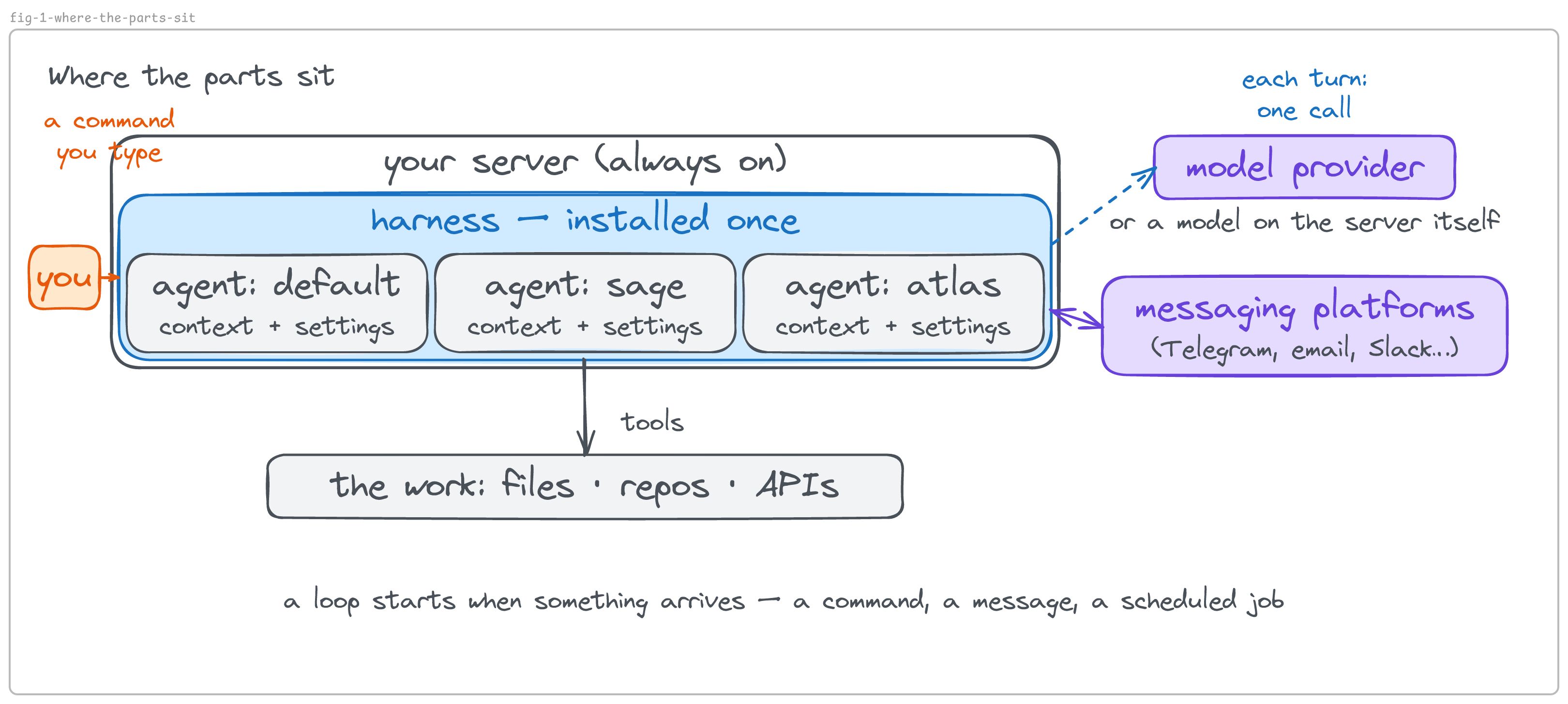
That picture is the rest of this article. Section 3 is the agents on the server; 4–6 are what a single agent’s configuration contains and what it does and doesn’t wall off; 7 is using an agent with no messaging platform connected; 8–9 are how the outside world reaches it; 10 is handing a finished agent to someone else.
3. One server, many agents
The first thing that trips people up: “I have one server, so I have one Hermes.” You have one Hermes installation. How many agents run on it is a separate question, and the answer is as many as you create. Each one is an ABC unit of its own: its own context, its own choice of model, its own tools.
Hermes calls each agent a profile. The docs’ definition: “a separate Hermes home directory” with “its own config.yaml, .env, SOUL.md, memories, sessions, skills, cron jobs, and state database” (Profiles). Read that list as the parts from section 1 laid out on disk. config.yaml is how the agent is configured — which model, which tools. .env holds its credentials. SOUL.md is its identity and standing instructions. Memories are what it has learned about you; sessions are its conversation records, kept in the state database. Skills are reusable workflows — text files of steps it follows so one kind of task is done the same way each time (the idea is older than the products: Voyager, the 2023 Minecraft agent, kept “a skill library” as “an external context memory that stores complex behavior for future reference”). Cron jobs are routines it runs on a schedule. What makes an agent this agent lives in one folder.
Two commands: the first lists the agents on the server, the second creates a new one.
hermes profile list          # every agent on this server
hermes profile create sage --description "Customer support specialist."
Ten profiles on one server is ten agents: ten sets of instructions, ten memories, ten model choices, one machine. They are colleagues, not modes of one assistant — a support agent, a manager, and a front desk that routes what comes in can run this way. Their state is separate. What they share, by default, is the machine itself: one installation, the same files, and the same command-line credentials; each profile keeps its own provider and platform keys in its own .env (section 6 is about the difference).
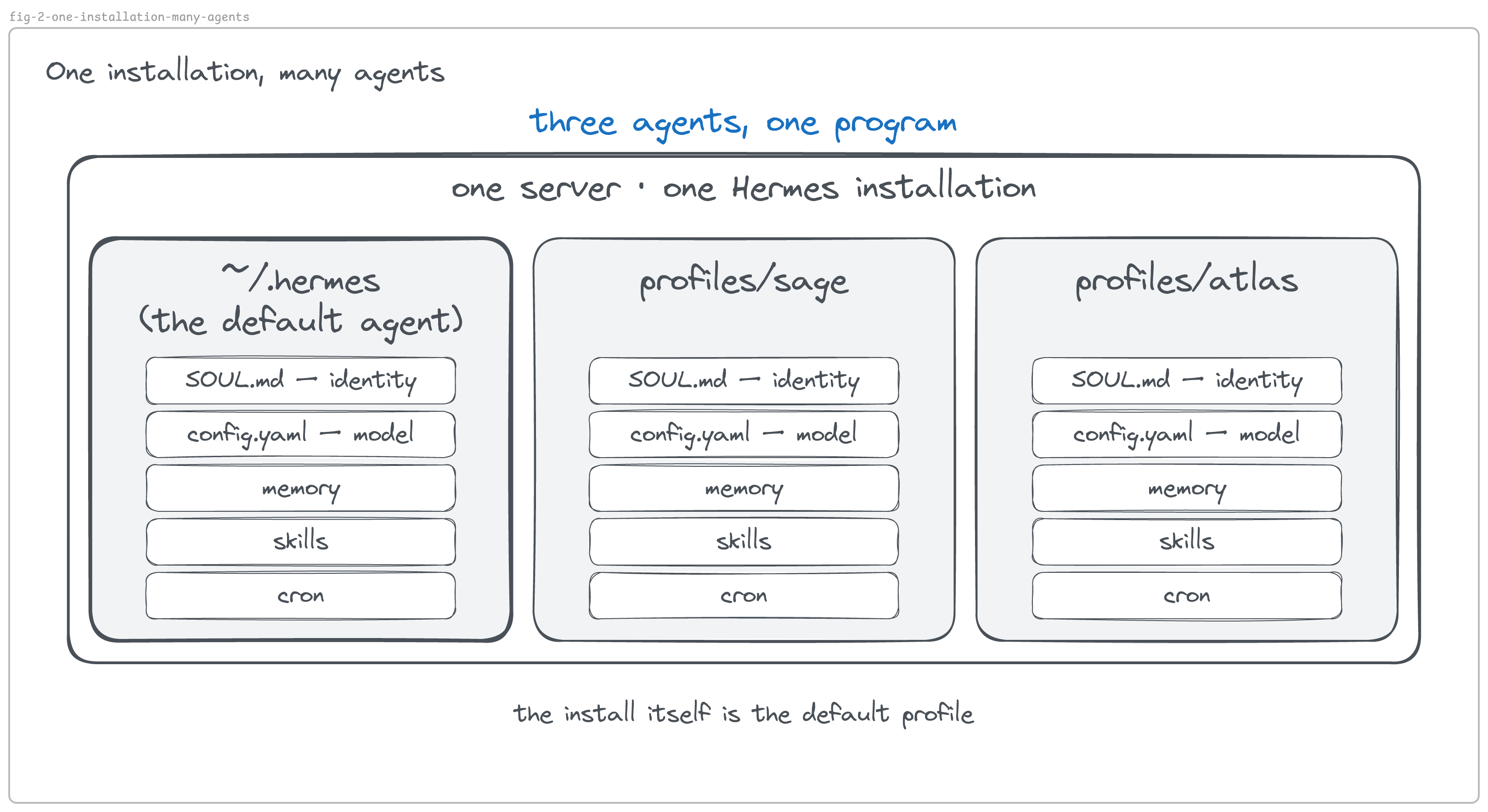
One naming detail that saves confusion later: the default profile is not a separate folder. The docs: “The default profile is simply ~/.hermes itself.” Named profiles live one level down, in ~/.hermes/profiles/. So ~/.hermes/config.yaml is the default agent’s own config, not a global one — and ~/.hermes/SOUL.md is the default agent’s identity, which is how a fresh install already contains one agent before you create any.
4. A profile is three files you write, plus what the agent accumulates
Of the list above, three files are yours to write to start — and skills and schedules are yours too, when you add them; memories and sessions the agent fills in by working.
| File | What it decides | Which part of the agent |
|---|---|---|
SOUL.md |
who it is — identity, tone, standing instructions | context you author |
config.yaml |
the model and provider, the tools it may use, every setting | which brain, and what actions |
.env |
the secrets it holds — API keys, bot tokens, mail passwords | the keys its actions use |
Look inside one agent’s folder and those are the files you see:
ls ~/.hermes/profiles/sage/ # the files above, on diskA profile is the stored half of an agent. It becomes a running agent when a process loads it and starts the loop — hermes -p sage chat does that for one conversation; a message arriving from a messaging platform does it for one turn; a scheduled job does it on the clock. Between those moments, Sage is a folder. That is worth holding onto, because it turns vague questions into checkable ones: can one agent read another’s memory? becomes can one process read another folder? — and section 5 answers it.
5. A profile is not a workspace, and it is not a sandbox
Mistaking a profile for a sandbox can expose files outside the profile directory.
Hermes says so plainly:
A workspace or working directory is where terminal commands start. That is controlled separately by
terminal.cwd. A sandbox is what limits filesystem access. Profiles do not sandbox the agent. On the default local terminal backend, the agent still has the same filesystem access as your user account. A profile does not stop it from accessing folders outside the profile directory. — Profiles
Three different things, then:
- A profile separates state — memory, instructions, model, sessions. Sage and Atlas keep separate memories.
- A workspace is the starting directory for the agent’s shell commands, set by
terminal.cwd. Point a profile at a project folder and its work begins there. - A sandbox is a limit on what the agent can reach. A profile is not one.
Isolation comes from the execution backend — the thing that runs the agent’s commands. Hermes ships several (Configuration): local, docker, ssh, and cloud sandboxes. The default is local: “Commands run directly on your machine with no isolation.” The docs name the remedy in the same place: “Use hermes tools to disable tools you don’t want, or switch to Docker for sandboxing.” So there are two levers for limiting an agent — take the tool away, or change the backend. Creating another profile is neither.
Hermes’s own code is candid about this. There is a deny-list that stops the file-reading tool from opening .env and auth.json, and the source says what it is and isn’t:
This is NOT a security boundary. The terminal tool runs as the same OS user with shell access; the agent can still
cat auth.jsonorcat ~/.hermes/.envand exfiltrate the file. […] A determined model or malicious instruction can always shell out. — the file-safety module in hermes-agent
That tells you what the deny-list is for: a clear “no” to a well-behaved model, and an audit trail. It is a speed bump, not a wall. Two agents on one server are a convenience boundary; if one client’s data must not share a wall with another’s, that is a job for the backend or for separate machines — not for a second profile.
Where an agent’s knowledge comes from
An agent’s knowledge arrives from four places — which also answers “what does the agent know, and who can change it?”:
| Source | Example | Can you change it? | How long it lasts |
|---|---|---|---|
| Embedded — trained into the model’s weights | what a refund is, how English works | no — that is the model’s, frozen before you met it | as long as the model |
| Authored — you wrote it | SOUL.md, skills, the rules file |
yes | ships with the agent |
| Accumulated — the agent wrote it | its memory file, session history, its own logs | yes | stays with whoever runs it |
| Supplied — the job brought it | the ticket, a retrieved document, today’s email | yes | lives for the task |
Only the last three are context in the sense of section 1; the first is the brain. The table settles a common misconception: using an agent does not make the model smarter. The model’s weights do not change when you use it. What changes is the data layer: as the agent works it writes what it learns — a fact about you, a procedure that worked — into its memory and skill files, and those files are loaded into its context the next time it runs. Delete the memory file and the agent forgets, while the model is untouched. What an agent knows about your work comes from the three rows you can edit, and that is good news: it means the part that makes an agent yours is the part you control.
6. Three directories, three different jobs
It is natural to treat “home directory” as one idea. For an agent it is three, and each answers a different question. A metaphor helps here, as long as each one comes with the real thing underneath.
| Think of it as | The question it answers | In Hermes | |
|---|---|---|---|
| the agent’s mind | where this agent keeps its state | Which agent is this? | HERMES_HOME → ~/.hermes/profiles/sage |
| the desk it works at | where its shell commands start | Where does its work begin? | terminal.cwd → e.g. /home/you/support |
| the keyring its tools reach into | where command-line tools find their credentials | Whose credentials does it use? | HOME → /home/username |
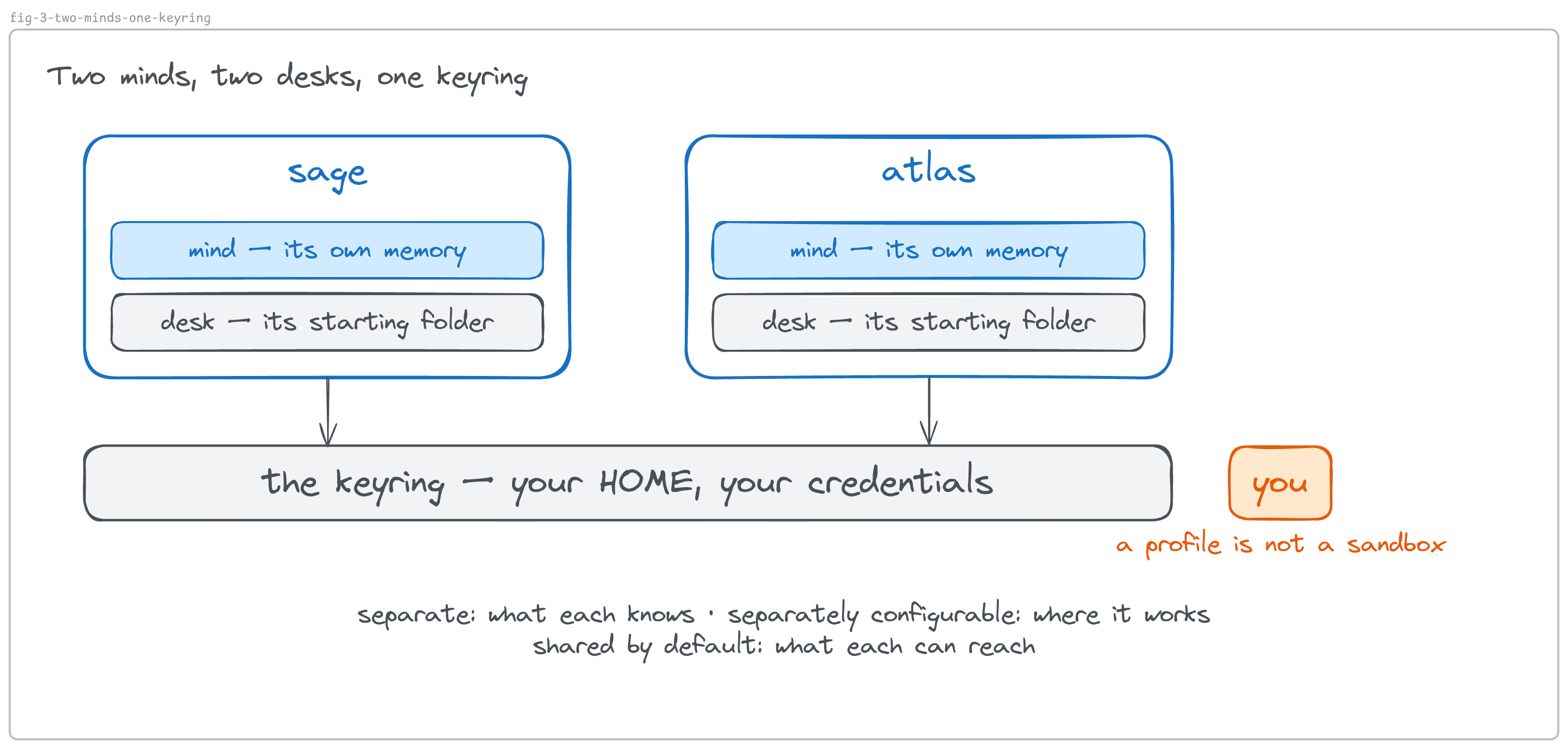
The mind is the profile folder from section 3: memory, skills, sessions, scheduled jobs. It is the only one of the three that separates agents.
The desk is a starting directory. Sage runs ls and lists whatever folder it is standing in — its desk, not its mind. Set it per profile:
# ~/.hermes/profiles/sage/config.yaml
terminal:
  cwd: /home/you/support
The keyring is where the surprise lives, and the mechanism matters more than the metaphor. Command-line tools — git, ssh, gh, aws — have no idea who you are. Each opens a config file at a fixed path under your home directory and trusts whatever it finds there: git reads ~/.gitconfig and ~/.ssh/, gh reads ~/.config/gh/hosts.yml, aws reads ~/.aws/credentials. “Home” to them is the HOME environment variable. And by default, an agent on the server runs its commands with your HOME. So when Sage runs git push, it pushes as you; when Atlas opens a pull request, it is you. Neither has command-line credentials of its own — both reach into your drawer. The docs state the trade-off: “Profile data is isolated by HERMES_HOME, not by changing HOME”, and “host profiles share normal user-level CLI state by default.”
This is the practical meaning of a line from section 1: instructions shape what an agent chooses; permissions bound what it can do. A SOUL.md can say “never touch production,” and that sentence does not stop git push --force if the key is in the drawer.
To give an agent its own empty keyring, and then provision only what it should hold:
# ~/.hermes/profiles/sage/config.yaml
terminal:
  home_mode: profile      # HOME becomes a folder inside the profile
One detail worth knowing: the default behaves differently depending on where Hermes runs. On a host install, agents share your keyring; inside Hermes’s official container, each profile gets its own without you asking (Configuration). Same software, different default — which is one more reason to check rather than assume.
7. Using an agent directly
So far this describes an agent sitting on a server. You can put it to work right now, with no messaging platform connected:
hermes -p sage chat -q "summarize today's commits and flag anything risky"
hermes -p sage chat                      # an interactive session
An agent with no messaging platform connected is already a capable worker. It acts through its tools: it runs shell commands, reads and writes files, browses the web, calls APIs, and connects to MCP servers — the open standard through which an agent reaches outside services like Slack, Jira, or a database (Hermes tools). It can pull a repository, run the tests, and open a pull request; read a folder of invoices and produce a summary; research a question for twenty minutes and write the result to a file. That uses no messaging account; a code host or an API it reaches still needs its own.
There are several front doors to the same agent:
| Front door | What it is | What is running |
|---|---|---|
| CLI — command-line interface | you type hermes chat -q "…" in a terminal and get an answer |
a process that starts on your machine, answers, and ends |
| TUI — terminal user interface | hermes --tui: a full-screen program inside the terminal, like a text editor, for a longer session |
the same agent, with a screen around it |
| Desktop app | a normal application window — file browsing, reviewing changes, several sessions side by side | the window starts a small local server on your machine and talks to it |
| Web dashboard | hermes dashboard, then a browser tab — keys, skills, schedules, settings without editing files |
a local web server it starts for you |
All four share one memory and one session store, so a conversation begun in one can continue in another (Hermes CLI). What they have in common is more important than how they differ: you come to the agent, and it runs only while you are there. In their local form, close the window and the process ends; it cannot be reached from outside your machine.
So an agent with no messaging platform connected has one limit, seen twice: nothing outside the session can start a turn — only you, at the machine. A message from your phone or from a colleague cannot start one, and neither can the clock. Between your sessions it is idle. Closing those two gaps is what the next two sections are about — and it is the difference between the on-demand and always-on shapes from the introduction.
8. Messaging platforms, and the gateway that serves them
For people to reach an agent from outside, and for the agent to work while nobody is watching, something has to stay running and keep connections open. In Hermes that is the gateway. The docs’ one line: “a single background process that connects to all your configured platforms, handles sessions, runs cron jobs, and delivers voice messages” (Messaging). Four jobs in one process — connection, session state, the scheduler, delivery — and they explain both gaps from section 7 at once. The gateway is what lets something other than you start a turn: it listens on the messaging platforms you have configured. And it is what gives the agent a clock: the scheduler lives inside it, so an agent with no gateway running has no way to act on its own.
The gateway handles what arrives; the scheduler handles what nobody sends. A customer’s email at three in the morning is handled by the gateway, reactively. A Monday-morning report has no incoming trigger — nobody sends you a request for it — so without a schedule it does not happen.
What a messaging platform is, and why “bot” is two things
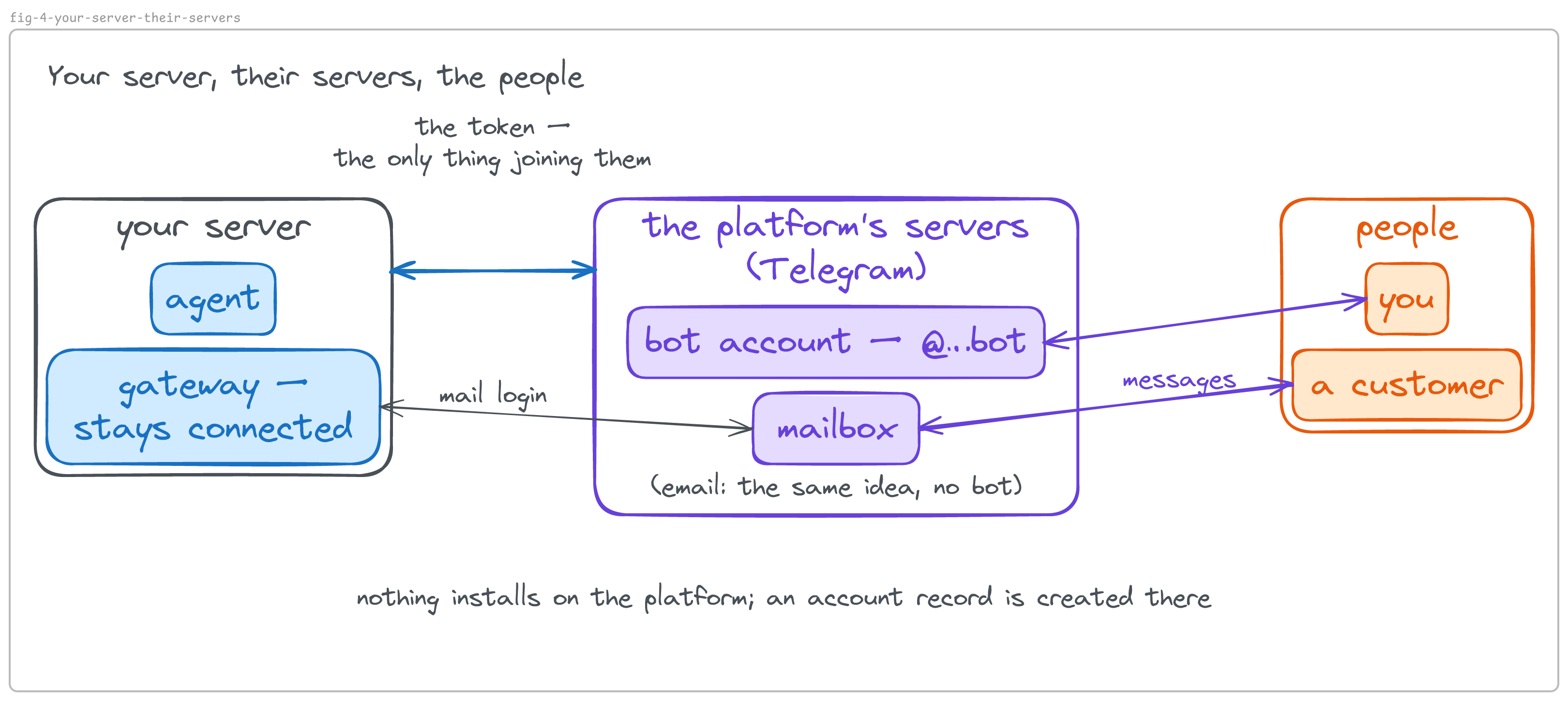
A messaging platform is an outside messaging service an agent can be reached through — email, Telegram, Discord, Slack. (This article says messaging platform, not channel, because “channel” already means a room in Slack and Discord, and Hermes uses it for something else again.) The gateway runs one small adapter per platform you have given it credentials for — a piece of code that translates between that service’s way of doing things and the agent’s.
Email is the clearest case, because it has no bot in it: you give the gateway a mailbox and its password, it polls for new mail and replies. That shows the general shape — a connection to the platform is the requirement; a bot account is only how chat platforms do it.
On a chat platform, “bot” names two different things that live in different places. When you ask Telegram’s @BotFather for a new bot, an account is created on Telegram’s servers — a name, a username, something people can find and message — and you are handed a token, which is the password to that account. No software is installed. The account is real but inert: people can message it, Telegram holds their messages, and no program answers. The program that answers is yours — the gateway. Give it the token, start it, and it collects what is waiting and replies as that account. So: the bot account belongs to the platform; the program belongs to you; the token is the only thing joining them. Telegram’s own warning is the definition of a token: “it can be used by anyone to control your bot” (Bot Features) — whoever holds the string is the bot until it is revoked. Discord and Slack have the same shape with different names.
Because the account and the program are separate, the same account can be operated by more than one program for sending — though only one program should receive its messages — and the same program can operate more than one account.
Sessions: what the agent remembers, and where one conversation ends
A session is the agent’s memory of one conversation. The gateway decides which session a message belongs to by where it came from: a direct message is one session; a group topic is another; for email, the sender’s address is treated as the conversation, so every email from one person is one long session. A session is not a ticket — one conversation can carry several pieces of work, just as one chat with a colleague can. When you design an agent that handles work for people, the question to ask of any platform is what does it treat as “the same conversation”? — because that decides what the agent remembers and where it answers.
9. How many gateways, and how they decide who gets a message
One gateway serving one agent is the default, and the docs call it “the right choice for most setups” (Running Many Gateways at Once): each profile runs its own process with its own bot token, and since each bot only sees the chats it was invited to, no routing decision is needed.
A team that shares one room is a different shape. Put two agents in the same group, both set to receive every message, and each question gets answered twice, once by each — they don’t take turns the way two people do. And the platform’s bots can’t hand work to each other through Telegram: Telegram’s FAQ says bots “will not be able to see messages from other bots”, so they cannot loop (Bot FAQ). So for a team in one room, Hermes offers an opt-in alternative, “off by default”: one gateway serves the agents on the server, and a routing table decides which agent handles each message by where it arrived.
That routing table is the team’s shared channel — the meta-agent’s Context. In Hermes that routing table is a few lines in the front-desk agent’s configuration — one switch that turns the shared gateway on, then one rule per room saying which agent answers there:
gateway:
  multiplex_profiles: true
  profile_routes:
    - name: support-inbox-to-sage
      platform: telegram
      chat_id: '-1004400269785'   # the group
      thread_id: '2'              # the topic inside it
      profile: sage               # the agent that answers here
    - name: escalations-to-atlas
      platform: telegram
      chat_id: '-1004400269785'
      thread_id: '4'
      profile: atlas
Two numbers do the work: chat_id names a chat — a group, a direct message — and thread_id names a topic, a thread inside a group with its own number. “Messages in the support topic go to Sage; the escalations topic goes to Atlas” becomes a rule you can write, and each agent gets its own lane inside one room that people are already in. That is one bot, one gateway, and a topic per agent behind it.
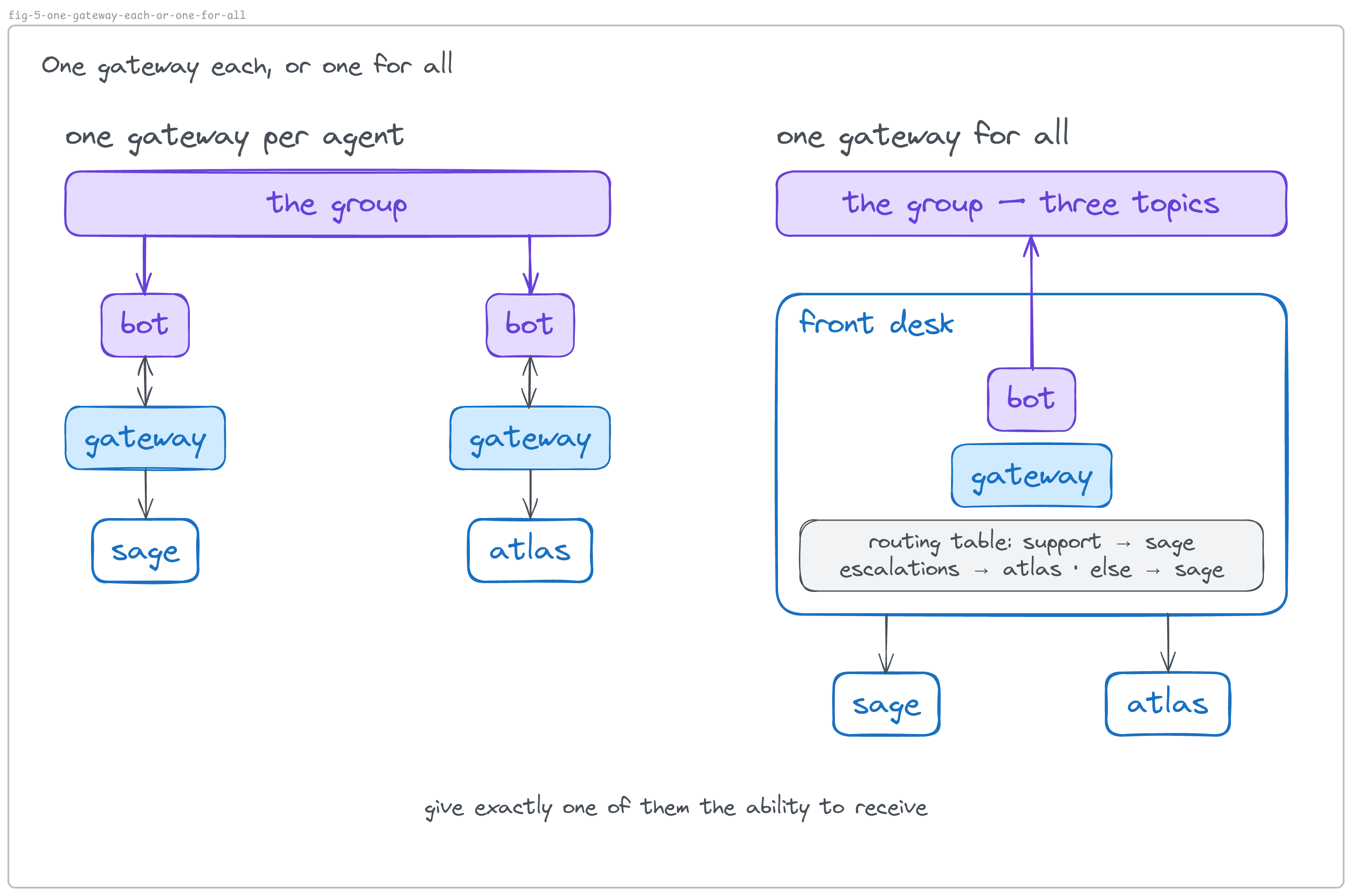
The design idea underneath travels beyond Hermes: when several agents share a room, give exactly one of them the ability to receive. An agent with no ears cannot answer twice, cannot be reached by a stranger, and cannot be triggered by something you did not build. How the agents then hand work to each other is the other half of the picture — on the server, directly, the way colleagues in one building talk without going through the phone system — and the support-desk tutorial builds it command by command.
Choosing between the two: if you want each agent isolated in its own chats, restarting independently, run one gateway per agent. If you want several agents in one room under one company identity, with one process to supervise, run one gateway with routes.
10. Shipping an agent: a profile is a thing you can hand someone
An agent you built is not stuck on your server. Because what you authored lives in one folder, that folder can be packaged and handed to someone else:
A profile distribution packages a complete Hermes agent — personality, skills, cron jobs, MCP connections, config — as a git repository. Anyone with access to the repo can install the whole agent with one command, update it in place, and keep their own memories, sessions, and API keys untouched. If a profile is a local agent, a distribution is that agent made shareable. — Profile Distributions
Two commands on the receiving side — one installs the agent from its repository, one updates it later without touching what it has learned:
hermes profile install github.com/you/my-research-agent
hermes profile update  my-research-agent
What travels and what stays is the four-source table from section 5, enforced by software: the authored context — identity, skills, schedules, connections — ships; the accumulated context — memories, sessions — and the local secrets — credentials — stay with whoever runs it; the supplied context was not in the package. The docs put it as a rule: “User data (memories, sessions, auth, .env) will NOT be touched.” So you own the agent’s design; they own its history. You push a better version, and what it has learned working for them survives.
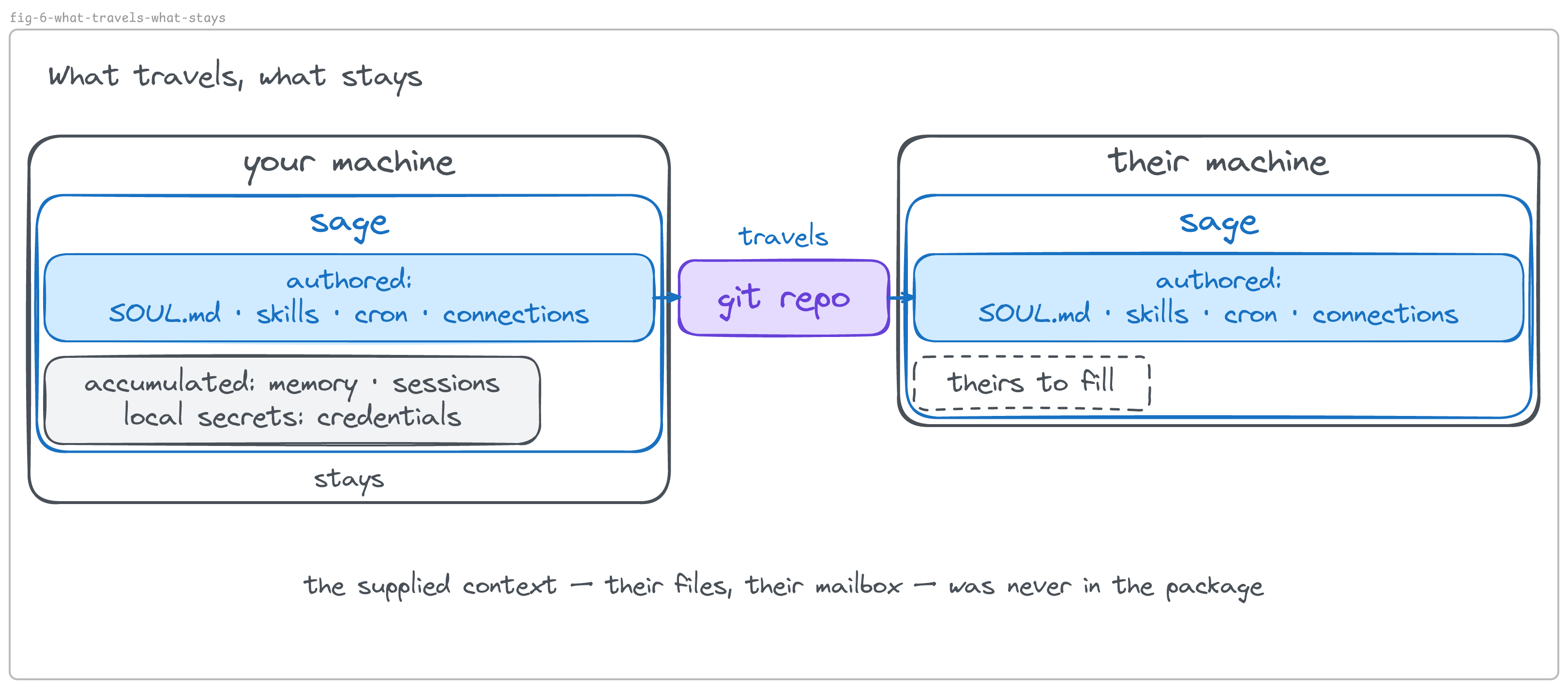
The harness is the same on any machine. What you are shipping — what makes the agent yours, and now theirs — is context. That is the difference between having built an assistant and having shipped one.
In ten sentences
- An agent is Context, Brain, and Action — what it sees, how it thinks, what it does — run in a loop, inside a boundary you set, with the agency to decide its next step.
- The harness is the layer that operates those parts: it runs the loop, manages the context, calls the model, executes the tools, and enforces your boundary. You install it once.
- The harness manages context; it doesn’t come with any. You supply the context, and you spend your time on it.
- One server, many agents — an agent is a profile, and you can run as many as you make.
- A profile is three files you write plus what the agent accumulates.
- A profile is not a sandbox: the main ways to limit what an agent can reach are taking a tool away and changing the execution backend.
- An agent has a mind, a desk, and a keyring — and by default the agents on a server share your keyring.
- An agent with no messaging platform connected is already a capable worker; nothing outside the session can start a turn, so it is idle while you’re away.
- The gateway lets other people and the clock start turns; a bot is an account on someone else’s service; a token lets one operate the other.
- Ship the authored part; the accumulated part stays with whoever runs it.
What you can do now
Pick any agent product — one you use, or one announced this week — and ask the three questions: what can it see and carry, how does it reason, what can it do through tools? Then two more: what can start a turn — only you, or other people and the clock — and where does your approval sit? With those five answers you can see how an agent is put together. The same five questions work when you plan one of your own.
Then look at what is yours in it. The harness you install and the model you rent or run are the same for everyone who chooses them. The data layer — the instructions, the knowledge, what the agent remembers — is the part you write and the part that compounds, and it stays yours when the layers under it change.
Then build one. The companion tutorial puts three agents on a free server, gives them a rules page that says who decides what, and connects them to real email and to your phone — the concepts in this article, running.
Practical exercise
Pick one agent product you can open today — Hermes if you have it installed, otherwise Claude Code, Codex, OpenClaw, or the one announced this week.
Step 1 — Name the parts. Write one line each: what it can see and carry (Context), how it reasons (Brain — which model, yours or a provider’s), what it can do through tools (Action).
Step 2 — Find the loop and the boundary. Write what can start a turn — only you, or other people and the clock — and where your approval sits: which actions it takes on its own, which stop and ask you, and where the record of what it did lives.
Step 3 — Find the data layer. Open the folder or settings where its instructions, memory, and skills live. Note which of those you wrote and which it accumulated.
Step 4 — If it is Hermes, prove the separation. Create a second profile (hermes profile create test), tell the first agent one fact in a chat, then ask the second agent for it. Then ask each to run echo $HOME.
Success criteria
- For your product, you can fill the five answers from Steps 1 and 2 in plain words, without the product’s own vocabulary.
- You can point at the files (or screens) that hold its instructions, its memory, and its skills — and say which of the three you would carry to a new machine.
- If you did Step 4:
hermes profile listshows both agents; the second agent does not know the fact you told the first; both print the same$HOME— separate minds, one keyring.
Frequently asked questions
Is the loop the harness, or part of it? Not the same thing. The loop is the agent’s own cycle, at the center of ABC — a turn close up, and across jobs from a distance. The harness is the program that runs the turn and keeps what it leaves behind: each turn it builds the context, calls the model, carries out the action, and goes round again. Take the harness away and the cycle does not happen; take the cycle away and the harness is a program with nothing to do.
Does an agent need a bot to be useful? No. An agent with no messaging platform connected works through its tools — files, shell, web, APIs. A bot, or a mailbox, is what lets other people start a turn, and a gateway is what keeps that connection open.
When I create a bot, does something start running on my computer? No. An account record is created on the messaging platform’s servers and you receive a token. The program that answers is the gateway, and you start it.
Is a gateway a server? Both words are in use, which is the confusion. The server is the machine. A server is a kind of program that stays running and waits for requests — the gateway is one. When this article says something runs “on the machine” rather than “through the gateway,” it means an ordinary command typed on that computer.
What is the difference between a program I talk to and code I import? Talking to a program means a second process is running and you talk with it — Codex’s App Server is that kind of example. Importing a library runs its code inside your own program — the Claude Agent SDK — a software development kit, a library developers call from their own code — works that way, though it starts a bundled Claude Code process underneath, so a process boundary is still there, hidden behind the import.
If a harness runs on my machine, do I have its source code? Separate questions. Hermes (MIT), OpenClaw (MIT), and Codex’s command-line harness (Apache 2.0) publish theirs. Claude Code runs locally and does not publish its source. Software can run on your machine without being open.
Are chat, conversation, and session the same thing? No. Conversation is the everyday word, and some platforms also give it a technical meaning — Hermes’s email adapter, for example, treats one sender’s address as one conversation. A chat is the container a messaging platform gives an id to, holding every message exchanged in it over time. In Telegram that is a private chat (you and one other account), a group (many members), or a channel (one account broadcasting to many). Conversations happen inside a chat: a private chat holds years of them, a busy group holds several at once, and a group with topics turned on splits them into rooms, each with its own id. Slack’s containers are channels and direct messages, with threads inside; Discord’s are servers and channels. A session is the agent’s memory of one exchange. In Hermes it is keyed by where the messages came from — the platform and the chat, plus the topic if there is one — so a group topic is one session and a direct message another. Other harnesses keep the same idea under their own names.
How does one agent talk to another? On one server, the plain way: agent A runs a command that hands agent B a message — the same hermes -p atlas chat -q "…" you would type yourself — and reads what comes back. No messaging platform is involved, and the handoff is a line in a log you can read. Across machines, agents talk the way programs do: over an API, a queue, or shared files. In either case what matters is that the handoff is visible and recorded, so you can see who asked whom for what.
Peer agents or one agent with sub-agents — what is the difference? A sub-agent is one mind borrowing hands: in Hermes, a child task with the same identity and the same authority; other harnesses let a sub-agent carry its own instructions and tools — either way it reports back and disappears. Peer agents are colleagues: each with its own memory and its own level of authority, so one can refuse another, and the handoff leaves a record. Use sub-agents when the work needs more hands; use peers when it needs a second judgment. A sub-agent is nested agency: a tool that is itself an agent.
Does using an agent make it smarter? The model does not change; the data layer does. As the agent works it writes to its memory file and, in Hermes, can turn a procedure that worked into a skill file; both are loaded into its context on the next run, so it starts further along. Delete those files and it forgets, while the model is untouched.
Glossary
| Term | Definition | Example |
|---|---|---|
| CLI | command-line interface — a program you drive by typing commands in a terminal | hermes chat -q "hello" |
| TUI | terminal user interface — a full-screen program that runs inside a terminal and stays open, like a text editor | hermes --tui |
| terminal | the window where you type commands | the black window with a prompt |
| IDE | integrated development environment — a programmer’s editor with tools built in | VS Code, with Claude Code running as an extension inside it |
| process | one running program | the hermes you started; shown by ps aux | grep hermes |
| server (the machine) | a computer that stays on and is reached over the network | a small cloud machine, or a computer under your desk that never sleeps |
| server (a program) | a program that stays running and waits for requests | the gateway; the dashboard |
| API | a way for one program to ask another program to do something, over the network | Telegram’s Bot API; the model provider’s API |
| token | a secret string that proves you may operate an account | the bot token Telegram’s BotFather gives you |
| MCP | Model Context Protocol — an open standard for giving an agent tools and data from outside services | a Slack or database server the agent connects to |
| messaging platform | an outside messaging service an agent can be reached through | Telegram, email, Discord, Slack |
| profile | in Hermes, one agent’s folder — its configuration, identity, memory, skills, schedules | ~/.hermes/profiles/sage, the folder of an agent named sage |
| skill | a reusable procedure: a text file of steps the agent loads when a task calls for it | a SKILL.md file in the agent’s skills/ folder, say one for handling refunds |
| cron job | a task that runs on a schedule, with no one asking | a report posted every Monday at 9 |
Sources
Original test environment: Hermes Agent v0.20.4 (2026.8.18), Ubuntu 24.04.
- Hermes Agent — Profiles · Configuration · Messaging · Running Many Gateways at Once · Profile Distributions · Tools · CLI · repository (MIT)
- Claude Code — overview · glossary: agentic harness
- OpenAI — Unlocking the Codex harness · Codex repository (Apache 2.0)
- OpenClaw documentation
- What makes a harness a harness (arXiv:2606.10106)
- The Action-Brain-Context (ABC) Framework (2023) · AI Agent Engineering (2026)
- Telegram — Bot Features · Bot FAQ