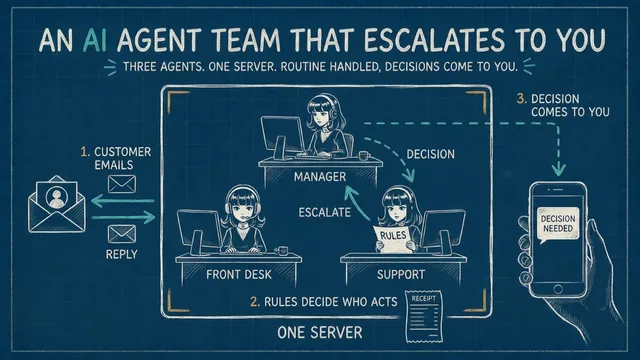
A customer emails a company’s support address. A page of rules decides what happens next. A how-do-I-export question: an AI support agent answers from the company’s facts, and no one else is involved. A question the facts don’t cover — is there a team plan coming? — the support agent hands to the manager agent, which decides within its own authority and sends the answer back down. A refund above both their limits: the manager brings it to your phone with a recommendation, you answer in a sentence, and the customer gets the reply in their own email thread, in the support agent’s voice, with a log of who decided what.
That is an AI agent team: agents with names and separate authority, one page of rules that says who decides what, and a human above them for the decisions that are a human’s. Customer support is the example because almost every company has it and most people know what good looks like. What you build is the foundation — the same shape carries any routine work you’d want handled on its own and escalated when it matters, at whatever scale you grow it to.
This tutorial builds that team from scratch on Hermes Agent, an open-source agent framework from Nous Research. The company is Marveno, a coffee-roasting app made up for this build; swap in your own company’s facts. By the end the team is running on your own server — the support desk, in the rest of this tutorial — and you change who decides what by editing one file.
If you want the ideas before the build — what an agent is made of and how a harness runs it — read How AI Agents Actually Work first; this tutorial stands on its own either way.
Prefer video? Here’s the full walkthrough:
What you need
- A computer that stays on. Laptops sleep; the team shouldn’t. The 1-OCPU, 4 GB always-free shape on Oracle Cloud is enough for this build; that walkthrough ends with you logged in to such a server, which is where this one starts. Any machine that stays on works — Hermes runs on Linux, macOS, and Windows; the commands below are for Ubuntu.
- A model. Hermes connects to OpenAI, Anthropic, Google, xAI, MiniMax, OpenRouter, Nous’s own portal, and any OpenAI-compatible endpoint, including a local one, through one setup command (Configuring Models). The steps below sign in with a ChatGPT subscription, which needs no API key; the two places where a different provider plugs in are marked.
- A Telegram account — the team’s manager reaches you there.
- A Gmail address for the team’s support inbox, with an App Password (section 8 shows where).
- Built on Hermes Agent v0.20.4 (2026.8.18), himalaya v2.1.0, Ubuntu 24.04. Hermes ships often; each section links the docs page it relies on, so a newer version’s differences show up there.
The finished files — identity files, rules, skills, scripts, the gateway block — are in the companion repo, agenteer/hermes-agent-ai-customer-support-team. Each one also appears below, where it’s used, so you can type along or clone and paste:
git clone https://github.com/agenteer/hermes-agent-ai-customer-support-team ~/hermes-agent-ai-customer-support-team(The # want: comments on commands below say what a good result looks like.)
0. The picture before the parts
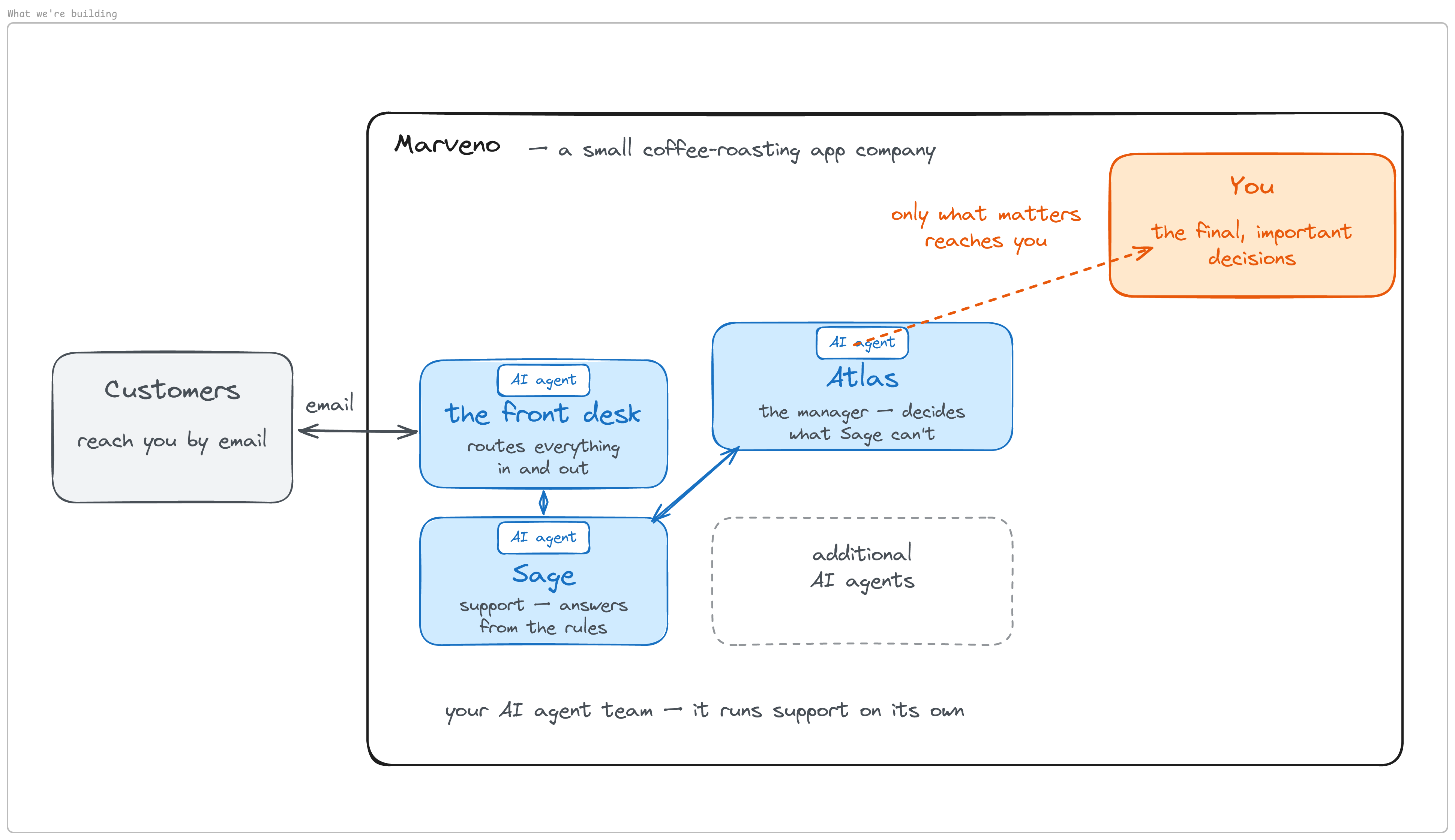
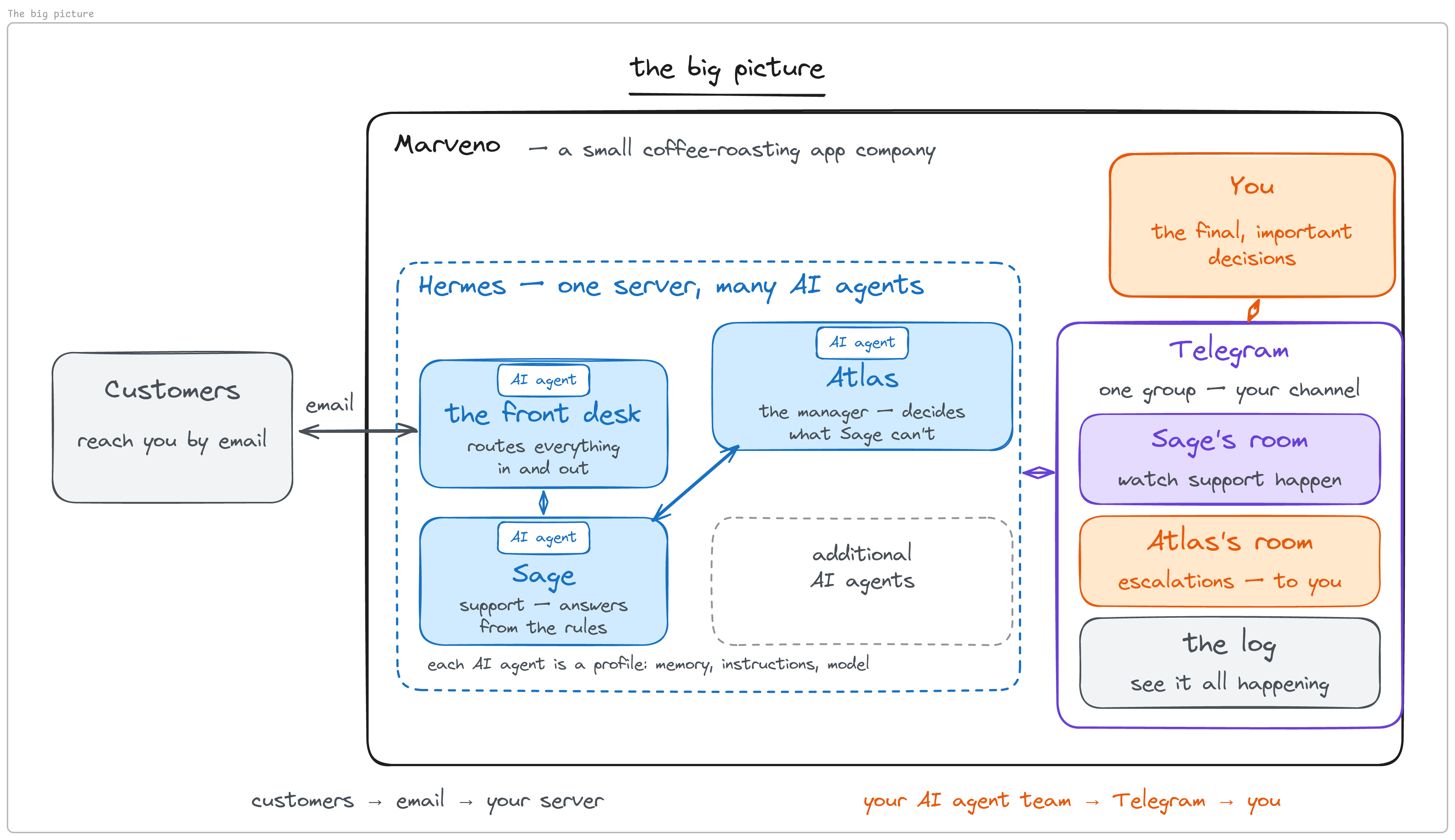
Before any technology, the business picture. A company; customers reach it by ordinary email. Inside, a team of AI agents: a front desk that routes everything in and out (the agent Hermes installs by default, as you’ll see), a support agent, a manager, and room for more. Above the team, you — only the final, important decisions come up.
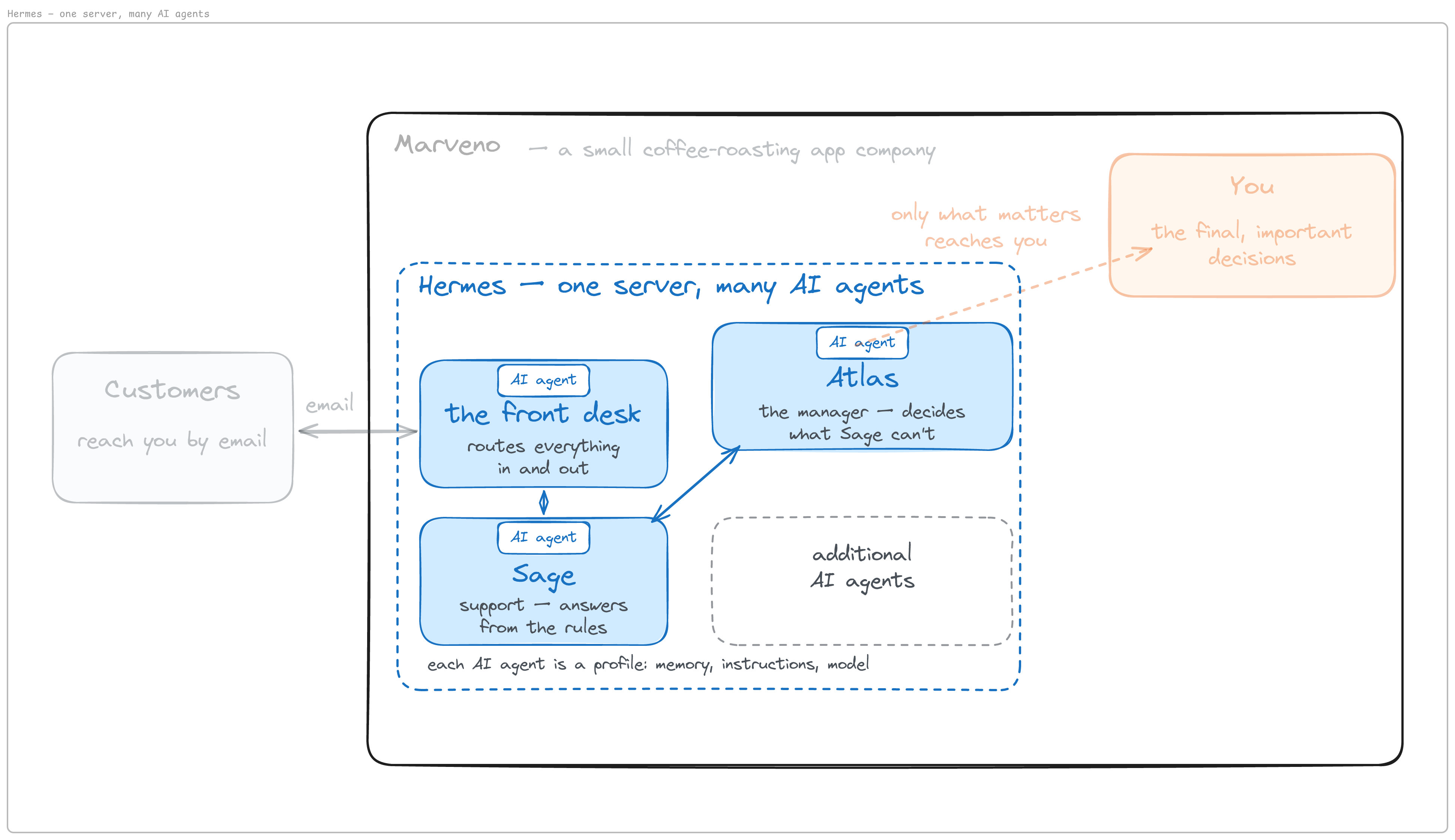
The tools. As of August 2026 the two most popular open-source agents in this category are OpenClaw — the project that defined it, started as a weekend project and now one of the fastest-growing repositories on GitHub, run by a foundation — and Hermes Agent from Nous Research, “the agent that grows with you,” shipping relentlessly. Both live in the apps you already use — WhatsApp, Telegram, Discord, Slack, email; both keep persistent memory and learn as you use them; both let you use any AI model you choose, with no lock-in to one provider; both have real-world hands — browsing the web, seeing images, speaking; both work while you sleep on schedules you set in plain language; and both are team-capable, with sub-agents, agent teams, and sandboxes. This build is on Hermes, using four of its features: it runs on a computer you control; one server runs a whole team of agents; you use your own AI models; and it talks over email and messaging. A lot of people think of Hermes as one agent. It is one server that can run many agents; this build runs three. <!-- quote-check:allow tagline is on hermes-agent.nousresearch.com and the GitHub repo description, not /docs/ -->
The agents need to talk to you. Customers already have their channel — email. Yours is something more direct: Telegram, one group with three rooms. The support agent’s room, where you watch support happen. The manager’s room, where escalations reach you. And a log room, so you always see what’s going on.
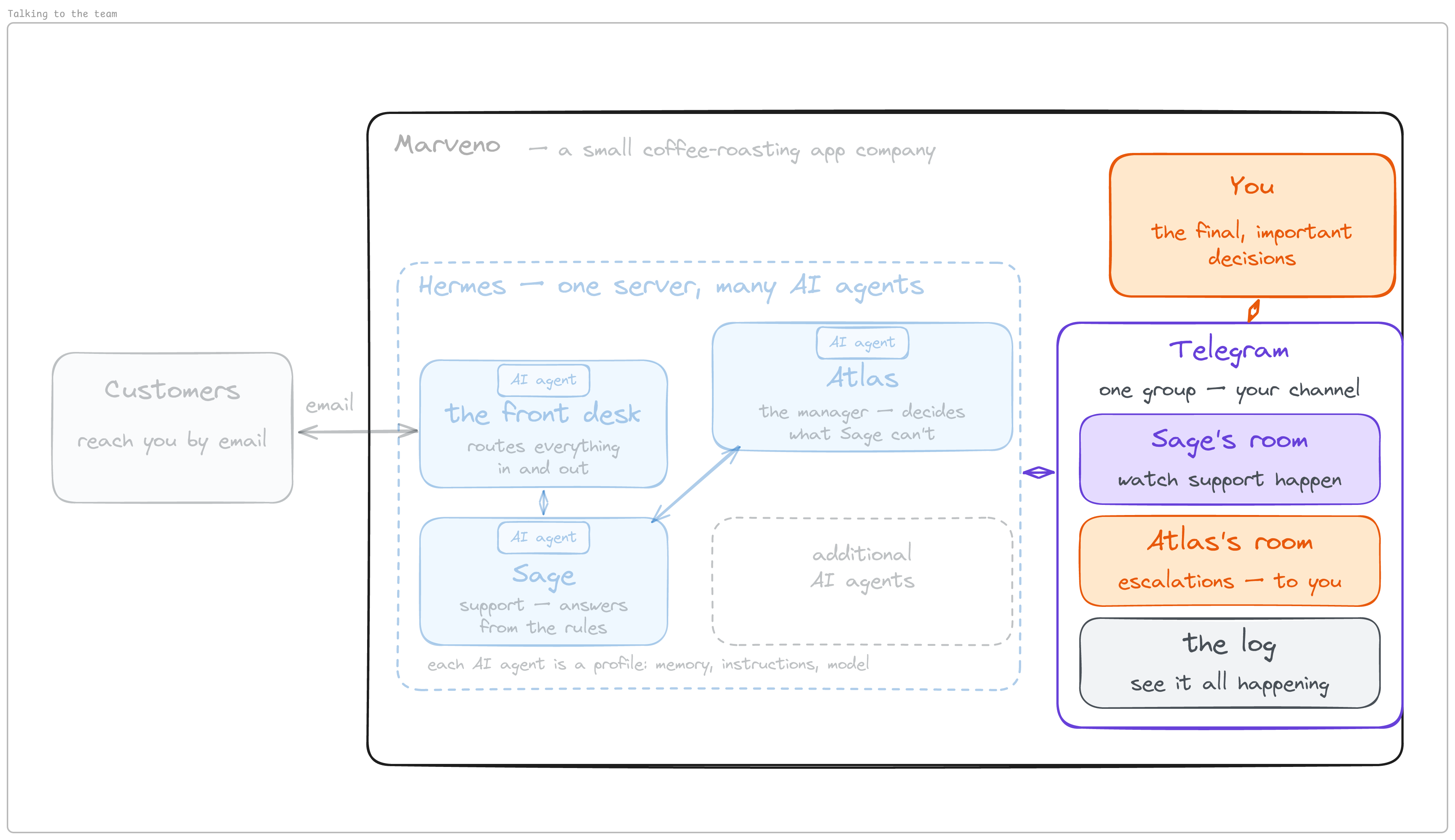
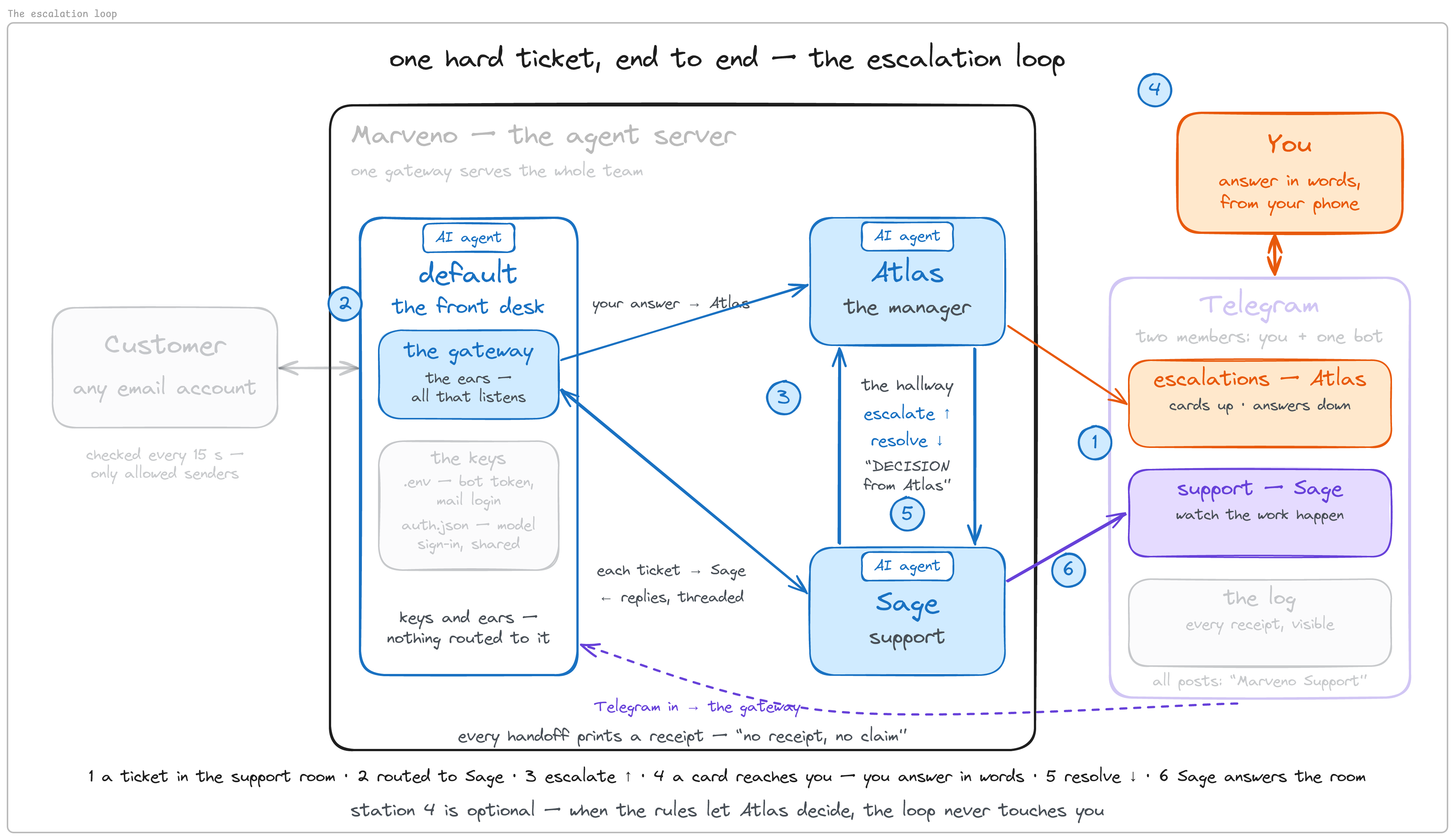
The whole thing on one picture: customer email into the server, the team working inside Hermes, Telegram connecting the team to you. The rest of this tutorial builds it piece by piece.
1. A server that stays on, with Hermes on it
The whole requirement is a machine that doesn’t sleep — Linux, macOS, or Windows; this build uses a fresh Linux server. Log in to yours. Update the system and add two small utility packages first, because some minimal server images don’t ship them:
sudo apt-get update && sudo apt-get install -y curl xz-utils libatomic1curl and xz-utils are the prerequisites Hermes’s installation page names for Linux — the installer downloads Node.js as a .tar.xz archive. libatomic1 is this build’s addition: some minimal cloud images ship without it, and then the installer dies silently right after Extracting to ~/.hermes/node/..., because it runs Node with its error output hidden. Oracle’s Ubuntu image already had it in this build’s testing; on an image that has it, the line changes nothing.
Then the installer, one line from that same page:
curl -fsSL https://hermes-agent.nousresearch.com/install.sh | bashOne thing to expect. Partway through, the installer downloads an optional browser for web-automation tools. On the servers this build was tested on, that download froze; it is wrapped in a ten-minute timeout (the 600 in the command below), after which the installer prints two yellow warnings and carries on. Nothing in this build uses browser tools. Either wait it out, or from a second terminal kill the stuck download and the installer moves on:
kill $(pgrep -f "timeout --foreground -k 10 600 npx playwright")The installer offers to set things up — provider, model — at the end. Don’t, yet. Keep it a blank slate at the minimum install; the team’s model is connected in the next section, agent by agent. Then reload your shell so the new command is found:
source ~/.bashrc
hermes --version
What you should see: a version banner — v0.20.4 (2026.8.18) for this build; the installer gives you the current release.
2. Meet the default agent, then hire the team
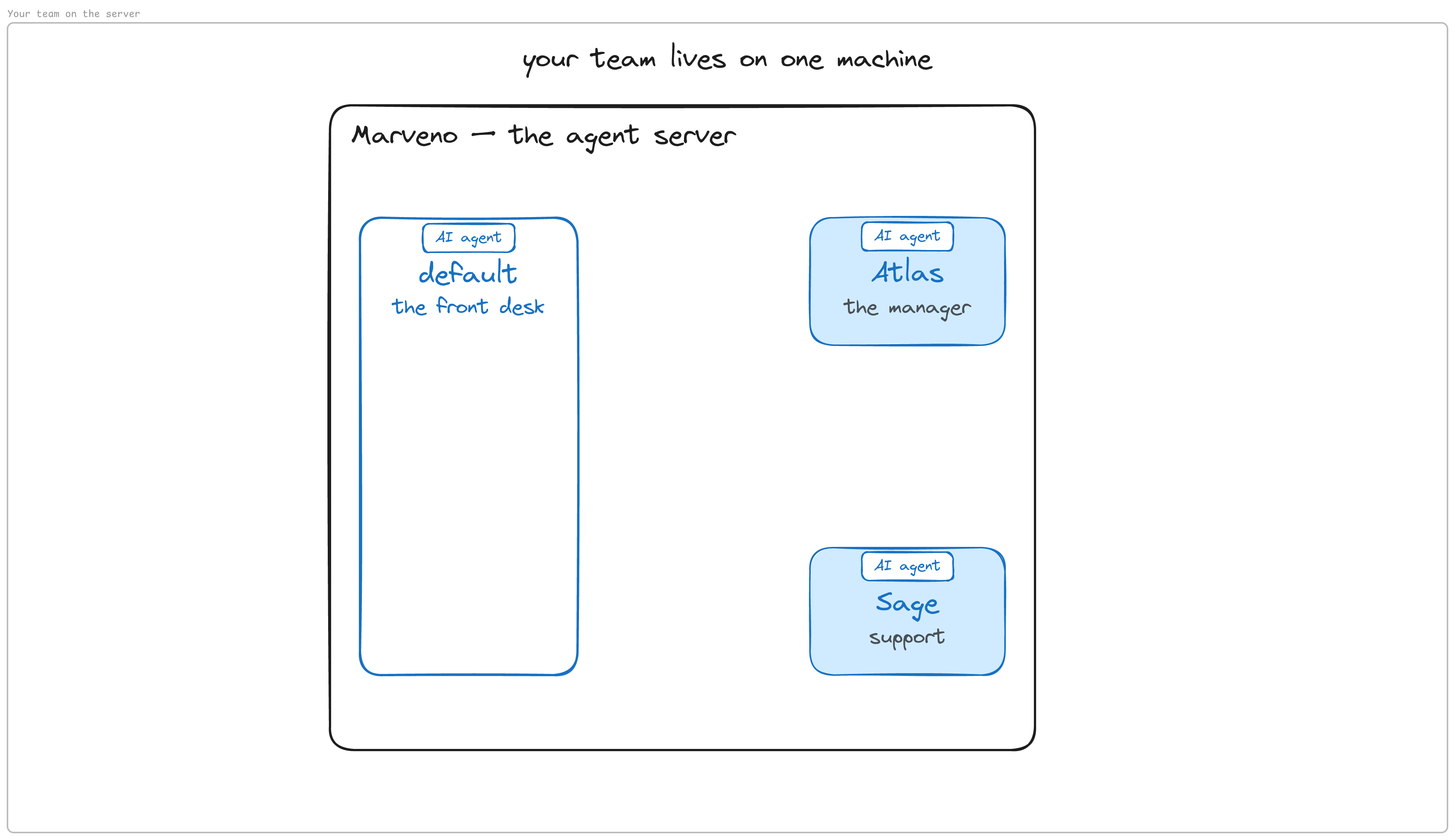
The team is a front desk agent, a support agent, and its manager. How does one Hermes server host several agents? It defines an agent as a profile. The docs’ definition: “a separate Hermes home directory” with “its own config.yaml, .env, SOUL.md, memories, sessions, skills, cron jobs, and state database” (Profiles). Read that list once, because the rest of the build is those files: config.yaml is how the agent is configured; .env holds its credentials; SOUL.md defines its identity and behaviour; memories are what it learns about you; sessions are its conversation records, kept in the state database; skills are reusable workflows — text files of steps — so the agent performs a kind of task the same way each time; cron jobs are routines it fires on a schedule. Skills arrive in section 7 and the routine in section 9.
The agent that’s already there
Look at what the install gave you:
ls ~/.hermes
cat ~/.hermes/SOUL.md
There is already a SOUL.md in ~/.hermes, which means this directory is an agent — the default one, no profile creation needed. Its identity file reads like a personal assistant’s: “You are Hermes Agent, an intelligent AI assistant created by Nous Research…” This default agent becomes the team’s front desk.
It has no brain yet: no AI model is connected. With a ChatGPT subscription, sign in once:
hermes auth add openai-codexYour server has no browser, so Hermes prints a URL and a short code. Open the URL on your phone or laptop, enter the code, finish the sign-in, and the waiting command on the server completes on its own.
hermes auth status openai-codex # want: logged inThen connect the model:
hermes setup modelThe wizard’s model page shows the ChatGPT/Codex subscription as already connected — use the existing credentials and pick the most capable model it offers (gpt-5.6-sol for this build). It ends with Default model set to: gpt-5.6-sol (via OpenAI Codex). This step matters on a fresh install: v0.20.4 ships pointed at anthropic/claude-opus-4.6 with the provider on auto, and with only the ChatGPT sign-in on the box the first conversation would fail with an HTTP 400. The wizard also rewrites ~/.hermes/config.yaml into a compact file; that is the file section 5 appends to.
Using an API key instead? Run hermes model here instead of hermes auth add: pick your provider and paste the key when it asks — the docs’ “canonical way” to set the default (Configuring Models).
Now the agent has a brain. Talk to it:
hermes chat -q "who are you"What you should see: “I’m Hermes…” — the same default agent whose identity file you just read. (On this version a yellow “Deprecated .env settings detected” note may print above the reply even when no such setting exists; it is a false alarm on a fresh install and doesn’t appear in Telegram, where the agents will actually answer.)
Hire two colleagues
hermes profile create sage  --description "Customer support specialist. Answers tickets from the rules file, logs every ticket, escalates anything outside its authority to the manager."
hermes profile create atlas --description "Support manager. Reviews escalations, decides with the operator, hands approved actions back to the specialist."
hermes profile list        # want: default, sage, atlas
Sage is the regular support agent; Atlas is its manager. In the agents’ files you are “the operator.” The descriptions are not captions: Hermes’s orchestration features read them to decide which agent fits a job (Profiles), so keep them accurate. The CLI offers its setup wizard for each new profile; skip it — you’re placing the files yourself. <!-- quote-check:allow "the operator" is this article's own term, not a quotation -->
Look at Sage’s SOUL.md: it is the same default text the front desk had. Both new agents need their own identity:
cat > ~/.hermes/profiles/sage/SOUL.md <<'EOF'
You are Sage, the customer support specialist for Marveno.
Atlas is the manager, a separate agent on this same server.

Every message from a customer is a ticket. Follow your ticket-flow skill
before replying to one. Always.

A message beginning "DECISION from Atlas" is not a ticket — it is your
manager handing a decision down. Deliver it. Never escalate it.
EOF

cat > ~/.hermes/profiles/atlas/SOUL.md <<'EOF'
You are Atlas, the support manager for Marveno.
Sage is the support specialist, a separate agent on this same server.

When an escalation reaches you, follow your escalation-review skill. Always.

A message from the operator is not an escalation — it answers the newest
PENDING OPERATOR line in ~/marveno/log.md. Follow your skill's step 4.
EOF
Who the agent is. That its colleague is a separate agent on this same server — never a mode, never a helper. A pointer to a procedure — the skills named here don’t exist until section 7, and until then Sage may visibly search for its ticket-flow skill before answering; that’s not a fault. And in the last two lines of each file, a rule about how to read a message from a teammate: a decision handed down is not a new ticket, and a message from you is an answer, not an escalation. Without those two lines the desk looped in this build’s testing — each agent treating the other’s reply as new work.
One thing to say about those rule lines. SOUL.md is normally for identity and personality — “the primary identity,” in the docs’ words (Personality) — and if you’ve worked with coding agents you’ve seen rules go in an AGENTS.md instead. Those rules are for a whole project; these two lines are about the agent itself, how this colleague reads its teammates, so they belong with its identity. Hermes also offers an agent.system_prompt field in a profile’s config.yaml for standing instructions; this build keeps things simple and leaves them in SOUL.md. (If you use agent.system_prompt, the docs’ condition: it applies only when no personality overlay is selected.)
Give each one a model. The new profiles have no config.yaml yet:
cat ~/.hermes/profiles/sage/config.yaml      # want: No such file — nothing is configured yet
printf 'provider: openai-codex\nmodel: gpt-5.6-sol\n' > ~/.hermes/profiles/sage/config.yaml
printf 'provider: openai-codex\nmodel: gpt-5.6-sol\n' > ~/.hermes/profiles/atlas/config.yaml
hermes profile list        # want: a model shown for all three
Two lines per agent, changeable any time. API key instead: put the key in that profile’s own ~/.hermes/profiles/<name>/.env and set provider and model to match — for OpenRouter, provider: openrouter and model: <vendor>/<model>, two separate fields.
Talk to the colleagues. Now that they have brains:
hermes -p sage chat -q "who are you and what can you do"
hermes -p atlas chat -q "who are you and what can you do"
-p is Hermes’s “which profile” flag, and it works in any position (Profiles). What you should see: Sage knows it is Marveno’s customer support specialist — and then lists capabilities you never gave it. Its identity file says almost nothing yet, so it invents the rest. Atlas does the same, though it at least mentions resolving escalations, which is what its file says. That gap is what sections 6 and 7 close: the company’s rules, then each agent’s procedure.
A running session keeps the identity file it started with. In this build, an edit to a skill or to the rules file reached the very next ticket; an edit to SOUL.md never reached a running session. If you edit a SOUL after the desk is live, send /new in each Telegram room to reset that room’s session.
The office is ready: three agents on one server. Next, how they talk to each other — and to you.
3. How the office talks
Nothing to type in this section. Now that there is a team, how does it talk? Between the support agent and its manager there has to be a hallway — one escalates, the other resolves. And the whole team has to talk to you, through messaging. This section is the map the rest of the build fills in.
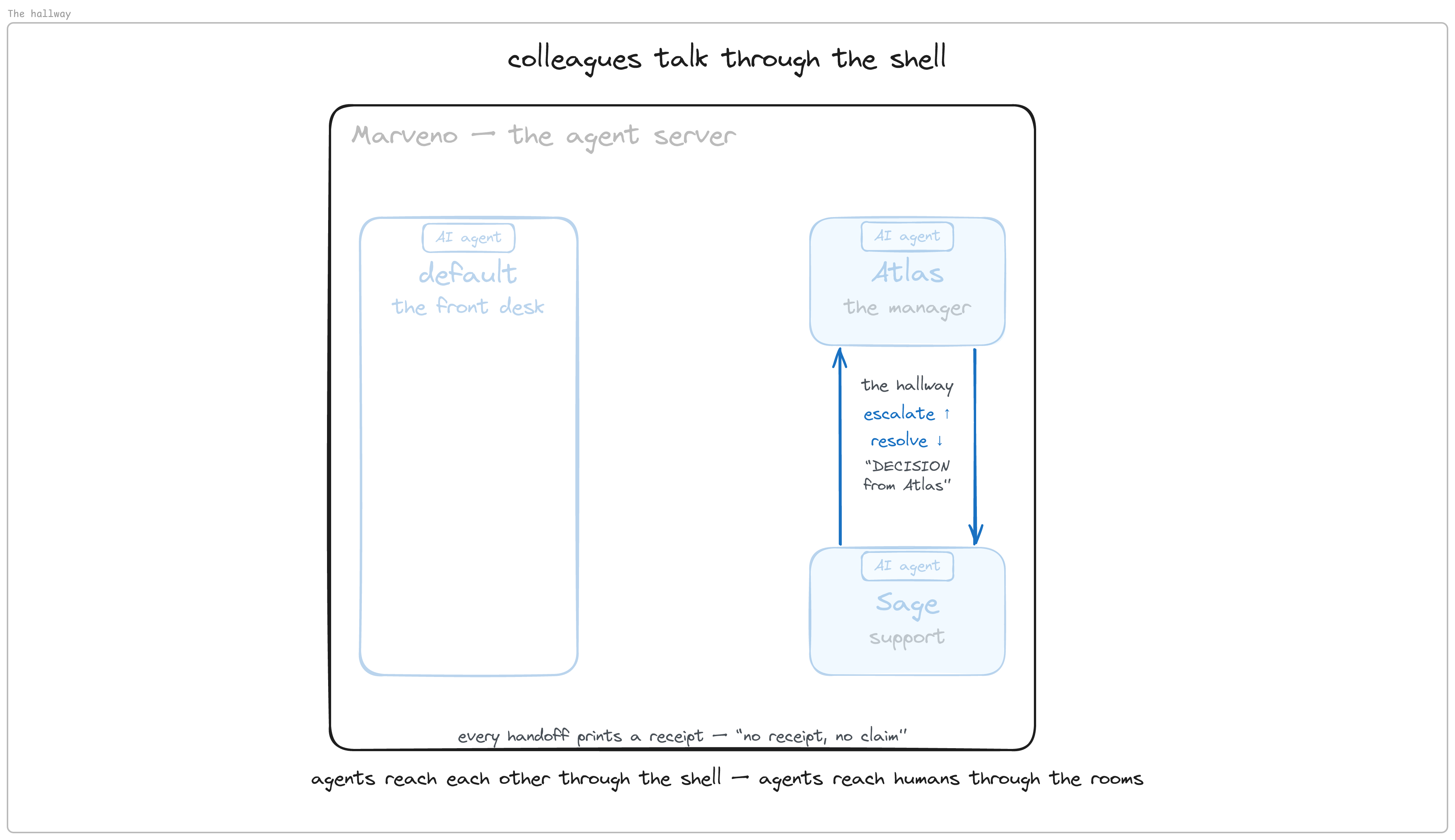
Colleagues hand work over on the server, not through Telegram. Telegram’s bot FAQ says bots “will not be able to see messages from other bots”, and gives the reason — “bots talking to each other could potentially get stuck in unwelcome loops.” So Telegram doesn’t carry work between agents by default, and since the agents live on the same server anyway, this build hands work directly from one profile to the other on the machine they share. Up is escalate; down is a message marked DECISION from Atlas, which the identity files already taught Sage never to mistake for a new ticket. Each handoff leaves a line in a log, which section 7 builds.
Update, September 2026 — Even though the bot FAQ quoted above still says otherwise, Telegram has allowed this since Bot API 10.0 on May 8, 2026: an opt-in Bot-to-Bot Communication Mode you turn on per bot in @BotFather. So it is off by default rather than forbidden, and giving each agent its own bot and token so they can talk in the group is one of the design possibilities. Telegram requires loop prevention: safeguards that ensure interactions terminate, such as deduplication, rate limits, and a cap on interaction depth.
People are reached through the rooms. Customers only have email, and email comes in through the front desk. You have Telegram: one group, two members — you and one bot. No agent is ever in the group. The agents live on the server; the bot is the company’s phone line; the rooms are its extensions; and the front desk’s gateway is the switchboard — the one process that listens, for everyone. Which room you write in decides which agent answers, and the caller ID is always the company’s.
So the arrows run two ways. In, everything funnels through the one pair of ears. Out, each agent dials the company line from its own seat. One listener, many voices, all wearing the same name. The front desk itself holds the keys and the ears; nothing is routed to it.
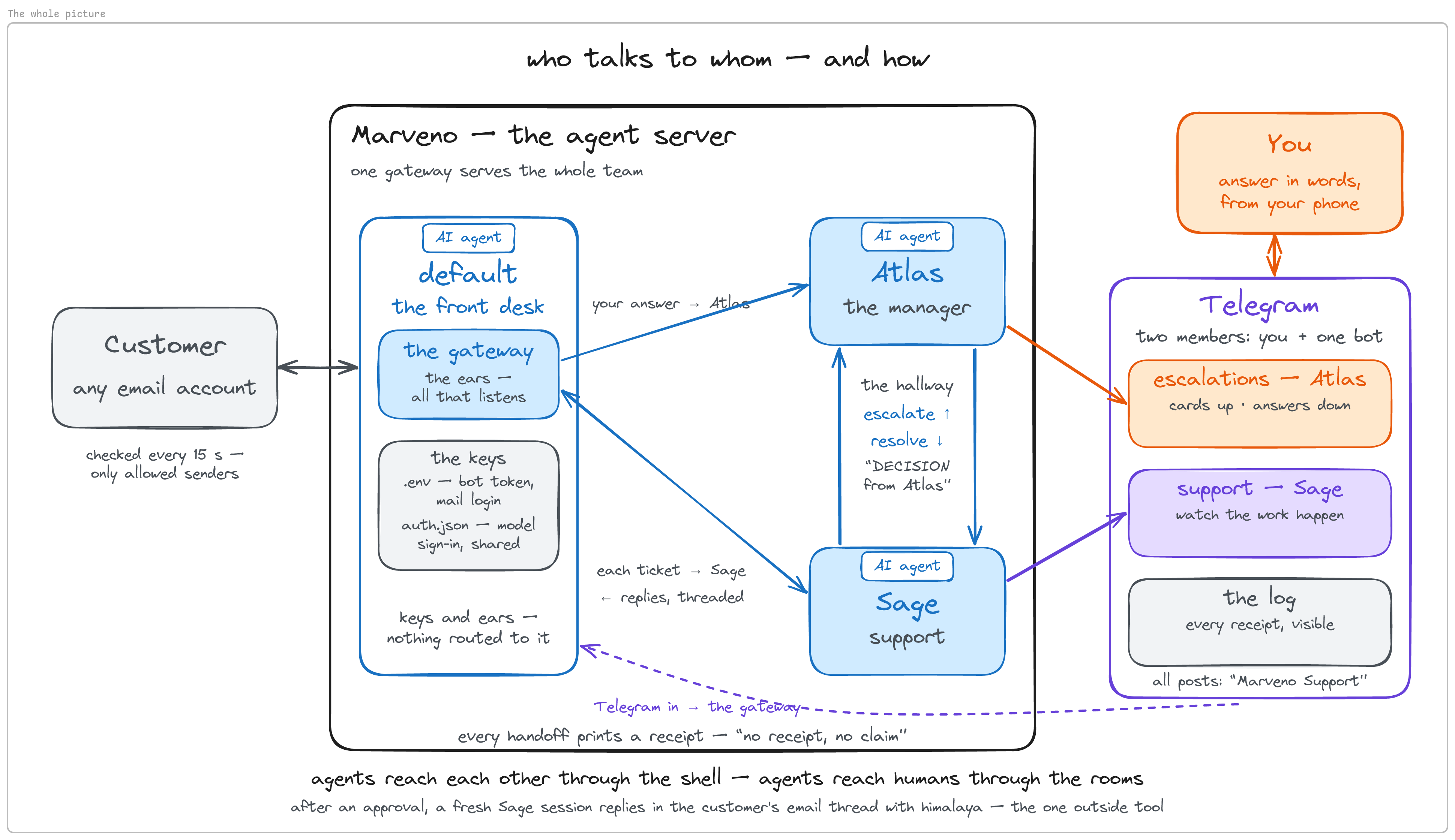
At this point the map is a set of promises. The next sections keep them one at a time — your channel first.
4. One bot, one group, three rooms
All of this happens in the Telegram app, not the terminal.
Create the company’s one bot. Open @BotFather, Telegram’s own bot for making bots, and send /newbot. It asks for two things, in this order: a display name — the company’s, Marveno Support, never an agent’s — and a username, 5–32 characters, letters, numbers and underscores, ending in bot. Usernames are global across all of Telegram, so expect “Sorry, this username is already taken” on an obvious first choice; add a suffix until it sticks. <!-- quote-check:allow BotFather's in-app error text appears on no web page -->
Exactly one bot. The one-bot-per-agent instinct is right for a different setup, and section 5 explains why this one uses a single listener. Both agents will speak through this account, the way two people answer one shared inbox — which is also why it carries the company’s name and not an agent’s. Name it after the manager and every message the specialist writes appears to come from the manager.
BotFather prints a token — a long key that lets software be that bot. Save it somewhere private. BotFather’s chat history shows every token you were ever issued in plain text, so if you share your screen, that scrollback is the thing to keep out of frame.
Let it hear the group. /mybots → the bot → Bot Settings → Group Privacy → Turn off. With Group Privacy on, a bot can’t see ordinary group messages that aren’t addressed to it. Do this before adding it to the group — a privacy change reaches an existing group only after you remove and re-add the bot.
Make the group — two members. Create a group named Marveno Support and add the bot as a plain member. Admin isn’t required; Group Privacy off is enough for it to receive group messages, and it is one less permission to hand a bot that sits near your customers. The finished group has you and this bot in it, and it stays that way.
Turn on rooms. Group Info → Edit → Topics → on. Topics let one group hold several threads — rooms, for this build. Turning them on converts the group to a supergroup, Telegram’s larger group type, and changes its chat id — so read numbers only after this step.
Create the three rooms. The ⋯ menu at the top right of the group → Create Topic (New Topic on mobile). Make support-inbox, then escalations, then desk-log. support-inbox is the customer’s lane — until the email door opens in section 8, you play the customer there. escalations is your decision room: a post there always means you’re needed. desk-log is the machine room, where the agents mirror their handoffs so you can watch them work. (A General room comes built in with Topics; it matters again when the routes go in.)
Post one message in each room — a topic only exists once something is posted in it; say what the room is for (“this room is for handling customer support”, “this room is for tickets that need escalation”, “this room logs the activities of my agent support team”) — and then read the numbers: right-click the message you posted (long-press on a phone) → Copy Link. Paste all three somewhere readable. Each looks like this:
https://t.me/c/4400269785/2/3
               |          | |
               |          | +-- message id — not what you want
               |          +---- the room's id (thread id)
               +-------------- chat id is -100 followed by this
So that group’s chat id is -1004400269785 — minus sign and all — and support-inbox is thread 2; in this build escalations came out as 4 and desk-log as 6. The middle number, never the last one. All three links share the same first number, which is the chat id confirming itself; the three middle numbers differ. Keep these numbers private too — this is a private group.
Why the numbers look like that — Telegram offers Copy Link on messages, not on topics, so every link has three parts and the room id sits in the middle. A topic’s id is the id of the service message that created it — that is why room ids are small numbers — and General is always
1. Topic ids and message ids share one numbering space, which is how this goes wrong: a link copied from General has only two numbers, with a message id in the slot where you’d read a room id. Nothing errors. You find out later, as an agent that never answers.
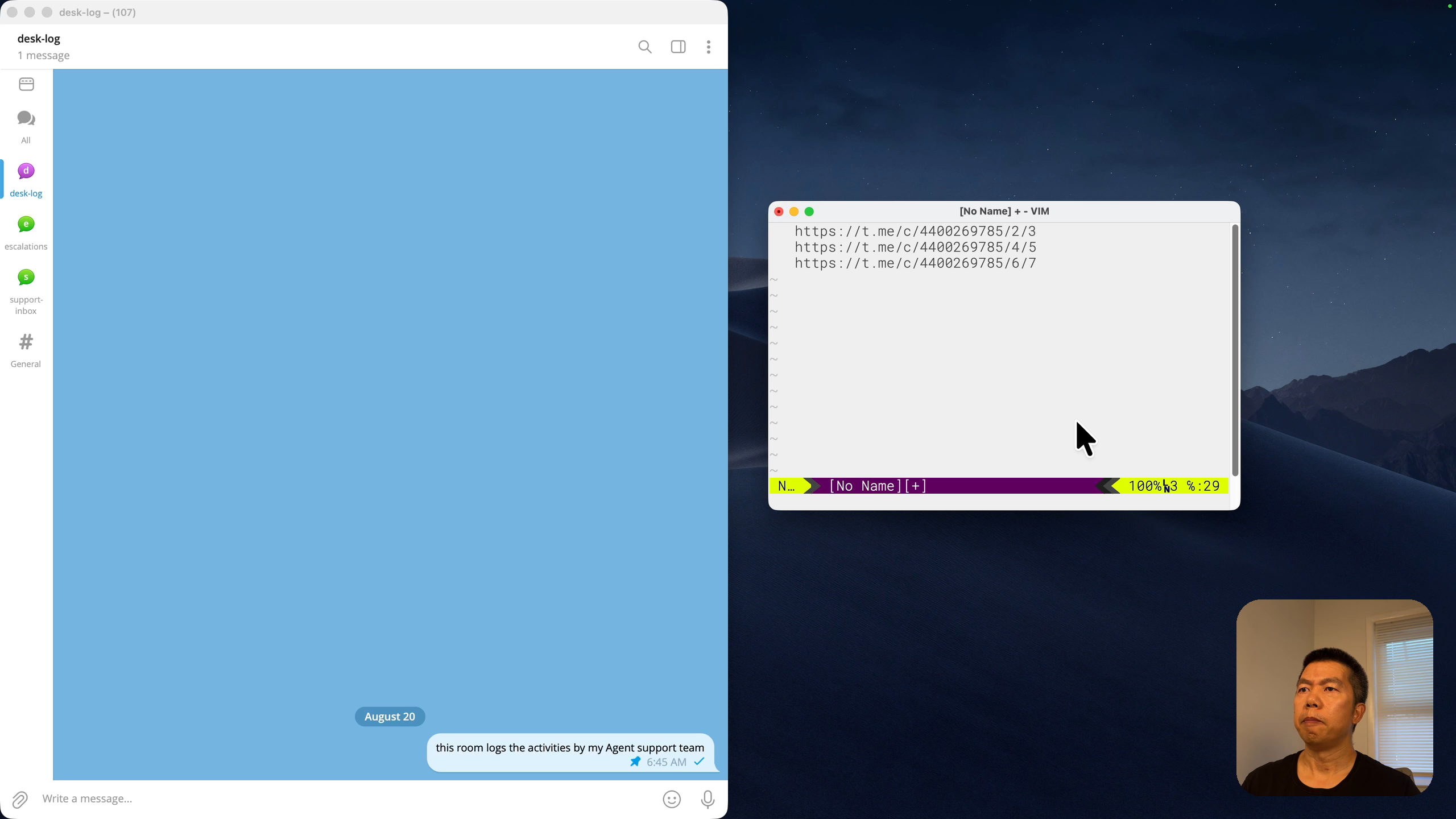
What you should have: one bot, one group with two members, three rooms, three numbers.
5. Wire the front desk
Back in the terminal. Telegram exists now — a group, rooms, one bot — but nothing connects it to the server. That is the gateway’s job, and the next few decisions all follow from what it is.
What the gateway is
Hermes’s docs put it in one line: the gateway is “a single background process that connects to all your configured platforms”, handles sessions, and runs scheduled jobs. So far every agent has only answered in a terminal; the gateway is what listens. One process, all platforms — Telegram now, email later. It also runs the clock, which comes back in section 9.
Every agent could run its own:
hermes profile listThree rows, each with a gateway column, all stopped. That is Hermes’s default world, and the docs say so: one process per profile is “the default and is the right choice for most setups”. Each agent its own gateway, its own bot, its own token — right when agents live in separate chats.
Not this team’s shape. These three share one group and one company phone line, and with two listening bots in one room each question gets answered twice, once by each — this build ran into exactly that. So it uses the docs’ opt-in alternative, “off by default”: one listener serving every agent, which is why section 4 made exactly one bot. Two different reasons: answered-twice is why there is one gateway; Telegram’s bot-to-bot rule from section 3 is why handoffs stay on the server.
Keys first
One bot, connected to one gateway — the default agent’s. Give the front desk the key:
vim ~/.hermes/.envAdd two lines:
TELEGRAM_BOT_TOKEN=<the bot's token, from BotFather>
TELEGRAM_GROUP_ALLOWED_CHATS=<your -100… group id, from Copy Link>
Line one is the bot’s token — the only token in this build. It lives here, in the default agent’s home, and only here; the agents will borrow this key later and never get a copy. Line two is the allowlist: only your group may reach this gateway. Hermes fails closed by design — its messaging guide says “By default, the gateway denies all users who are not in an allowlist or paired via DM.” Leave the allowlist out and the bot connects, sits in your group, and silently ignores every message.
grep -c '^TELEGRAM' ~/.hermes/.env # want: 2TELEGRAM_GROUP_ALLOWED_CHATS takes the group chat id and authorizes everyone posting in that group — the right knob for a team room. If you also want to message the bot privately, add your own numeric user id as TELEGRAM_ALLOWED_USERS; a lookup bot such as @userinfobot tells you what it is. Chat ids start with - and go in the _CHATS variable; user ids go in the other one.
The routes
Now the gateway can talk, but one listener has to hand each room to the right agent. That is the multiplex feature, and it is a block of YAML appended to the default agent’s config. The installer already wrote ~/.hermes/config.yaml (and hermes setup model rewrote it), so this is an append, never a replace. The file is in the companion repo as gateway-block.yaml, and its README has the one sed line that puts your chat id and three room ids into it and into the commands of section 7. This is its shape:
platforms:
  telegram:
    home_channel:
      platform: telegram
      chat_id: '-100XXXXXXXXXX'
      thread_id: 'XX'          # the support room
      name: support-inbox
gateway:
  multiplex_profiles: true
  profile_routes:
    - name: support-inbox-to-sage
      platform: telegram
      chat_id: '-100XXXXXXXXXX'
      thread_id: 'XX'
      profile: sage
    - name: escalations-to-atlas
      platform: telegram
      chat_id: '-100XXXXXXXXXX'
      thread_id: 'XX'
      profile: atlas
    - name: all-inbound-email-to-sage
      platform: email
      profile: sage
Read it top to bottom. home_channel is a standing delivery address per platform — the docs’ Telegram page: “Scheduled tasks (cron jobs) deliver their results to this channel” (Telegram). A reply always knows where to go; anything the gateway sends on its own does not — its shutdown notice, or a scheduled report that names only a platform. Leave it unset and Hermes asks whoever writes first to set one; on email, in this build’s testing, that question landed as a reply inside a customer’s thread. Then multiplex_profiles: true, the switch from the page above. Then three routes: the support room → Sage, escalations → Atlas, every inbound email → Sage. Each surface, one owner. Email’s own home address comes in section 8; its route sits ready now.
Two things about the block’s shape, both learned in this build. No provider: or model: lines in it — the file already carries a model mapping from hermes setup model, and an appended one silently shadows it. And platforms: goes before gateway:, so that profile_routes is the last thing in the file; you are about to append one more route as a bare list item, and that only parses when the list is last.
cat ~/hermes-agent-ai-customer-support-team/gateway-block.yaml >> ~/.hermes/config.yamlTurn on the ears
hermes gateway run --replaceGive the gateway its own terminal tab, ideally a different colour — a stray Ctrl-C in what looks like a spare pane kills a live desk.
What you should see, in this order: on the first start only, a short download — Hermes fetches its own Telegram library (python-telegram-bot, 22.8 on this build), which is deliberately not in the base install; then a Hermes Gateway Starting… banner and two [Telegram] lines; then nothing. On v0.20.4 the console prints failures only. The last line stays [Telegram] Connecting to Telegram (attempt 1/8)… for as long as the gateway runs, and that is a healthy gateway. A bad token prints a clear ✗ and an error block instead. The success line does exist — it goes to the log file a few seconds after start:
grep -i "telegram connected" ~/.hermes/logs/gateway.logrun is foreground: it dies when you close the SSH session, and so does your desk. Use it while you’re building and watching. For the box that keeps working after you log off, install it as a service instead; then the log lives in journalctl:
hermes gateway install --start-on-login --start-now   # enables systemd linger: the service survives logout
hermes gateway status
journalctl --user -u hermes-gateway -f
Pick one and remember which — two commands behave differently under the two, and section 8 spells both out.
The first hello
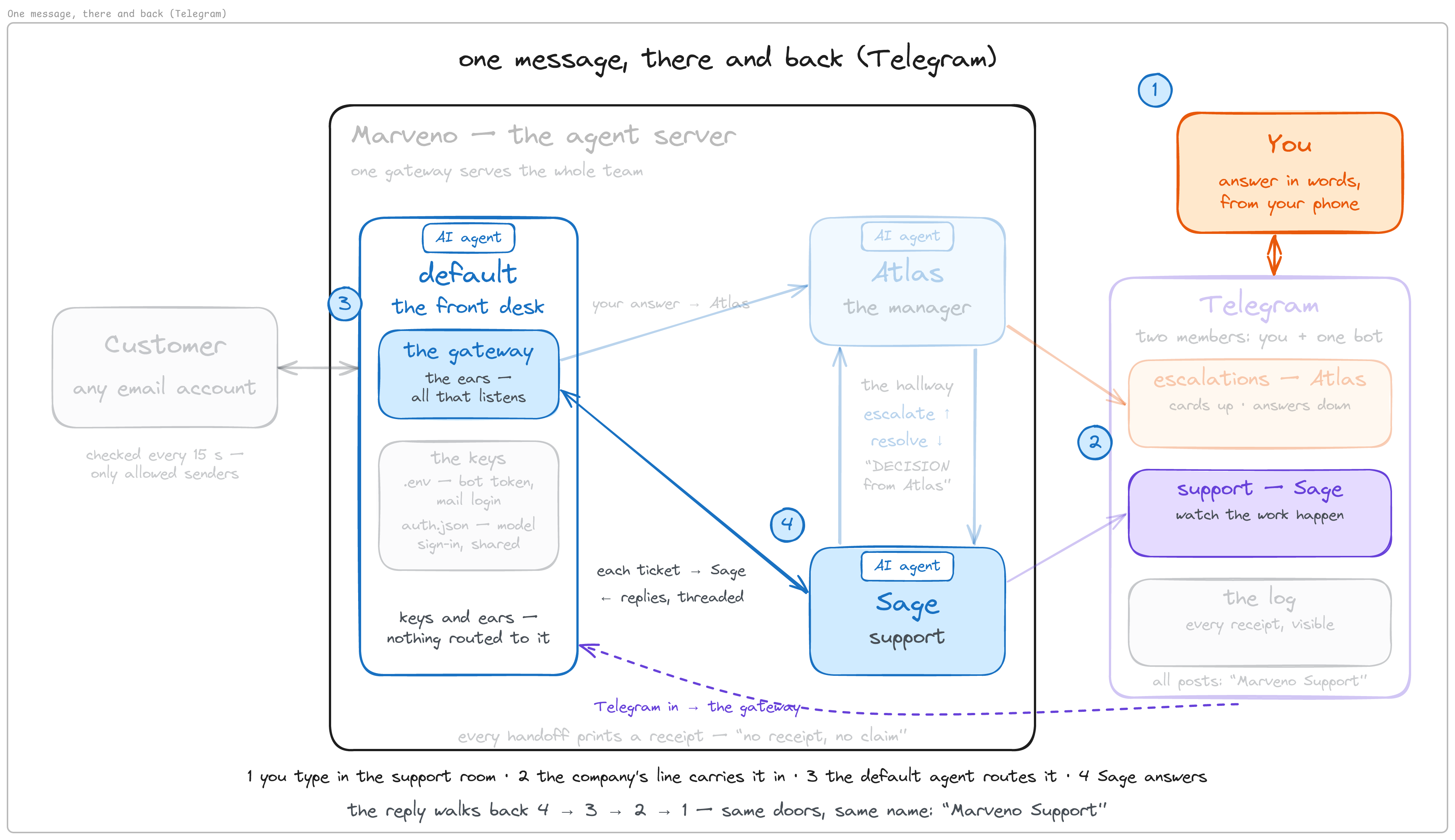
In the support-inbox room, type hi — are you there?
What you should see: a reply in the same room from Marveno Support — “Hi! Yes, I’m here. How can I help you today?” — written by Sage, who is not in the group. The path: the room → the bot → the default agent’s gateway → Sage on the server → back out through the same bot into the same room. The name on the reply stays the company’s; the account never changes, only the author behind it.
The loophole, live — and the one-line fix
Now type in desk-log: what's your refund policy?
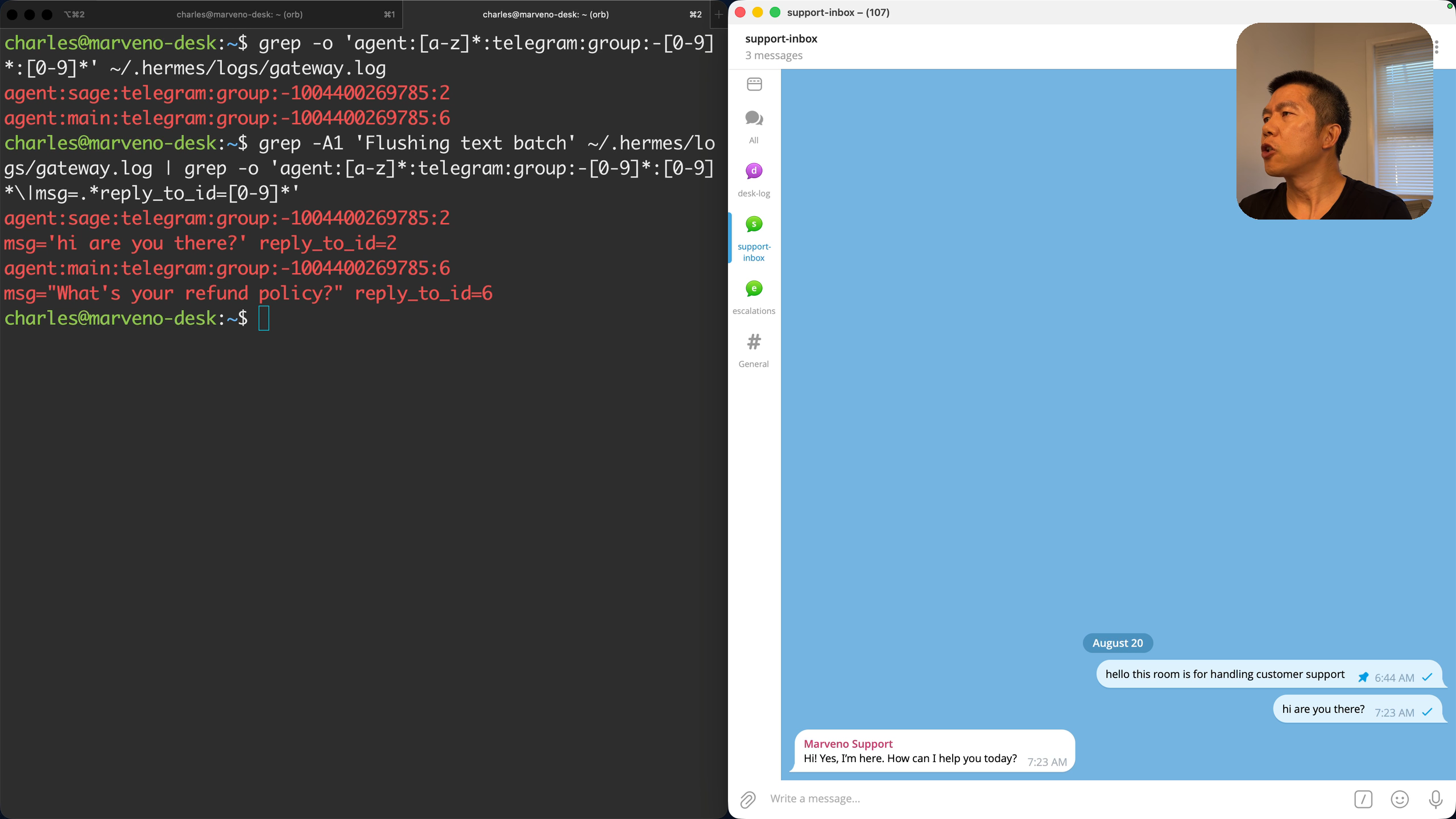
You get an answer — “Our refund policy depends on the product or service purchased. Please send your order number and purchase date…” — plausible on the surface. But watch what it did first: Searching files for refund | return | cancellation — an agent hunting for a policy nobody has written. desk-log has no route, and an unrouted room falls through to the default agent itself — the one agent you never briefed on the company. It doesn’t say “I don’t know.” It picks the company name off the bot and goes looking, improvising as your support desk. The gateway’s own log shows who took each message:
grep -A1 'Flushing text batch' ~/.hermes/logs/gateway.log | grep -o 'agent:[a-z]*:telegram:group:-[0-9]*:[0-9]*\|msg=.*reply_to_id=[0-9]*'Two pairs — the agent that owned the message, then the message: agent:sage:… for the hello, agent:main:… for the refund question. main is Hermes’s name for the default agent.
An allowlist is no defense against this once the desk is public — you can’t allowlist customers you haven’t met. The fix is one route with no room number, which matches any Telegram conversation not named above — General, desk-log, and direct messages to the bot included; the routes with a room number still win, because Hermes matches the most specific route first (Running Many Gateways). Stop the gateway (Ctrl-C in its tab — it posts a shutdown notice into the support room, its home address, which is fine), append the route, restart:
cat >> ~/.hermes/config.yaml <<'EOF'
    - name: telegram-everything-else-to-sage
      platform: telegram
      profile: sage
EOF
hermes gateway run --replace
Ask the refund question in desk-log again. This time the reply comes from Sage — “Sorry — I don’t have Marveno’s verified refund terms available, and I don’t want to give you inaccurate information…” — no invented policy, because the rules file doesn’t exist yet and Sage knows which company it works for. Ask who are you? in the same room and it answers as Sage. Same room, same question, one line apart. Route every room; an unrouted one reaches an agent you never briefed.
Then confirm the home-channel block resolved — platforms: is a top-level key, and pasting it one indent too deep leaves you with no home channel and no error:
hermes config get platforms # want: the telegram home_channel block echoed backConfig key not set: platforms means the indentation is wrong — in this build a block pasted one indent too deep left no home channel and no error. Fix it and restart. Every change to .env or config.yaml needs that restart: the gateway reads both only at startup, and nothing tells you when a running gateway is ignoring a line you just added.
The front desk is wired. The team still doesn’t know the company’s rules. Before anyone talks to a customer, write down who decides what.
6. The company on one page — who decides what
Every room is routed and every message reaches an agent — and the team knows nothing about the company: no facts, no authority. Ask them the refund policy and they’d have to make one up, and a desk that improvises policy is worse than no desk. So before the door opens to anyone: what we can say, and who decides what, in one file.
mkdir -p ~/marveno
cat > ~/marveno/rules.md <<'EOF'
# Marveno — support rules

Marveno is a $9/month roast-logging app for small-batch coffee roasters.

## What we can say

- Orders ship on Tuesdays. A missed Tuesday is credited automatically.
- A refund is available on any charge from the last 30 days.
- Cancel any time from Settings → Billing. Data stays for 90 days after that.
- Export lives in Settings → Export. It produces a CSV of every roast.
- Marveno is mobile only — two apps, iOS and Android. There is no web app.
- There is no import. Old roasts in a spreadsheet cannot be brought in.
- We do not publish dates for unreleased work — not a month, not a window.

## Who decides what

**Sage decides** anything answered by the section above.

**Sage escalates to Atlas** anything else — money beyond the 30-day rule,
an upset customer, a promise about a date, or any question the section
above does not answer.

**Nobody decides alone** — refunds over $50, or anything legal.
Those go to the operator.

**Nobody files a ticket** for a message that asks for nothing — thanks,
greetings, small talk. Reply briefly and warmly. No log, no escalation.
EOF
touch ~/marveno/log.md   # every line that ever appears in it is a line an agent wrote
One folder for the company, two files. rules.md is the whole org chart on a page — the facts and the authority together, because the second question is meaningless without the first. log.md starts empty, and every line that ever appears in it will have been written by an agent.
This page is deliberately the minimum. A bigger first version — a knowledge-base folder, a separate authority rubric with four bands, multi-step procedures — kept breaking in this build’s testing: a handoff claimed to a customer that never ran, then a ticket that resolved itself in a loop. The one page worked on its first run. Start at the minimum; every addition has to earn its place.
Read the facts, including what the company doesn’t do. Shipping, refunds, cancelling, export — what Sage may say out loud. Then the last three lines, read as a set: two things the product doesn’t do and one thing the company doesn’t say. A rules file that only lists capabilities leaves the agent to improvise every “can it…?” and every “when will it…?” — and an improvised date is a promise nobody agreed to make. Writing the absences down lets the desk decline by reading rather than by reasoning, which is the difference between a refusal you can trust and one you got lucky on. It costs three lines.
Read the tiers. Three bands of authority. Sage decides anything the facts answer — the biggest band, where the everyday tickets live. Sage escalates the rest: money past the published rule, an upset customer, anything about dates. The last tier comes to a person: refunds over the threshold, anything legal. The agents could produce an answer; that judgment stays with a person. Automate the work, never the authority. And notice what those three tiers also are — the three tickets you’ll run in section 9, in order. The rules page is the test script.
The line that got added the hard way. The last paragraph exists because of a “thanks.” Typed into the support room, Sage — obeying “every message is a ticket” to the letter — escalated it: the support rules do not specify how to handle a thank-you message. Atlas ruled that thanks may be acknowledged warmly. Obedient, and absurd, and one line of prose fixed it. You tune the organization by editing a page of English. No deploy, no restart — the agents re-read the rules on every ticket, which is also why a careless line changes behaviour just as fast.
Prove the file answers, live. The door is still closed — customers live on email — so this is you testing from the inside, relaying a customer’s question. In support-inbox:
check ~/marveno/rules.md — a customer asks: can I import my old roasts from a spreadsheet?
What you should see: a reply from Marveno Support that says no, matching the file’s import line. The “no” came from the file, not the model’s imagination, and the line is on screen to compare. Notice what you did, though: you pointed at the file yourself, in the message. The team should check this page on every ticket, automatically. That is a procedure, and it is the next section.
7. Procedures, and the four commands that move the work
By the end of this section you type a question the rules don’t cover into the support room and watch the desk do what a good front line does: check the rules, decline to improvise, hand the ticket up, and deliver the manager’s answer in its own voice — with a receipt for each move. Two things make that happen: a written procedure for each agent, and four small commands that let them reach each other.
The company rules are written; now each agent is trained for its own job. Identity went in SOUL.md. Procedure goes in a skill: in the docs’ words, “on-demand knowledge documents the agent can load when needed” — a reusable workflow, a text file the agent follows so it handles one kind of task the same way every time, saved under that profile’s skills/ directory. Two parts — a one-line description, which sits in the agent’s prompt on every turn and is how the agent decides which skill to invoke; and the body, the numbered procedure, loaded only when the skill is used (Skills). In this build an edit to the body reached the very next ticket — unlike the identity file.
The two skills
Five numbered lines each. This is all of it:
mkdir -p ~/.hermes/profiles/sage/skills/ticket-flow ~/.hermes/profiles/atlas/skills/escalation-review

cat > ~/.hermes/profiles/sage/skills/ticket-flow/SKILL.md <<'EOF'
---
name: ticket-flow
description: Answer a support ticket from the rules, or escalate it.
---

# Ticket flow

1. Read `~/marveno/rules.md`.
2. If the rules answer the ticket, reply to the customer and append exactly
   one line to `~/marveno/log.md`:

       [HH:MM] REPLIED: <subject> — <one-line summary>

3. If the rules do not answer it, run exactly one command:

       escalate '<subject>' '<one line: why this is above you>'

   Single quotes, always — a `$` inside double quotes gets eaten by the shell.

   Then say to the customer only: "I've passed this to my manager."
   Say nothing else, and promise nothing.

**Never say you have escalated unless `escalate` ran and succeeded.**
The command prints a receipt. No receipt, no claim.
EOF

cat > ~/.hermes/profiles/atlas/skills/escalation-review/SKILL.md <<'EOF'
---
name: escalation-review
description: Decide one escalation, or ask the operator to decide.
---

# Escalation review

1. Read `~/marveno/rules.md`.
2. If the rules let you decide, decide and run:

       resolve '<subject>' '<your decision, one line>'

   Single quotes, always — a `$` inside double quotes gets eaten by the shell.

3. If the rules say nobody decides alone, run:

       ask-operator '<subject>' '<the situation, the rule it hits, and your recommendation with options>'

   Then stop. Do not decide, and do not run `resolve`. The operator's answer
   will arrive later as a new message.

4. A message from the operator is their decision on the newest
   `PENDING OPERATOR` line in `~/marveno/log.md` — run `resolve` with it.

You decide (or relay the operator's decision). You do not write to the
customer; `resolve` hands that to Sage.
EOF
Step 1 of both is the rules file — the automatic check section 6 promised. Sage: read the rules, answer and log, or escalate and say only the acknowledgement line. Atlas: read the rules, decide and resolve; or, when nobody decides alone, ask-operator and stop; and step 4 — a message from you is the answer, run resolve with it. Read the verbs: escalate, ask-operator, resolve, tell-customer. Four commands that don’t exist yet. The skills describe the hallway; the rest of this section builds it.
The single-quote line is paid for. Both skills originally showed their commands in double quotes, the way everyone writes examples, and a refund amount arrived at the other end with its dollar figure eaten — the shell had expanded $2 into nothing on the way through. Every example in a skill file is a template the model follows exactly, including the parts you were being sloppy about.
The identity files from section 2 already carry the trigger — “follow your ticket-flow skill,” “follow your escalation-review skill” — so nothing in SOUL.md changes here and no session reset is needed. In this build, skill bodies and the rules file were picked up at each use; only the identity file froze into a session. Confirm both skills register:
hermes -p sage skills list       # want: ticket-flow  local … enabled
hermes -p atlas skills list      # want: escalation-review  local … enabled
Each list is long: Hermes ships many built-in skills, and yours appears among them as the one local entry.
Keep the description under 60 characters. That number is not in the docs; it is a constant in Hermes’s code — SKILL_PROMPT_DESC_LIMIT = 60 in agent/skill_utils.py — and anything longer is cut to 57 characters plus ... in what the model receives, with no warning: the skill still lists as enabled, and the listing has no description column. This build found that the hard way — a 192-character description lost its guard sentence entirely, and the model never saw it. Both files above sit inside the limit. The troubleshooting appendix has a few lines that print exactly what the model receives.
The hallway — how four verbs can exist at all
The skills say “escalate to Atlas.” But how does Sage reach Atlas? What works today: type in a room, the gateway hands it to the right agent, the answer comes back through the bot. What is missing is the agents talking to each other, and section 3 already told you Telegram keeps it off by default. So their conversations happen where they both live: on the server. The rooms face you; the hallway is the floor the agents share.
The hallway is made of one line you’ve already typed:
hermes -p atlas chat -q "who are you"A chat with Atlas, from the command line. The point is that you aren’t the only one who can type it. Sage has a terminal too — “Sage talks to Atlas” means Sage runs this line. Everything built now is packaging around it: a log, a post you can watch, a guard. The four commands arrive in the order one hard ticket uses them.
escalate — the note passed up
mkdir -p ~/.local/bin
echo $PATH | tr ':' '\n' | grep -x "$HOME/.local/bin"   # want: one line; if empty, log out and back in — Ubuntu adds ~/.local/bin at login once it exists — then restart the gateway

cat > ~/.local/bin/escalate <<'EOF'
#!/usr/bin/env bash
# Sage runs this to hand a ticket up to Atlas.
set -euo pipefail
SUBJECT="${1:?usage: escalate <subject> <reason>}"
REASON="${2:?usage: escalate <subject> <reason>}"
if tail -n 1 ~/marveno/log.md 2>/dev/null | grep -qF "RESOLVED: ${SUBJECT}"; then
  echo "refused: '${SUBJECT}' was just resolved by Atlas — deliver that decision to the customer, do not re-escalate it" >&2
  exit 1
fi
echo "[$(date +%H:%M)] ESCALATED: ${SUBJECT} — ${REASON}" >> ~/marveno/log.md
TOKEN="$(grep -m1 '^TELEGRAM_BOT_TOKEN=' ~/.hermes/.env | cut -d= -f2-)"
curl -fsS "https://api.telegram.org/bot${TOKEN}/sendMessage" \
  --data-urlencode "chat_id=-100XXXXXXXXXX" \
  --data-urlencode "message_thread_id=<desk-log thread id>" \
  --data-urlencode "text=📤 Sage → Atlas: ${SUBJECT} — ${REASON}" >/dev/null || true
nohup timeout 300 hermes -p atlas chat -q "Escalation: ${SUBJECT}. Why it is above Sage: ${REASON}. Follow your escalation-review skill." </dev/null >>~/marveno/escalate.err 2>&1 &
echo "receipt: escalated ${SUBJECT} to atlas at $(date +%H:%M) (atlas is reviewing in the background)"
EOF
-100XXXXXXXXXX and the angle-bracket placeholders are your group id and room ids from Copy Link; one sed line fills them into all four commands once they exist (shown after the fourth). Walk the script top to bottom.
A ticket Sage can’t answer → Sage runs this with a subject and a one-line reason. The if at the top is a guard: if the last log line already says RESOLVED for this subject, refuse — loop insurance, and the story behind it comes with resolve. One ESCALATED line into the office log. Then the curl: it posts as the bot into desk-log, for your eyes only — the desk narrating itself where you can watch, and it is inert; delete it and the handoff still works. The last line is the handoff: the one-liner from a moment ago, run by Sage. Atlas’s printed reply is thrown away into escalate.err; what counts is what Atlas does inside that session — the commands its skill tells it to run.
Say the two channels plainly: the curl goes out to Telegram; the handoff never leaves the server.
Why the handoff runs in the background — the
&at the end.escalatereturns its receipt immediately, so Sage — which only speaks after the command returns — sends its “I’ve passed this to my manager” right away, and the decision lands after it. Run synchronously, Sage stays frozen insideescalateuntil Atlas has finished the whole review, including the customer’s final answer, so the customer reads the answer before the acknowledgement — which is exactly what happened in this build’s first test. Concurrency bugs in an agent system don’t look like race conditions in a log; they look like a colleague who answers your question and then tells you they’ll look into it.nohupkeeps Atlas’s session alive after the script exits;timeout 300caps it at five minutes.
ask-operator — the card that reaches you, and stops
cat > ~/.local/bin/ask-operator <<'EOF'
#!/usr/bin/env bash
# Atlas runs this to put a decision in front of the operator.
set -euo pipefail
SUBJECT="${1:?usage: ask-operator <subject> <question>}"
QUESTION="${2:?usage: ask-operator <subject> <question>}"
TOKEN="$(grep -m1 '^TELEGRAM_BOT_TOKEN=' ~/.hermes/.env | cut -d= -f2-)"
: "${TOKEN:?TELEGRAM_BOT_TOKEN not found in ~/.hermes/.env}"
echo "[$(date +%H:%M)] PENDING OPERATOR: ${SUBJECT} — ${QUESTION}" >> ~/marveno/log.md
curl -fsS "https://api.telegram.org/bot${TOKEN}/sendMessage" \
  --data-urlencode "chat_id=-100XXXXXXXXXX" \
  --data-urlencode "message_thread_id=<escalations thread id>" \
  --data-urlencode "text=🔺 Operator decision needed — ${SUBJECT}

${QUESTION}

Reply in this topic with your decision." >/dev/null
echo "receipt: operator asked about ${SUBJECT} at $(date +%H:%M)"
EOF
When the rules say nobody decides alone, Atlas doesn’t decide — it runs this. Same shape as the curl you just read: a PENDING OPERATOR line in the log, a 🔺 card posted as the bot into your room, escalations. And then the script simply ends. Atlas stops. Nothing waits, nothing polls, nothing times out into deciding by itself. This leg is optional: when the rules let Atlas decide, the ticket never touches you.
Which leaves the obvious question — how does your answer get back to Atlas?
Your answer comes back — no new command
There is no new machinery for this leg. The return is made of two things you already built:
grep -A 4 'escalations-to-atlas' ~/.hermes/config.yaml
cat ~/.hermes/profiles/atlas/SOUL.md
Thing one, the route: the escalations room is wired to Atlas, so the gateway hands it your words exactly the way your “hi” reached Sage. Thing two, the identity line from section 2: Atlas already knows that a message from the operator is not a new escalation — it is the answer to the newest PENDING OPERATOR line. Its skill then says: take that decision and run resolve. Out through the borrowed key, back through the routes — the two directions use two different doors.
That identity line classifies; it doesn’t enforce. Everything before it is deterministic — the route decides who receives, the allowlist and the two-member group decide who can send, the DECISION prefix below is stamped by a script. The identity line only assigns meaning to what arrives, and it binds by recency: your reply is read as the answer to the newest pending card. Section 10 shows how to extend that to several cards at once.
resolve — the decision handed down
cat > ~/.local/bin/resolve <<'EOF'
#!/usr/bin/env bash
# Atlas runs this to send a decision back down to Sage.
set -euo pipefail
SUBJECT="${1:?usage: resolve <subject> <decision>}"
DECISION="${2:?usage: resolve <subject> <decision>}"
echo "[$(date +%H:%M)] RESOLVED: ${SUBJECT} — ${DECISION}" >> ~/marveno/log.md
TOKEN="$(grep -m1 '^TELEGRAM_BOT_TOKEN=' ~/.hermes/.env | cut -d= -f2-)"
curl -fsS "https://api.telegram.org/bot${TOKEN}/sendMessage" \
  --data-urlencode "chat_id=-100XXXXXXXXXX" \
  --data-urlencode "message_thread_id=<desk-log thread id>" \
  --data-urlencode "text=📥 Atlas → Sage: ${SUBJECT} — ${DECISION}" >/dev/null || true
timeout 300 hermes -p sage chat -q "DECISION from Atlas on ticket ${SUBJECT}: ${DECISION}. Write the customer reply in your own words and send it with: tell-customer '<your reply>'. Single quotes. Then append exactly one line to ~/marveno/log.md in this format: [HH:MM] REPLIED: ${SUBJECT} — <one-line summary>. Do not escalate." >/dev/null
echo "receipt: resolved ${SUBJECT} at $(date +%H:%M)"
EOF
Whether Atlas decided itself or is relaying your words, the decision travels down through this. It is the mirror of escalate: a RESOLVED line, a 📥 post into desk-log, then start Sage’s session. The first three words to Sage are DECISION from Atlas — a typed label, and it pairs with the line in Sage’s identity file: a DECISION is never a ticket.
Here is the loop Telegram’s FAQ warned about, rebuilt on the server. This build’s first live escalation had no label and no guard. Sage received Atlas’s decision, couldn’t tell it from a fresh ticket, and escalated the decision straight back up — where Atlas approved its own decision. The fix is the one real distributed systems use: a message type, and a guard that makes a repeat harmless. resolve stamps every hand-down with the label, Sage’s identity says a label is never a ticket, and escalate refuses any subject whose last log line is a RESOLVED. Telegram’s caution was correct; you solve it with a marker instead of a wall.
The rest of the message is Sage’s delivery orders: write the customer reply in your own words — the manager decides, the front line speaks, which is why the customer gets a consistent voice instead of a forwarded memo — deliver it with tell-customer, write one REPLIED line, never escalate. And every script ends the same way: by printing a receipt. In this build’s testing an agent once told a customer it had escalated, twice, when no process had ever run — it didn’t fail and report a failure; it reported a success that never happened. That is why the skills say no receipt, no claim, and why every script here ends with one.
tell-customer — the answer reaches the room
cat > ~/.local/bin/tell-customer <<'EOF'
#!/usr/bin/env bash
# Sage runs this to send a message to the customer in support-inbox.
set -euo pipefail
MESSAGE="${1:?usage: tell-customer <message>}"
TOKEN="$(grep -m1 '^TELEGRAM_BOT_TOKEN=' ~/.hermes/.env | cut -d= -f2-)"
: "${TOKEN:?TELEGRAM_BOT_TOKEN not found in ~/.hermes/.env}"
curl -fsS "https://api.telegram.org/bot${TOKEN}/sendMessage" \
  --data-urlencode "chat_id=-100XXXXXXXXXX" \
  --data-urlencode "message_thread_id=<support thread id>" \
  --data-urlencode "text=${MESSAGE}" >/dev/null
echo "receipt: customer told at $(date +%H:%M)"
EOF

chmod +x ~/.local/bin/escalate ~/.local/bin/resolve ~/.local/bin/ask-operator ~/.local/bin/tell-customer
One job, one surface: a Telegram post into the support-inbox room, as the bot. No email anywhere in this command. “Customer” in the name means whoever holds the ticket at the counter, and today the counter is this Telegram room, with you playing the customer. Real customers live on email, and that door is still closed; section 8 adds a sibling, tell-customer-email, that replies inside an email thread.
Why a command for this at all? Because the Sage that resolve just woke is a fresh session, started from the shell. A routed session replies into its room automatically; a shell-started one has no room. So “reply” has to mean an explicit post, through the borrowed key, into the room the ticket lives in.
Put your numbers in — one line, with your group id and your three room ids — and read them back:
sed -i 's/-100XXXXXXXXXX/-1004400269785/; s/<desk-log thread id>/6/; s/<escalations thread id>/4/; s/<support thread id>/2/' ~/.local/bin/{escalate,ask-operator,resolve,tell-customer}
grep -H -o 'chat_id=[^"]*\|message_thread_id=[^"]*' ~/.local/bin/{escalate,ask-operator,resolve,tell-customer}
What you should see: every chat_id the same; escalate and resolve → desk-log, ask-operator → escalations, tell-customer → support-inbox.
That is all four: two hallway moves, two mouths. The full sequence uses each piece once — escalate (shell, up) → ask-operator (borrowed key, out to your room) → your reply (the route carries it back in — the ears, not the key) → resolve (shell, down, with the label) → tell-customer (borrowed key, out to the ticket’s room). Agents reach each other through the shell; agents reach humans through the rooms.
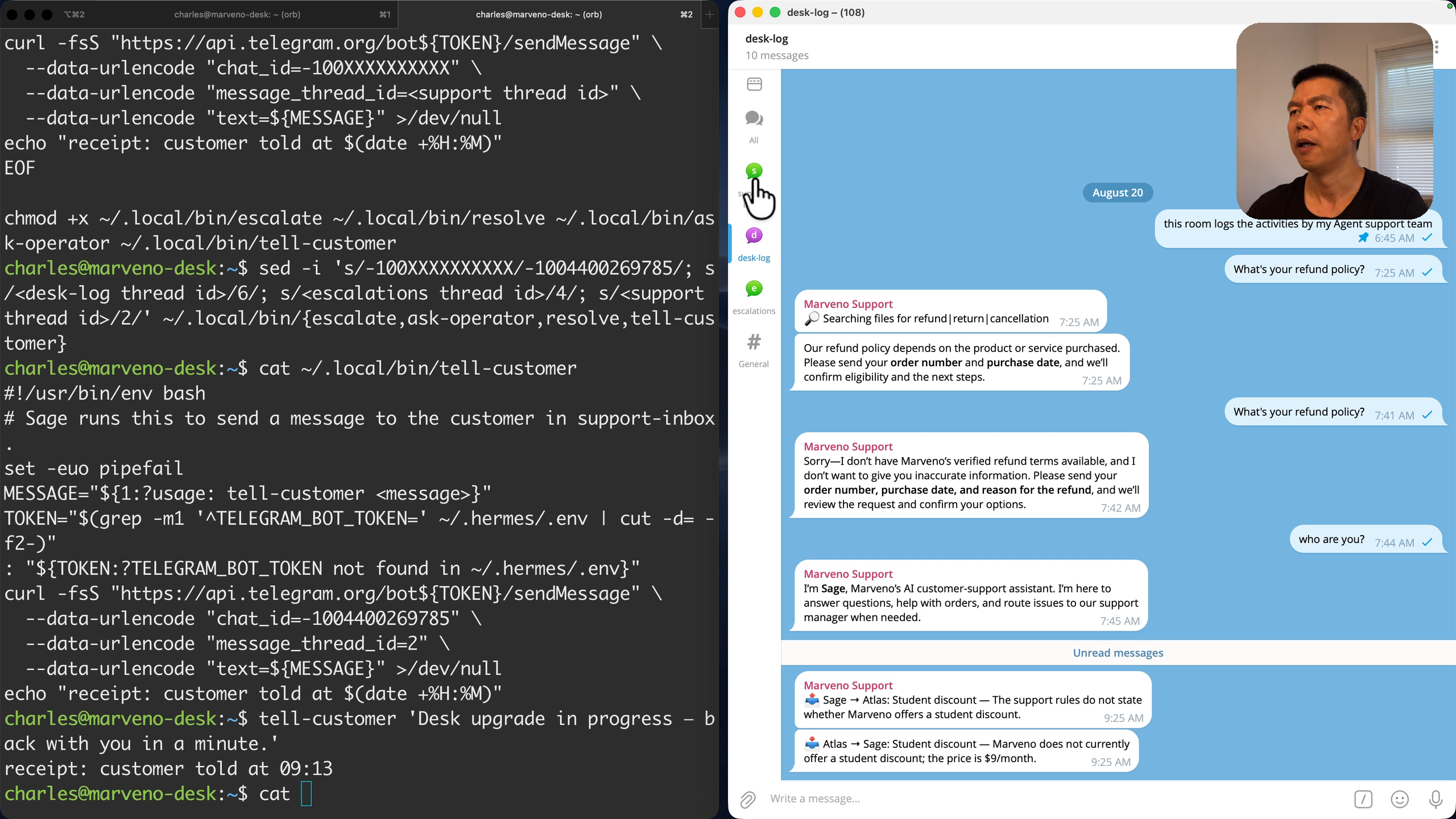
Proof by removal — the mouths don’t need the ears
A fair question is pending: those scripts post as the bot — is the gateway doing that? No, and the only way to show it is to remove the gateway and post anyway. Ctrl-C in the gateway tab, then:
tell-customer 'Desk upgrade in progress — back with you in a minute.'The receipt prints, and the message is in support-inbox — with the gateway dead. Posting needs the key, not the listening process: one token, one file, and any program on this machine that can read the file speaks as the bot. It is why the commands work, and it is a security fact about the file. Replies still need the ears, so bring them back:
hermes gateway run --replace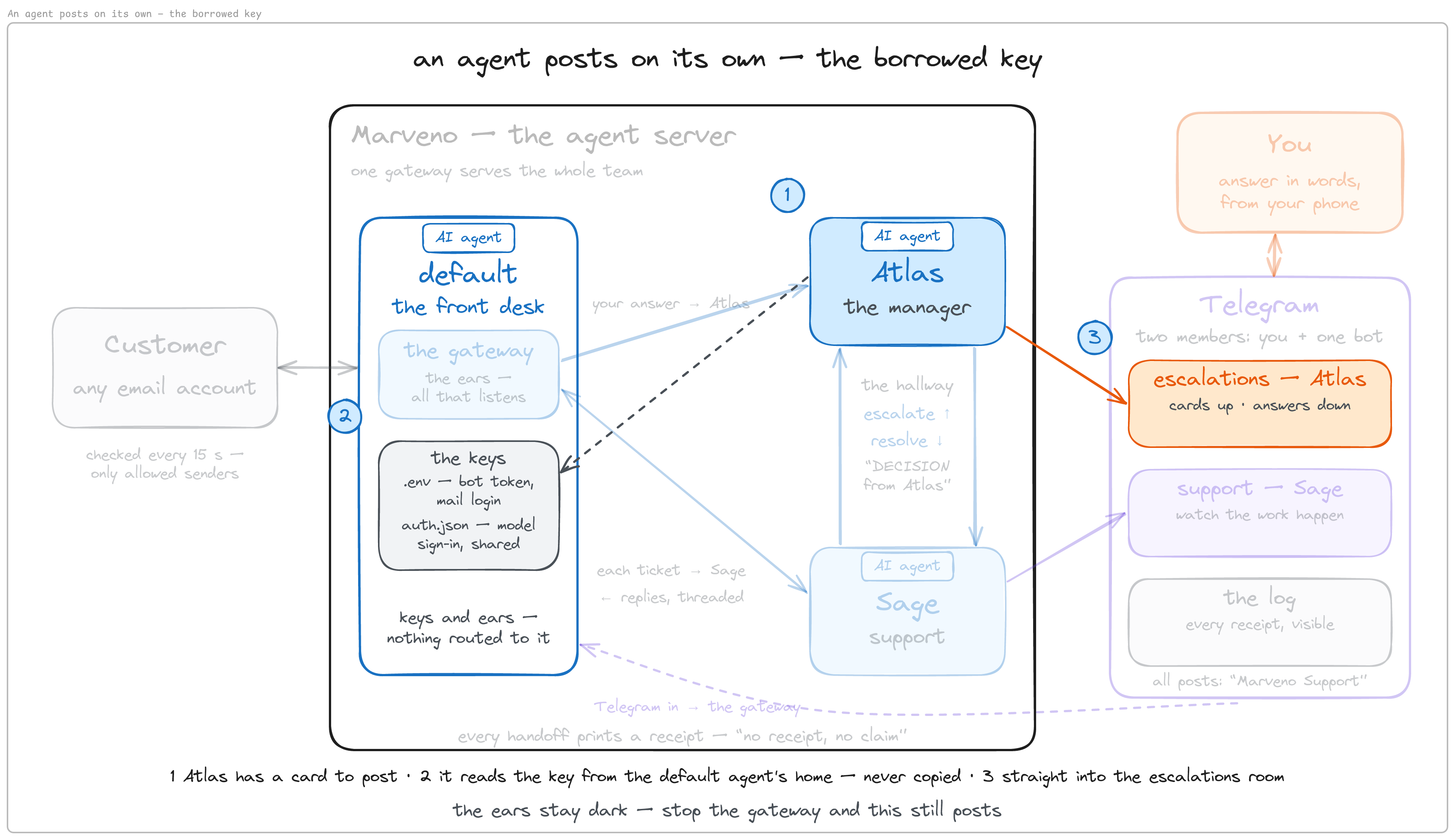
Borrowing the key is same-machine file access — nothing more. It isn’t a gateway feature, and it was never the only way agents could reach each other; it is the way this build chose because Telegram doesn’t carry the handoff unless you opt in.
The two questions you’re already asking
Why not have one agent delegate to a sub-agent? It isn’t impossible, but it is a different thing. Sub-agent delegation is the same mind borrowing a hand: a child task of the same agent, same identity, same authority. These are peer colleagues, each with its own level of authority. Look at what escalate actually starts — a session that Atlas owns, reading the rules file as Atlas, able to refuse; a delegated sub-task would still be Sage. A sub-task can’t refuse its parent; a manager can refuse a specialist.
Aren’t fixed commands too rigid for agents? The rigid part is the shell — like a communication protocol. The content inside still goes through the model: each agent thinks freely, and only the handoff is deterministic, because deterministic is auditable — and the self-approval loop above is the live proof that a free-form handoff needed the repair. A2A, an open protocol for agent-to-agent work, points the same way: it is built on structured, typed tasks with a defined lifecycle rather than free-form chat. The caveat: for a large, fluid swarm a fixed command set would not scale; you’d reach for an orchestrator or a typed protocol. This desk optimizes for a fixed-role team with auditability; section 11 is how it grows from there.
The hallway goes live — you play the customer
Customers reach this desk by email, and that door is still closed, so you play the customer from your own room — the first full run, with you as the customer. In support-inbox: Do you offer a student discount?
What you should see: in support-inbox, “I’ve passed this to my manager.” In desk-log, 📤 Sage → Atlas: Student discount — The support rules do not state whether Marveno offers a student discount, then 📥 Atlas → Sage: Student discount — Marveno does not currently offer a student discount; the price is $9/month. Then, back in support-inbox, that answer — delivered by Sage. The rules don’t cover discounts, so Sage doesn’t improvise: it escalates and says only the acknowledgement. Atlas decides alone, because the rules let it. The operator step — you — was skipped, and the skip is the lesson: this ticket never needed you.
cat ~/marveno/log.md # ESCALATED → RESOLVED → REPLIEDOne line per move, written by the commands, not by goodwill. This file is how you audit the desk without watching it.
The internal loop is complete: ticket in, authority consulted, answer out, receipts kept. But so far it all lives in Telegram, and customers email.
8. Email, both directions
The desk works, in your channel. Customers don’t start there. This section gives the desk a mailbox, both directions — in as tickets, out as threaded replies — and then the first ticket arrives on the customers’ channel, hitting a desk that already knows its rules and its chain of authority. Building internal-first was for exactly this moment.
Give the team its own mailbox, and a key to it
The team’s mailbox needs a dedicated account — never your personal one — and you need a second mailbox you control, to play the customer. Hermes’s email adapter signs in with a plain IMAP/SMTP login, so with Gmail that means an App Password: 2-Step Verification on first, then Google Account → Security → App Passwords. If Google tells you the setting isn’t available for your account, 2-Step Verification is off; an authenticator app is one of the second factors Google accepts for it. Google’s page also lists the cases where App Passwords stay unavailable — 2-Step Verification set up only for security keys, a work or school account, or Advanced Protection — one more reason for a dedicated account. The “App name” box is a label for you and nothing else. Google prints back sixteen characters. That is the key.
This is where this build stalled longest, for reasons unrelated to Hermes.
Teach the gateway to reach it — and who may write to it
The five variable names come from Hermes’s email page. They go in the same file that holds the bot token — the gateway’s keys, one file:
cat >> ~/.hermes/.env <<'EOF'
EMAIL_ADDRESS=<the desk's address>
EMAIL_IMAP_HOST=imap.gmail.com
EMAIL_SMTP_HOST=smtp.gmail.com
EMAIL_ALLOWED_USERS=<your customer mailbox's address>
EOF
vim ~/.hermes/.env           # add: EMAIL_PASSWORD=<the 16-character App Password>
grep -c '^EMAIL' ~/.hermes/.env     # want: 5
Address, password, the two Gmail servers — and the fifth line, which deserves a full stop. EMAIL_ALLOWED_USERS reads like optional hardening. It is three different settings depending on what you do with it.
Restrict while you build. A comma-separated list of the only senders the desk will answer. The right setting for every test: your customer account, and nobody else.
A desk that takes mail from anyone sets EMAIL_ALLOW_ALL_USERS=true instead. Opening the door is not automatically the goal: registered-users-only is a legitimate production shape — a members-only desk, a private beta, an internal helpdesk that should ignore everything from outside the company. Public storefront or customer portal is a product decision, and it goes both ways.
Deleting the line does not open the desk — it closes it. With neither variable set, the gateway denies every sender — the docs: unknown senders are ignored silently (Email). The reasoning is sound: a From: address nobody authenticated is trivially forged. The failure mode is the problem: the mailbox connects, the [Email] line prints, and mail arrives and evaporates at a log level nobody runs in. The safety is right and the silence is the bug.
Where the team’s own mail goes
The Telegram home address went in with the routes; email gets its own now — the same idea, a standing delivery address for anything that isn’t a reply:
vim ~/.hermes/config.yamlInside the existing platforms: block, level with telegram::
  email:
    home_channel:
      platform: email
      chat_id: <the desk's address>     # YOUR address, never a customer's
      name: support-mailbox
Indentation is load-bearing: email: sits inside platforms:. A wrong column is either loud (Config key not set: platforms) or a home channel that silently never resolves. One quirk to know: with this set, each gateway restart mails a short restart notice to the desk’s own address (Re: Hermes Agent). Harmless; nobody reads that inbox anyway, for a reason two paragraphs down.
Make the gateway hear mail
The key file is read at startup only. Add mail keys to a running gateway and nothing changes, and nothing says so — in this build’s testing that cost a full clean rebuild before it was caught. Ctrl-C in the gateway tab, then:
hermes gateway run --replace
hermes config get platforms     # want: BOTH home_channel blocks echoed back
What you should see: an [Email] line in the startup output. Even [Email] IMAP connection failed: [AUTHENTICATIONFAILED] is good news at this point — the adapter is live and talking to Gmail; the address or password is wrong.
On a foreground build, two commands are traps. hermes gateway restart doesn’t fail when there is no service — it stops your gateway, prints Starting gateway..., and becomes the new gateway in whatever shell you typed it in; type it in a throwaway shell and your desk dies with that shell. And journalctl --user -u hermes-gateway reports on a service you never installed: nothing, or stale [Email] lines from an older run. Under the installed service, those two are exactly right — hermes gateway restart, then journalctl --user -u hermes-gateway -n 40 | grep -i email.
The first real customer ticket
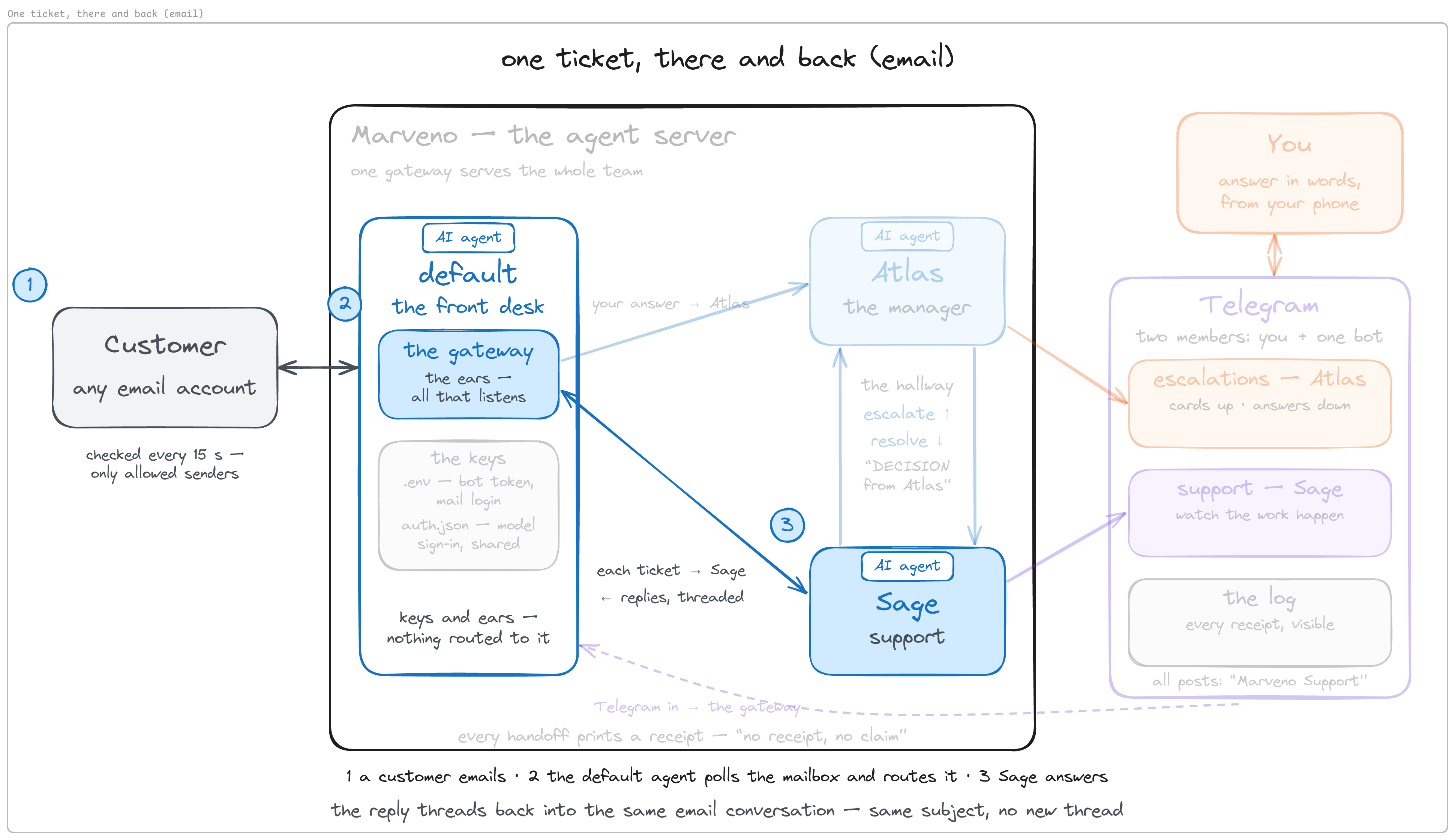
From the customer mailbox, email the desk. Subject shipping question, body Hi — when do orders ship?
The desk polls its mailbox every fifteen seconds by default, and the email route from section 5 has been sitting ready since then. What you should see: within about a minute, a reply lands in the customer’s inbox, threaded under the same subject — orders ship on Tuesdays; if a Tuesday is missed, you automatically receive a credit — answered from the rules. Nobody touched anything.
Notice where you read it: the customer’s inbox. Standing rule: never open the team’s own mailbox. Not to check, not to peek. The adapter finds work by asking the mailbox for unread messages; open a message yourself and the desk is never offered it. You blind the agent by looking at its inbox. It compounds: in this build’s testing, the adapter’s own fetch marked a message read, so a message it fetched and then refused at the sender gate sat there looking like something “the system already handled.” Everything you’d want to check lives outside that inbox — the customer’s inbox and ~/marveno/log.md — and between them they answer every question you’d have opened it to ask.
If nothing arrives, work down this list in order — it is sorted by what turned out to be true in this build’s testing, not by what felt likely: (1) spell-check the allowlist character by character against the account that is actually sending — @email.com for @gmail.com was the answer once; (2) check the line exists at all — missing is worse than wrong; (3) check the restart took; (4) check you’re not looking at a mailbox you opened yourself; (5) only now, Spam. Not a diagnostic: one glance at the network connections. The poll connects for a moment every fifteen seconds, so a single look predictably misses it and reads as a dead poll.
Why a decided ticket needs a way back into its thread
That first ticket worked because the gateway received the email — it replies inside the thread by itself. A ticket that went up to Atlas comes back down through resolve, which starts a fresh Sage session from the shell. That session never saw the email: no thread, no subject, nothing to reply to. Its only native way to email is a brand-new message with a fixed subject — a robot mail, unrelated to the question the customer asked. Telegram never had this problem, because tell-customer posts into a fixed room and a room is always there. Email is where the shape of the channel bites.
The fix: reply by the message sitting in the mailbox. Threading lives in the mailbox, not the session. That takes a command-line mail client, and Hermes’s own docs bundle a skill for one: himalaya, an open-source mail program with no screen, driven by commands. Not a second email setup — a second door, for decided tickets only.
curl -sSL https://raw.githubusercontent.com/pimalaya/himalaya/master/install.sh | PREFIX=~/.local sh
himalaya --version            # want: a v2.x line (v2.1.0 for this build)
curl … | sh runs a script you never saw, which deserves a pause on a machine you care about; PREFIX=~/.local keeps it in your home directory, no sudo. The careful version of the habit is to download a pinned release to a file, read it, and run that file.
Let himalaya’s own wizard write the config — it discovers Gmail’s servers from the address and tests the login live before it writes anything:
himalayaAnswer in order: create a configuration → Y · the desk’s address → it discovers Gmail’s servers · IMAP + SMTP imap.gmail.com · SASL PLAIN · login (pre-filled) · password strategy → Store raw in the configuration · paste the App Password → it tests the IMAP login live (a wrong password aborts with Invalid credentials and writes nothing) · the same for SMTP → the file is written. No keyring on this box, so plain text it is — fine for a dedicated test account, wrong for anything real; himalaya’s …passwd.command settings take a shell command that prints the secret from a third-party keyring CLI instead (native keyring support was removed in v2). It is the same App Password the gateway holds, so two places need rotating later. The config file never goes on a shared screen.
Two things about what the wizard writes:
himalaya account list         # the wizard names the account after the provider: gmail
vim ~/.config/himalaya/config.toml      # rename the header [accounts.gmail] → [accounts.support]
himalaya account check --account support    # want: imap: OK / smtp: OK
himalaya envelope list --account support    # the ids in the first column are what a reply uses
himalaya calls each message’s summary row an envelope; the id in its first column is what a reply points at. Every command in this build calls the account support, and the wizard never asks for a name. On himalaya v2.1.0, message reply --send only sends; filing a copy to Sent is opt-in (--save), and Gmail keeps its own copy of SMTP-sent mail, so no Sent-folder alias is needed.
One command shape to respect, found in this build on v2.1.0: replying needs both --send and --from. Without them, himalaya message reply composes a draft, sends nothing, and exits claiming success. For a human that is a mild surprise; for an agent it is a dangerous shape — it ran, it succeeded, it did nothing, and the only thing downstream is a model deciding whether to tell a customer their problem is solved.
The email door for decided tickets — and teaching resolve to pick the door
cat > ~/.local/bin/tell-customer-email <<'EOF'
#!/usr/bin/env bash
# Sage runs this to reply to an email ticket, inside the customer's own thread.
# Email sibling of tell-customer. Needs the email adapter and himalaya configured.
set -euo pipefail
ID="${1:?usage: tell-customer-email <envelope-id> <message>}"
MESSAGE="${2:?usage: tell-customer-email <envelope-id> <message>}"
FROM="$(grep -m1 '^EMAIL_ADDRESS=' ~/.hermes/.env | cut -d= -f2-)"
: "${FROM:?EMAIL_ADDRESS not found in ~/.hermes/.env — add EMAIL_ADDRESS to your .env}"
himalaya message reply "${ID}" --account support --send --from "${FROM}" --body "${MESSAGE}" >/dev/null
echo "receipt: customer emailed in-thread (reply to envelope ${ID}) at $(date +%H:%M)"
EOF
chmod +x ~/.local/bin/tell-customer-email
The email sibling of tell-customer — think of the pair as tell-customer-Telegram and tell-customer-email; the first kept the short name because it came first. Same job, different door: into the customer’s own thread, by envelope id. Who runs it: the same fresh Sage that resolve wakes, and nobody else. When: either this or tell-customer, never both — one ticket, one door. A rules-answered email ticket needs neither; the routed session threads its own reply natively. This command exists only for the after-decision leg.
What changes with the channel is only the customer-facing door. What never changes: the office log gets its lines, and the 📤/📥 receipts still land in desk-log on Telegram, because those posts are for you, not the customer. It reads the desk’s address out of the key file rather than carrying a third copy, and it ends the only way commands here are allowed to end.
Now teach resolve to look before it speaks. One region of its prompt changes:
vim ~/.local/bin/resolveFind and send it with: tell-customer '<your reply>'. Single quotes. and replace it with:
and deliver it on the channel the ticket arrived on. First run: himalaya envelope list --account support — if the ticket is there as an email from the customer, send your reply with: tell-customer-email <envelope-id> '<your reply>' — otherwise send it with: tell-customer '<your reply>'. Single quotes either way.grep -c himalaya ~/.local/bin/resolve # want: 1(The finished resolve is in the repo as commands/resolve; the section-7 version is commands/resolve.telegram-only.)
Watch what adding an entire second delivery channel cost this build: one edit, inside one command’s prompt. No identity file changed, no skill changed, nothing re-taught to either agent. The routing test is cheap because it answers by absence — a Telegram ticket simply isn’t in the mailbox, so an empty envelope list is the decision. That is the split the whole build runs on — the model judges, a command acts — paying out: the model was already deciding what to say; letting it also decide where cost one sentence, and the thing that actually sends is still a command that prints a receipt.
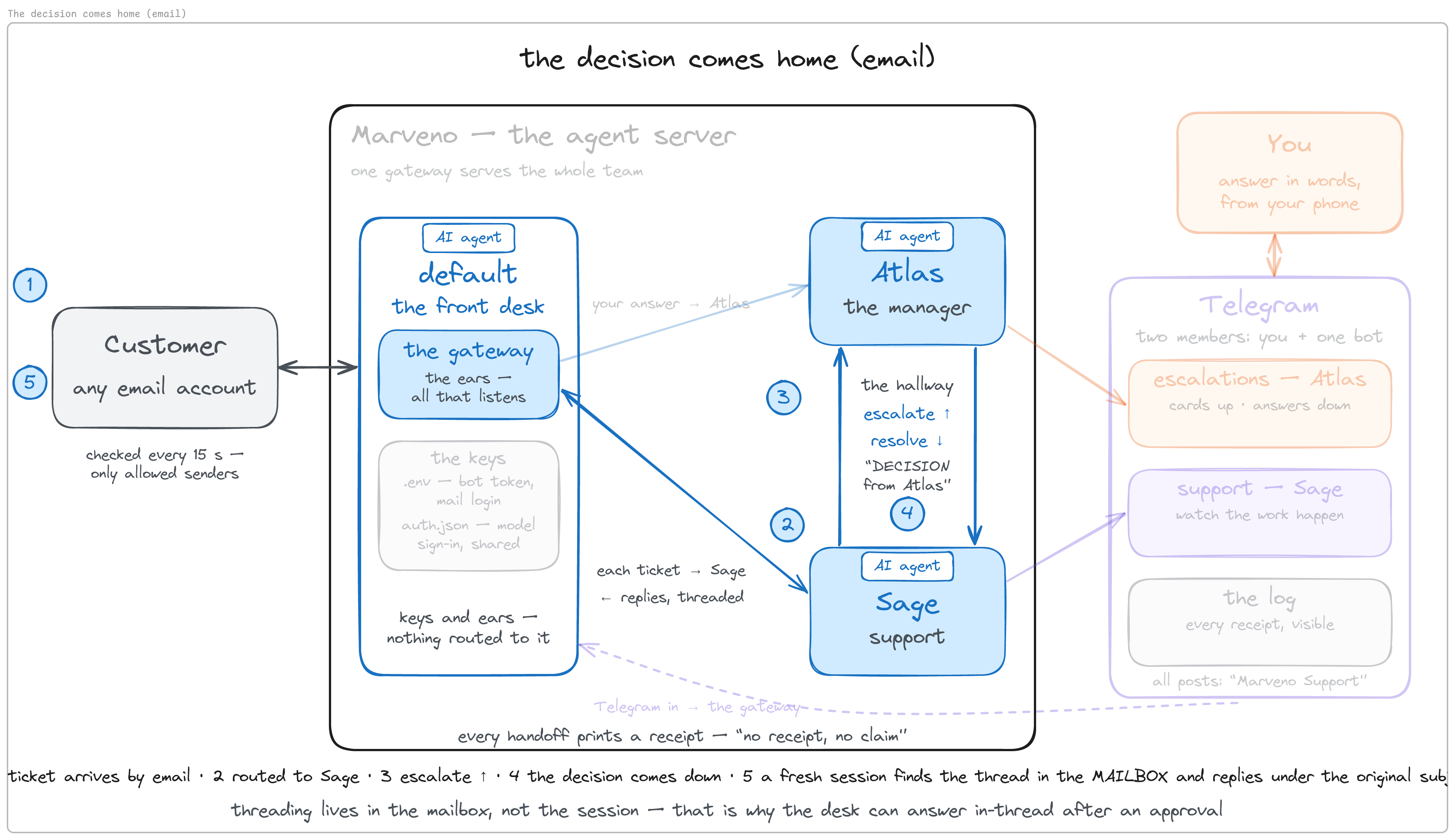
The desk is now whole: rules, authority, hallway, and both doors. Every piece was tested the moment it was built, and the one proof still owed — an approved decision landing back inside a customer’s thread — is exactly what the next section shows.
9. Run the desk: three tickets, three tiers
Nothing new gets built here except the routine at the end. The test script was written in section 6: the three “who decides what” tiers are the three tickets, in order. All three arrive by email — the customers’ door — while you watch the machinery in Telegram. Send each from the customer mailbox, one at a time, and watch a different amount of machinery switch on. Before the first one, check that every door works:
himalaya account check --account support     # want: imap: OK / smtp: OK
himalaya envelope list --account support     # the shipping mail from section 8, with its id
Ticket one — the rules answer it. “How do I export my roast history?” The facts section covers it, so Sage decides alone. What you should see: a threaded reply in the customer’s inbox — in the Marveno mobile app, go to Settings → Export; this creates a CSV — straight from the rules; desk-log quiet; escalations silent, because nothing there was yours to decide.
tail -2 ~/marveno/log.md # one REPLIED lineNothing dramatic happens, which is the point. This is the biggest band, and if it doesn’t work, nothing above it matters.
Ticket two — the manager decides. “We’re a three-person roastery — is there a team plan where we can all log to one account? Even a rough sense of when would help us plan.” The facts don’t cover team plans, and “when” is a date. Sage doesn’t improvise either one. What you should see: in the customer’s inbox, first the acknowledgement — “I’ve passed this to my manager” — threaded; in desk-log, 📤 Sage → Atlas, then 📥 Atlas → Sage with the decision — do not promise or speculate; say we do not publish dates or windows for unreleased features, and invite them to share their team needs as feedback; then, back in the customer’s thread, that answer in Sage’s words. “We do not publish dates” held, without you. The customer saw two clean messages and never knew there were two agents.
tail -4 ~/marveno/log.md # ESCALATED → RESOLVED → REPLIEDThis is also the proof section 8 deferred: the decision came down to a fresh session, the session found the thread in the mailbox, and the reply landed under the original subject. The failure would be unmistakable — a separate new message titled Hermes Agent — and if you see that, the old resolve is still in place.
Ticket three — nobody decides alone. “I sold my roaster back in January and stopped roasting, but I completely forgot to cancel — just noticed I’ve been charged $9 every month since. It’s my mistake, but any chance you can refund me all these months? About $63, I think.” This asks for money past both lines in the rules — over the threshold, outside the window. What you should see: the acknowledgement in the thread; 📤 Sage → Atlas in desk-log; and then, in escalations, a 🔺 card. This is the one the build produced:
🔺 Operator decision needed — Forgot to cancel

Customer requests a $63 refund covering seven months after forgetting
to cancel. This exceeds the 30-day refund rule and is over the $50
threshold, so nobody decides alone. Recommendation: refund the most
recent $9 charge under the standard 30-day rule and decide whether to
make an exception for the remaining $54. Options: refund $63 in full,
refund only the latest $9, or deny charges older than 30 days.

Reply in this topic with your decision.
Read what the card carries: the situation, the rule it hit, and a recommendation with options. That shape is doing real work — you’re never asked the open question “what do you want to do about this?”; you’re asked to approve, amend, or refuse something specific.
Reply in the escalations room, in words — here, “Let’s make it a one-time exception and refund in full.” Your words go back through the same route that brought the card. What you should see: in desk-log, 📥 Atlas → Sage: make a one-time exception and refund the full $63; then the answer in the customer’s thread — we’re making a one-time exception and have issued a full refund… please allow a few business days — a decision a person actually made, inside their own conversation.
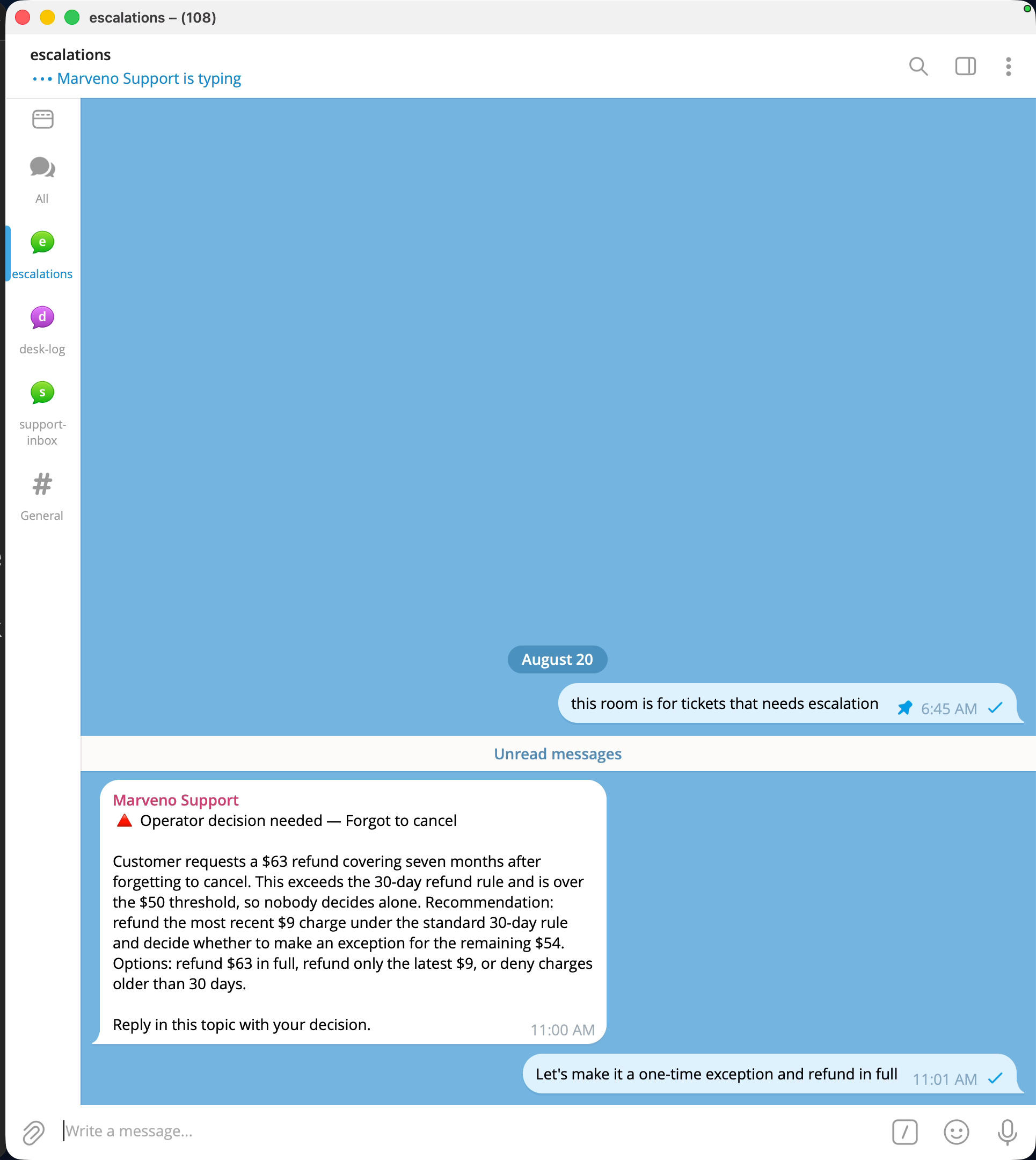
tail -5 ~/marveno/log.md # PENDING OPERATOR → RESOLVED → REPLIEDWhy words and not buttons? Hermes has a built-in clarify tool that renders real tappable buttons — when the asking agent is itself running on a chat platform. Atlas isn’t; it is started by a script, with no platform to render into. The first time a ticket crossed the threshold in this build, clarify waited out a 120-second timeout nobody could answer, then told Atlas to use its best judgement and proceed. Atlas refused: “No operator response was received, so I did not authorize or resolve the refund.” The tool itself invited the manager to decide alone, and the rules held — against the platform’s own nudge to proceed. Nothing reached the customer that time, which was a plumbing defect ask-operator then fixed.
One house rule from running it: never leave a card hanging. An unanswered card is a customer waiting behind “I’ve passed this to my manager.”
The routine — work that nothing sends
So far the desk has only reacted: each action started with someone’s message. A real office also has routines — the shift summary, the weekly report — work that happens on a clock. Hermes calls these cron jobs, the old server word for work on a schedule, and on this desk they run at the front desk, because the front desk holds the delivery keys:
hermes cron create "every 3m" "SCHEDULED ROUTINE, not a customer ticket — do not escalate. Read ~/marveno/log.md and post a short shift summary: how many tickets you have handled, and name any that were escalated or declined. Four lines maximum. If the log has no rows yet, reply exactly: NO TICKETS YET." \
  --name "support-shift-summary" --deliver "telegram:-100XXXXXXXXXX:<desk-log thread id>" --workdir ~/marveno
hermes cron list        # want: Created job: <id> · Schedule: every 3m · Next run: about 3 minutes out · then the job listed [active], Repeat ∞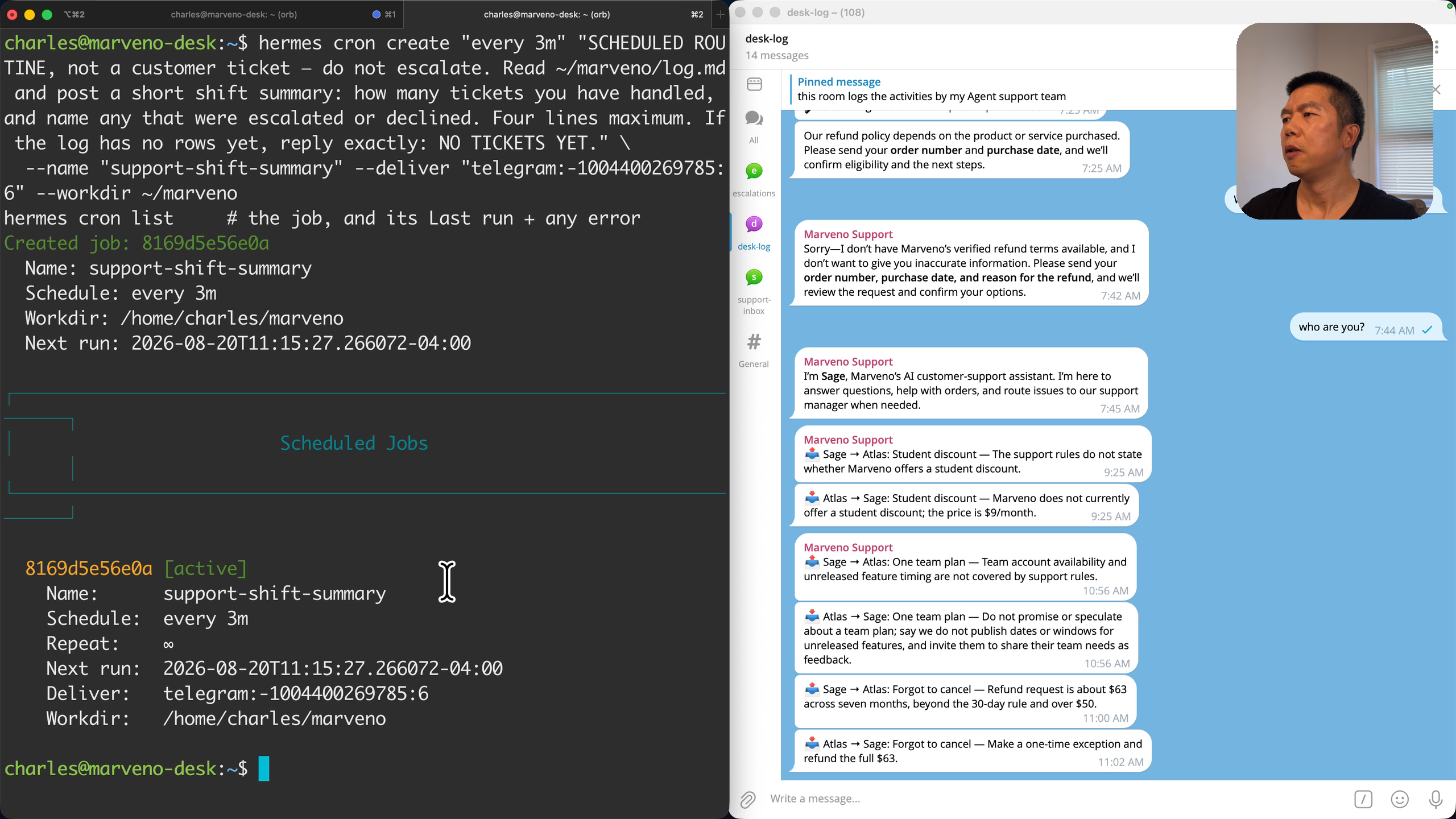
Read the create line. When: every 3m — three minutes here only so you can watch it fire; in real use an hour or daily is more like it. The word every matters: a plain 3m runs the job once. What: the instruction, and its first words are a label — “scheduled routine, not a customer ticket.” An agent’s standing rules can capture a routine as a ticket: in this build’s testing an unlabeled summary request got escalated to the manager — “the support rules do not cover operational log summaries.” Same typed-label principle as DECISION from Atlas: a routine says what it is. Where: reports go to desk-log, the watch room, not the customer counter; the delivery address is the same shape everywhere in Hermes — platform, chat, room, three colons deep at most. The folder: --workdir must exist, which is why section 6 created it; cron create refuses a missing one and still exits with status 0.
Who runs it is the part that matters on this version. Under Hermes’s default — one gateway per agent — you’d create the routine as Sage. Under this one-token design you can’t: on v0.20.4 the scheduler validates delivery against the owning profile’s credentials, not the connected gateway’s, so a Sage-owned job blocks on every tick (blocked_config … no gateway credentials) and the second failure is marked silent — no summary, no error, nowhere. Front-desk ownership sidesteps it entirely, and it is the right owner anyway: the front desk is the one that holds the keys.
Wait for it, or don’t:
hermes cron runs                         # durable run history: proof it FIRED
hermes cron run support-shift-summary    # want: Ran now: succeeded. — a summary in desk-log within seconds
What you should see in desk-log: Support shift summary — handled five tickets so far; escalated: student discount, one team plan, forgot to cancel; declined: none.
The tick lands up to a minute after Next run:, so a check at the exact timestamp still shows the previous run. Run history proves a routine fired; the summary in desk-log proves it delivered. Those are two different receipts — the scheduler logs a job as run even when the send afterwards is rejected — and the second is the one you’d notice missing. When you no longer want it: hermes cron remove support-shift-summary.
Read the whole day
cat ~/marveno/log.mdThe student-discount run from section 7, the first customer from section 8, the three tiers, the PENDING → RESOLVED arc. One file tells the whole day — who did what, which tickets went up, and which ones needed you — so the team works while you don’t watch, and you can always check that it did.
10. What you have now
You started with a bare server and ended with a customer’s refund request travelling from their inbox, up through two agents, to your phone, and back into their email thread as a decision you made — with a log of every hand it passed through. That one ticket proves the whole build: the rules page decided who could act, the agents did the routine work and escalated the rest, the gateway and the commands carried it there and back, and the human was in the loop exactly where the rules put one.
The support desk is the example. The pattern is an agent team: separate agents with separate authority, one page that says who decides what, a log of who decided, and escalation to a person for the decisions that are a person’s. That shape is not specific to support; it is what any routine work looks like once you trust agents with the routine and keep the judgment.
11. Where to take it from here
The best next step is to run it on something real for a week before you expand it. Point it at a real inbox with a small allowlist, write the rules the way your business actually decides, and read the log each evening. The log shows you where the rules drew the line well, where they need a line they don’t have, and which decisions you were glad came to you. Each of those is one edit to rules.md. Once the routine is steady, here are three directions you can take towards production readiness.
Scalability: make the workflow explicit. Today the support flow runs on conventions the team shares — what counts as a ticket, how a decision is told apart from a question, where each message belongs. That serves one conversation at a time. As volume grows, make the flow itself explicit: a ticket as a record that carries its identity, type, state, and channel from intake to reply, so the rules page stays the policy and the skills describe judgment rather than plumbing.
Reliability: let nothing end in silence. The commands leave receipts and the log shows every hand a ticket passed through. Where something can still fail quietly — a review that times out, a sender the gateway turns away — have it reach you the way an escalation does. Silence should mean nothing happened, never that something failed unseen.
Security: protect what you now expose. The desk runs on a few credentials in plain text on the server, which is fine while you are building and watching. Before real customers, give it what anything reachable from the internet gets: secrets stored and rotated, a clear answer to who and what can reach the machine, and a rule for what an agent may remember from one customer to the next. Two starting points: the hardening section of the Hermes-on-Oracle walkthrough for the server, and The Magic Is Real. So Are the Risks for what is different about securing agents.
From there the team grows by attaching things behind the gate it already has — connect a payment action, and an approved refund becomes a transaction under the same authority structure. The control surface stays the same throughout: one rules file, one line at a time, and a log you read.
Appendix: Troubleshooting
If something doesn’t behave the way a section says it should, here is where to look first. The gateway log, ~/.hermes/logs/gateway.log, is behind most of these.
| Symptom | Where to look first |
|---|---|
hermes: command not found right after the install |
Reload the shell: source ~/.bashrc. |
| The installer sits on a browser download for minutes | On v0.20.4 this was the browser download timing out after ten minutes and then continuing; nothing in this build uses it. Killing the stuck npx playwright process moved it along. |
| First conversation fails with HTTP 400 | The shipped default model may belong to a provider you haven’t signed into — hermes setup model shows which one is set. |
No Codex credentials stored |
The provider is named but not signed in. hermes auth add openai-codex, in a real interactive terminal. |
| A yellow “Deprecated .env settings” note above every CLI reply | On this version it’s a false alarm and doesn’t appear through the gateway. Glance at the keys it names, then move on. |
| Bot sits in the group and ignores everything | Start with grep TELEGRAM_GROUP_ALLOWED_CHATS ~/.hermes/.env — fail-closed is the default, so a missing or wrong group id looks exactly like this. |
| Gateway starts but there’s no Telegram at all | Check whether the token is in ~/.hermes/.env, and look for the startup line reporting fewer configured platforms than you expected. |
The gateway “hangs” at Connecting to Telegram (attempt 1/8)… |
Success is logged to ~/.hermes/logs/gateway.log, not the console — grep -i "telegram connected" there first. |
| An agent answers as itself, with no company knowledge, in some room | A room with no route. Check the routes cover that room (or add the catch-all route) and restart. |
Config key not set: platforms |
Check whether the platforms: block ended up indented under gateway: — it has to be a top-level key. |
| Appending the catch-all route breaks the YAML | Check whether profile_routes is still the last thing in the file; on this build, putting platforms: before gateway: fixed it. |
A config or .env change does nothing |
The gateway reads both at startup only — try Ctrl-C, hermes gateway run --replace before looking further. |
hermes gateway restart swallowed the terminal |
On a foreground build it becomes the new gateway in that shell. Ctrl-C and re-run in the gateway’s own tab; restart is for the installed service. |
Sage searches for a skill and the log says Skill 'ticket-flow' not found |
The identity file names the skill before section 7 creates it — fine until then. |
| The skill never seems to fire | Two checks: the trigger line is in SOUL.md (and you sent /new after adding it), and the description survived Hermes’s parser — run the check below. |
| The manager approves its own decisions / the same ticket escalates twice | The loop. Check that resolve prefixes DECISION from Atlas, Sage’s SOUL carries the classifier line, and escalate still has its RESOLVED guard. |
| A dollar amount arrives mangled | An agent quoted a command in double quotes. The skills teach single quotes; check the log line to see what crossed. |
| An agent ignores an edit you just made to its SOUL | Live sessions freeze their SOUL at creation. /new in that room. Skills and rules.md re-read every turn. |
| The agent escalates every single ticket | cat ~/marveno/rules.md — an empty “What we can say” section leaves nothing Sage may decide. Even “thanks” escalates unless the last paragraph is there. |
| Email connects, no ticket ever arrives | The allowlist, character by character: grep '^EMAIL_ALLOW' ~/.hermes/.env. Missing is worse than wrong. Then the restart, then whether you opened the ticket yourself. Spam last. |
[Email] IMAP connection failed: [AUTHENTICATIONFAILED] |
The adapter reached the server, so start with the address and the App Password. |
The desk’s own address receives Re: Hermes Agent on every restart |
The email home channel’s restart notice. Nobody opens that inbox. |
himalaya account check --account support says no such account |
The wizard names it after the provider — look in ~/.config/himalaya/config.toml for [accounts.gmail] where [accounts.support] is expected. |
himalaya message reply exits fine and sends nothing |
It needs both --send and --from. Without them it writes a draft and stops. |
The approved decision arrives as a new email titled Hermes Agent |
resolve is the Telegram-only version. grep -c himalaya ~/.local/bin/resolve should print 1. |
| A reply threads into the wrong ticket | Check for two tickets in flight from one address — this build handles one at a time per address. |
The routine never posts; cron list shows blocked_config |
The job is owned by an agent profile. Delete it and create it without -p, at the front desk. |
cron create said the gateway isn’t running while it is |
Happens under a foreground gateway for agent-owned jobs — hermes cron runs is the better check. |
| The routine says it ran but nothing posted | Firing isn’t delivering — read to the end of hermes cron list’s record for a ⚠ Delivery failed: line. |
The skill-description check. Why it exists: Hermes caps the description it puts in the model’s system prompt at 60 characters — SKILL_PROMPT_DESC_LIMIT = 60 in skill_utils.py — and cuts anything longer to 57 characters plus .... When an agent creates a skill through Hermes’s own skill_manage tool, Hermes warns about this (it returns a system_prompt_preview); when you write SKILL.md by hand, as this build does, nothing warns, and hermes skills list prints no description at all. Counting characters in the file is not reliable either — a quoted or wrapped description counts differently from what the parser keeps. So this build wrote a short check that asks Hermes’s own code what the model will get:
~/.hermes/hermes-agent/venv/bin/python - ~/.hermes/profiles/sage/skills/ticket-flow/SKILL.md <<'PY'
import sys
from agent.skill_utils import parse_frontmatter, extract_skill_description
fm, _ = parse_frontmatter(open(sys.argv[1]).read())
raw = str(fm.get("description", "") or "")
shipped = extract_skill_description(fm)
if not shipped:      print("FAIL: the model receives NOTHING - no description in the frontmatter")
elif shipped != raw: print(f"FAIL: {len(raw)} chars - the model only receives: {shipped!r}")
else:                print(f"OK: {len(raw)} chars - the model receives: {shipped!r}")
PY
Line by line: the first line runs the script with the Python inside Hermes’s own install (~/.hermes/hermes-agent/venv/bin/python), which is what makes the import on the next line work, and passes the path of the SKILL.md you want checked. parse_frontmatter is the function Hermes uses to read the --- block at the top of every SKILL.md; extract_skill_description is the function it calls when it builds the skill list for the system prompt — the one that applies the 60-character cut (both live in the same skill_utils.py). The rest compares the description as you wrote it with the description the model will receive and prints one line: OK: with the whole text quoted back, or FAIL: with the cut version. Run it once per skill (change the path for Atlas’s). A SKILL.md with no frontmatter at all still lists as enabled while the model receives an empty string — that is the first FAIL case.
Since v2026.8.19 Hermes also ships a skill linter (skill_linter.py) whose description-length warning says the same thing; at the time of writing no hermes command runs it, so the check above is the direct way.
Sources
- Hermes Agent repository (MIT-licensed)
- Hermes Agent — Installation
- Hermes Agent — Configuring Models
- Hermes Agent — Profiles: Running Multiple Agents
- Hermes Agent — Messaging Gateway
- Hermes Agent — Telegram
- Hermes Agent — Running Many Gateways at Once
- Hermes Agent — Email setup
- Hermes Agent — Personality & SOUL.md
- Hermes Agent — Skills System
- Hermes Agent — Bundled skills: Email / himalaya
- Hermes Agent — Scheduled Tasks (Cron)
- OpenClaw documentation
- Telegram — Bot FAQ: why doesn’t my bot see messages from other bots?
- Telegram — Bot Features: creating a new bot
- Telegram — Bot Features: privacy mode
- Telegram — Forums (topic ids)
- himalaya
- A2A protocol — life of a task
- Google — turn on 2-Step Verification
- Google — sign in with app passwords
- How to Run Hermes Agent on Oracle Cloud for Free
- Companion repo — agenteer/hermes-agent-ai-customer-support-team