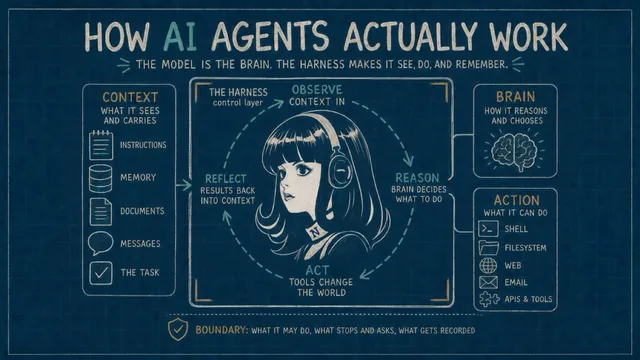
You ask an AI to prepare a research brief for an important decision. It does most of the work. The remaining question is whether the result is trustworthy: Does each factual claim have a real source? Are the required perspectives covered? Does the conclusion follow from the evidence?
To keep the work moving without checking every pass yourself, the process needs a way to judge the result. Sometimes the check is deterministic: a required section is present or it is not. Sometimes a separate AI evaluates the result against stated criteria. When the answer depends on judgment, the work comes back to a person.
The result of the check determines what happens next: continue, stop, try again with the failure attached, or hand the job back. Repeating the same request with the same information is not enough; another pass needs feedback it can act on.
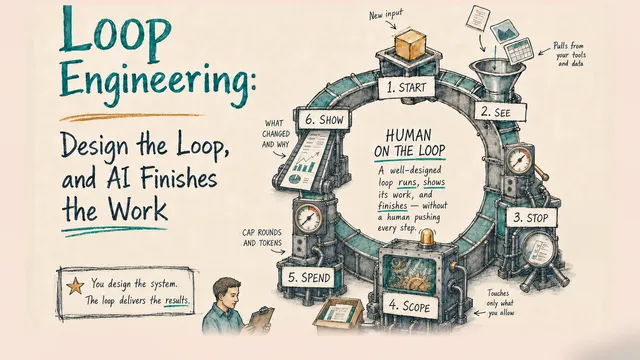
When work repeats this way — act, check the result, and use that result to decide the next step — you have a loop. Loop engineering is the practice of designing it: what starts the work, what information it can use, how it decides to stop, what it may touch, what it may spend, and what it must show you.
Where loop engineering came from
The phrase came together on the coding-agent frontier over about a week this past June. On June 2, Boris Cherny — who built Claude Code, Anthropic’s coding agent — told an audience he doesn’t prompt Claude anymore: “My job is to write loops.” Five days later, Peter Steinberger — who had closed 2025 declaring he could “ship code now at a speed that seems unreal” — put it bluntly: stop prompting your coding agents, start designing loops that prompt them. The next day, Addy Osmani worked the practice out in detail in an essay titled “Loop Engineering,” and Anthropic later published its own guide to designing loops.
The idea underneath the buzzword is much older. I studied control engineering decades ago, and the words were already old then — open loop, closed loop, feedback, overshoot. A thermostat runs a loop: read the temperature, compare it to the target, act, wait, read again. The invoice reminder that goes out every few days until the payment lands is a loop too. What changed is the thing inside the loop. A thermostat knows one number; an AI in the same seat can read a hundred messy messages, weigh which ones matter, act, and notice when one is delicate enough to hand back to you.
That’s also why the discipline travels beyond the code it was named in. Coding agents got there first because code hands back unusually honest feedback — a test passes or it fails, a build breaks or it doesn’t — but the same shape holds for any work that leaves something checkable behind: the books tie out or they don’t, every claim in a brief has a source or it doesn’t. Loop engineering is loop discipline arriving in AI work — a session that used to end wherever the model stopped, with you as the only check, can now run closed.
Three questions design a loop
In my Ralph Wiggum loop piece I read every loop through two dimensions: who curates the context the agent sees, and who decides when an iteration ends. Loop engineering is what happens when the loop starts waking up without you — which puts a third question in front of those two. Together they are the design half of the framework this piece runs on.
Start — what starts it? Three kinds of things do: a person, a clock, or a system — a new support ticket, an email landing in a monitored inbox, one service pinging another (a webhook). Look underneath any product’s trigger menu and it resolves to one of those; a clock tick is just an event that arrives on schedule, and even your own prompt is an event.
See — what does it see? An agent acts on exactly what enters its context: the files, the records, the report you point it at — and each pass around the loop, someone decides what carries forward. That someone is either you, curating fresh input every round, or the agent, dragging its accumulated history along. This is the context-control dimension from the Ralph piece, and it matters more once nobody is watching: a loop that sees the wrong slice of the world will confidently work on the wrong problem.
Stop — what stops it? The AI doing the work, a separate evaluator, a script, or you. “Stop” is really four moves — keep going, stop, retry, or hand it back to a human — and every one of them is a response to a measurement: did the lines reconcile, or not? Did the page get indexed, or not? That measurement is the feedback — in AI terms, your eval — and I’ll call it the done-check. A loop with a weak, delayed, or missing done-check is a machine repeating an action with no reliable sense of whether it’s helping. Most of what goes wrong in a loop goes wrong here.
Start and Stop are also where products differ. Claude Code and Codex, the agent tools from Anthropic and OpenAI, ship named features for both, but they do not put the same thing at the exit of the loop.
Three more make it safe to leave running
Start, See, Stop tell you whether you have a loop. Whether you can walk away from it is three more questions — the leash.
Scope — what’s in scope? What the loop may touch, and what it must never do on its own. A reconciliation loop may match lines and write an exceptions list; it may not move money. A support loop may draft replies; it may not send them. Scope is where the fear under all of this — an AI acting unattended — gets answered concretely, boundary by boundary, instead of with reassurance.
Spend — what can it spend? Loops burn tokens — the units AI usage is metered in — until they stop, and a thin done-check burns the most, because nothing tells the loop its effort isn’t landing. Give a loop a budget the way you’d give a new hire one: a cap on rounds, a less expensive AI for the mechanical passes and a more capable one only for the judgment calls, and a frequency no higher than the work actually changes.
Show — what does it show? This is See’s mirror: See is what the loop takes in, Show is the evidence that comes back out to you. A loop you’re not watching has to show its work, in both tenses: while it runs — progress you can glance at, evidence surfaced as it goes — and after it stops, in the record it saves: what it did, what it fixed, what it couldn’t and why. And word of it has to land where you already look — pushed into your inbox or your chat, not parked somewhere you’d have to remember to check. This is the question that catches the failure I’d worry about most — quieter than any runaway robot: the loop that decides it’s done, exits clean, and hands back something confidently wrong. The books “reconcile” because it forced a line; the brief is “sourced” because it made a citation up. A loop like that was never one you could safely trust — it behaves like a prompt wearing an autonomy costume, and the tell is that nothing inside it ever had to show real evidence to anyone.
One design makes the pair of Stop and Show concrete. The job: turn a stack of sources and a question into a decision brief. You can’t loop until “the brief is good” — quality is a judgment no script can certify — but you can loop until every claim in the brief resolves to a real line in a cited source, because a script can check that. So the loop keeps a ledger tying every claim to its source, and a validator script — not the AI worker’s opinion — has to pass before “done” can be recorded. The finished run hands back a receipt reading Status: PASS — and a second check that deliberately falsifies the status confirms the loop can’t lie its way to done. That’s the maker/checker split Osmani draws, pushed onto the stop condition itself. For consequential work, use a checker separate from the AI doing the work whenever you can — and even then, “done” is a claim, not proof.
Filling in the card: the indexing loop
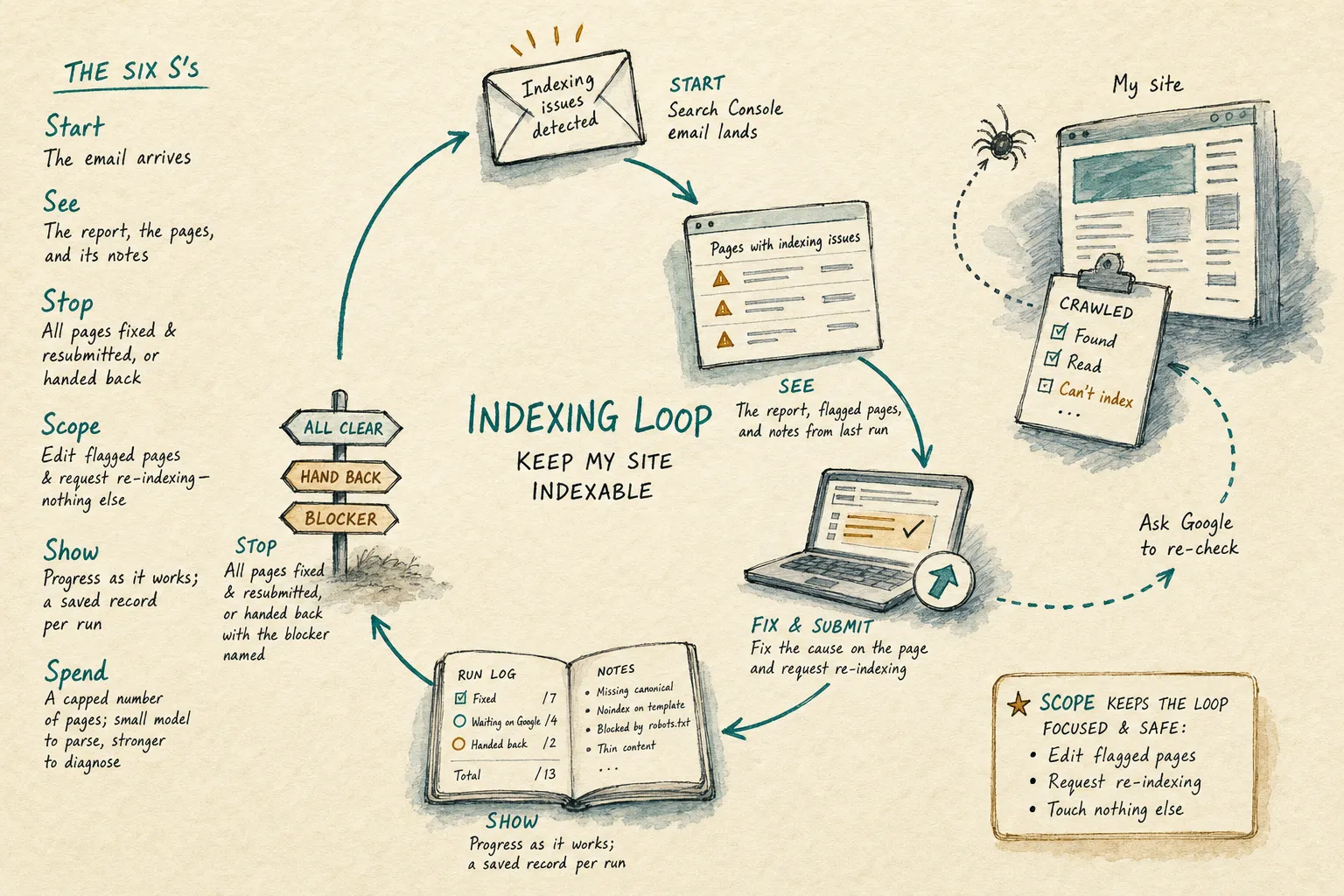
Here’s a job every site owner will recognize. Google Search Console periodically emails you that some pages on your site have indexing problems — crawled but not indexed, or something stopping them from showing up in search. Every site accumulates a few of these; the email is part of running one. And the routine is the same every time: open the report, find the affected pages, work out the cause, make the intended local change, check it, ask Google to re-check, wait for the next email. You do the judging; the steps in between barely need you. That’s the shape this whole piece is about — a job where you’re the loop. So here it is, held against all six questions:
| The six S’s | The indexing loop |
|---|---|
| Start — what starts it? | The Search Console email landing — a system event, not a schedule |
| See — what does it see? | The report, the flagged pages, and its own notes from the last run |
| Stop — what stops it? | This run ends when every flagged page passes the named local checks and is resubmitted, or is handed back with the blocker named; a later Search Console result can reopen the loop |
| Scope — what’s in scope? | Edit the flagged pages and request re-indexing — touch nothing else |
| Spend — what can it spend? | A capped number of pages per run; a small model to parse the report, a stronger one to diagnose |
| Show — what does it show? | Progress as it works; a saved record per run: local checks passed, pages resubmitted, causes found, what’s waiting on Google; later Search Console status can reopen the loop; done-or-blocked notice back to your inbox, record linked |
Filling in that card is the design work — a card you can’t complete is the earliest sign you’re about to schedule a hopeful prompt. Notice what the card quietly decides: the current run stops on evidence it can actually observe — named local checks plus a successful resubmission — while Google’s delayed verdict can wake a later run. Stop also includes a hand-back path (some indexing problems are content decisions no loop should make), and Scope keeps it off every page Google didn’t flag.
A loop that runs while you sleep
The indexing loop wakes on an event. The other big class wakes on a clock. Month-end reconciliation makes that class concrete because its “done” is a number you can count. Put it on a monthly schedule — both Claude Code and Codex can wake work on a clock — and the whole design still fits in one short contract. It’s the same six answers a card would hold, written out for the system running the loop — the basic architecture:
Match last month's incoming payments against the invoices I issued. For every
line that doesn't reconcile, find out why — a payment with no matching invoice,
an invoice marked paid with no payment, an amount that's off, a duplicate. Fix
the ones that are unambiguous (a known fee, a rounding difference, a duplicate)
and record the exact invoice and payment evidence for every match — a fix here
means matching and noting; never move money, never change an amount. For anything
you can't resolve with confidence, leave it on an exceptions list with the
evidence. After each pass, a separate validator — not this worker — must recompute
the totals from the source records, verify every matched line against its
evidence, and return the failed lines and reasons. Retry with that feedback;
hand the run back after three failed passes. Only a
validator PASS may mark the run done. Then email me the report: what you fixed,
what's on the exceptions list and why, the balancing check, and the final counts.
Read it against the framework and every question has an answer in plain sight: the clock is its Start, last month’s payments and invoices its See; only the separate validator can close the run after independently balancing the totals and checking the evidence, and a failed check returns the affected lines and reasons for the next pass (Stop); a fix may match and note but never move money (Scope); it hands back after three failed passes (Spend); and the report it emails you includes the balancing check and evidence (Show). Compare that with a scheduled report that emails you a tidy summary with nothing checking whether anything got resolved: same trigger, none of the discipline. A scheduled prompt is not a loop; it just shows up on time.
A production version of this loop grows along two lines, and neither is a longer prompt. It gets connected: instead of working from an export, it reads the ledger through your accounting system’s own interface — QuickBooks, Xero, whatever runs your back office — writes back the matches and notes its scope allows, and sends the exceptions list to whoever acts on it, your accountant more often than you. And the written contract gets enforced in software: the three-pass cap counted by the system running the loop instead of the model’s honor, the separate validator recomputing the balance and checking the evidence, a receipt saved per run. If a job can’t answer the six questions in a paragraph, elaboration won’t save it; if it can, everything you add — connection or enforcement — is rope, paid out as the loop earns it.
A habit that saves grief: before you put any loop on a schedule, run it by hand at least once, on real data. The first manual run is where the weak spots surface — an ambiguous success condition, a check the agent can game, a missing input, a decision that keeps coming back to you. A clock only makes the current behavior recur more reliably, so fix the loop first and schedule it second.
Where you stand: in the loop, or on it
None of this removes you from the work; it moves you. In the Ralph piece I drew the line between the human in the loop — approving every single iteration — and the human on the loop — setting it up, curating what it sees, watching what it shows, stepping in on the cycles that matter. Loop engineering is mostly the move from in to on.
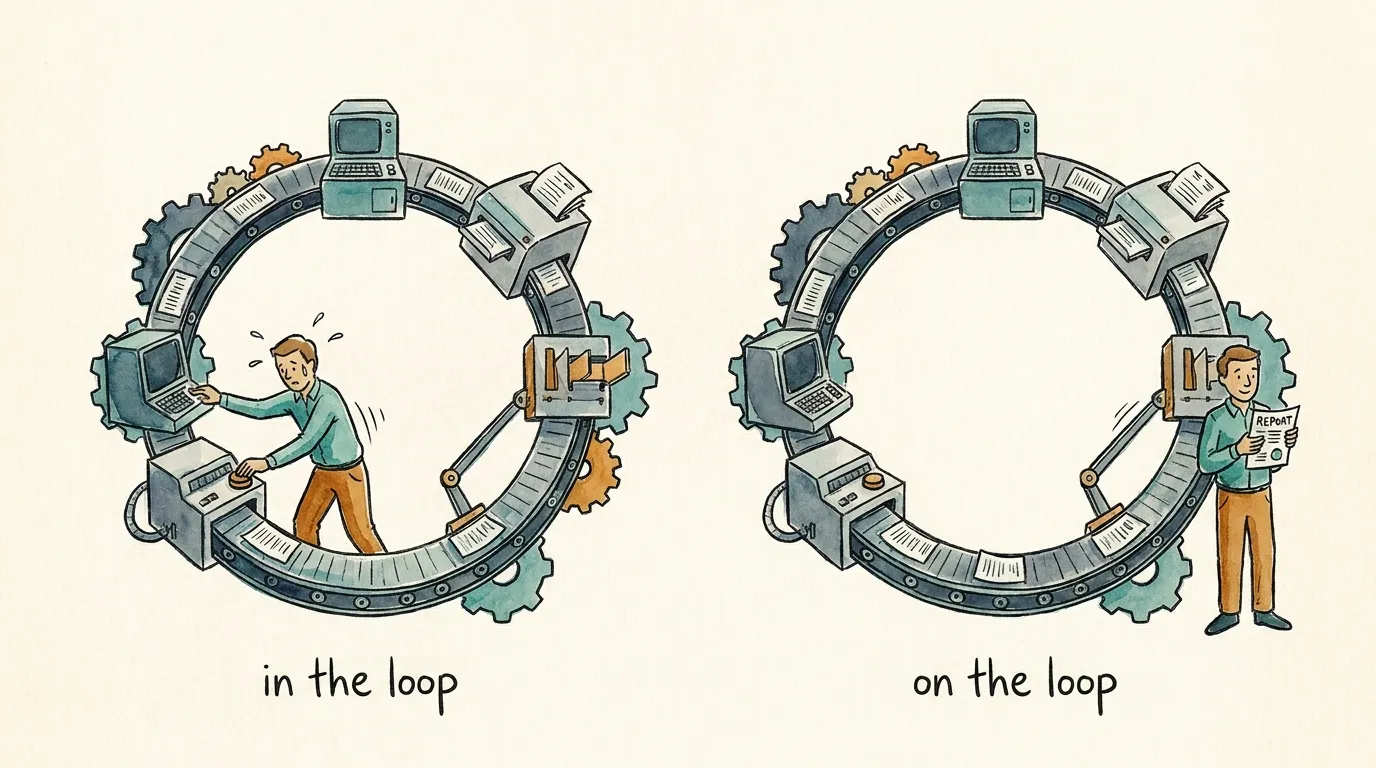
Customer support makes the move concrete, and it wakes on an event — a new ticket. Split the job by what you can check. The triage half is verifiable: every open ticket categorized and routed, nothing waiting past its first-response deadline. A loop can own that. The reply itself is not verifiable — “is this correct and on-brand” is a judgment — and it’s outward-facing: a wrong autonomous send lands in a real customer’s inbox with your name on it. So the design follows the split: the loop triages and drafts, a second agent checks each draft against your policy, the confident low-stakes ones go to a “ready to send” queue, and anything sensitive — a refund, an angry customer, a legal word — is escalated with the draft attached. I’d keep the send gate for a good while; the loop earns rope. None of that is unique to loops — it’s how you’d treat any AI touching customers — but a loop repeats whatever it does, unattended, which is why a soft signal on an outward-facing action is exactly where a human stays on.
Does the work deserve a loop?
One question remains, and it’s the easiest to skip. Not “can I get an AI to do this?” — you almost always can — but whether the work deserves a loop. “A job you do over and over” is only half the answer. Some work recurs — the reconciliation every month, the support queue all day, Google’s emails whenever they arrive — and the loop is the standing operation that keeps handling it. Other work happens once but can’t be nailed in a single pass — driving the books to zero, or the developer’s version, driving a failing test suite back to green — and the loop is the iterate-check-retry it takes to get there. Reconciliation is quietly both: it recurs monthly, and each run converges to zero. So the test I’d apply: does getting it right take more than one pass — because the work comes back, or because reaching “done” takes iteration — and is there a done-check honest enough to answer Stop? Add that it’s valuable enough to be worth the trouble and reviewable enough that you’d trust what it shows, and you’ve got a job that deserves the design.
Plenty of tasks fail that test, and that’s fine — a one-off prompt in a single session is the right tool surprisingly often, and there’s no shame in a quick question that finishes in one pass. And some jobs simply don’t loop: you can’t “loop until we build a full permissioning system,” because there’s no verifiable target and no telling which way the model will run.
Where the products fit today
Back at the design questions, Start and Stop pointed here. Two products anchor the map — Claude Code from Anthropic and Codex from OpenAI, the agent tools whose loop features are documented well enough to check — but read the rows as a template: whatever tool you use, these are the four capabilities to look for. As of this writing, mid-2026, the names line up like this:
| What you want | Claude Code | Codex |
|---|---|---|
| Keep working until a condition is true | /goal <condition> |
/goal <objective> |
| Re-run on an interval, session open | /loop 30m <prompt> |
Scheduled task on a minute-based interval, returning to the existing task |
| Recur durably, no machine needed | Routine (schedule via /schedule) |
Scheduled task (the “Scheduled” panel) |
| React to an outside event (a finished build, a new code change, a ping from another system) | Channels, or a Routine on GitHub events or called directly by another system | Poll for it on a schedule — Scheduled tasks are time-based |
They’re roughly at parity, with one difference to check before you lean on either: who answers Stop. When you give Claude Code a /goal, after every turn it hands your condition and the transcript to a separate small fast model (Haiku by default) that rules yes or no. Anthropic’s docs state both halves of that plainly: completion is “decided by a fresh model rather than the one doing the work,” and the evaluator “does not call tools, so it can only judge what Claude has already surfaced in the conversation.” OpenAI’s guide to Codex goals describes the stop differently: “It will stop running when it’s confident it has reached the stopping condition,” and its advice for making that trustworthy is to “Define the commands or artifacts that prove progress.” Put those side by side and you know where the second pair of eyes comes from in each tool. Claude Code builds a separate evaluator in. A Codex goal keeps the stop decision inside the working agent, so the commands or artifacts you name need to be independently inspectable; for consequential completion, add a separate validator.
One level deeper, so the tools stop looking magical. Anthropic’s docs describe /goal as “a wrapper around a session-scoped prompt-based Stop hook.” A hook is a small rule that fires by itself at a fixed moment — this one fires at the moment Claude would otherwise stop, and asks that second model whether your condition is met; a “no” sends Claude back to work with the reason attached. So the goal isn’t enforced by the worker’s diligence. It’s enforced by a tripwire at the exit. Codex builds the lifecycle into the goal itself — you can pause it, resume it, or clear it — with the stop decision living inside the working agent, anchored to whatever proof you named. Different architectures, one lesson that outlives both product names: know what’s standing at the exit of your loop, because that’s the thing you’re actually trusting.
The bottom line
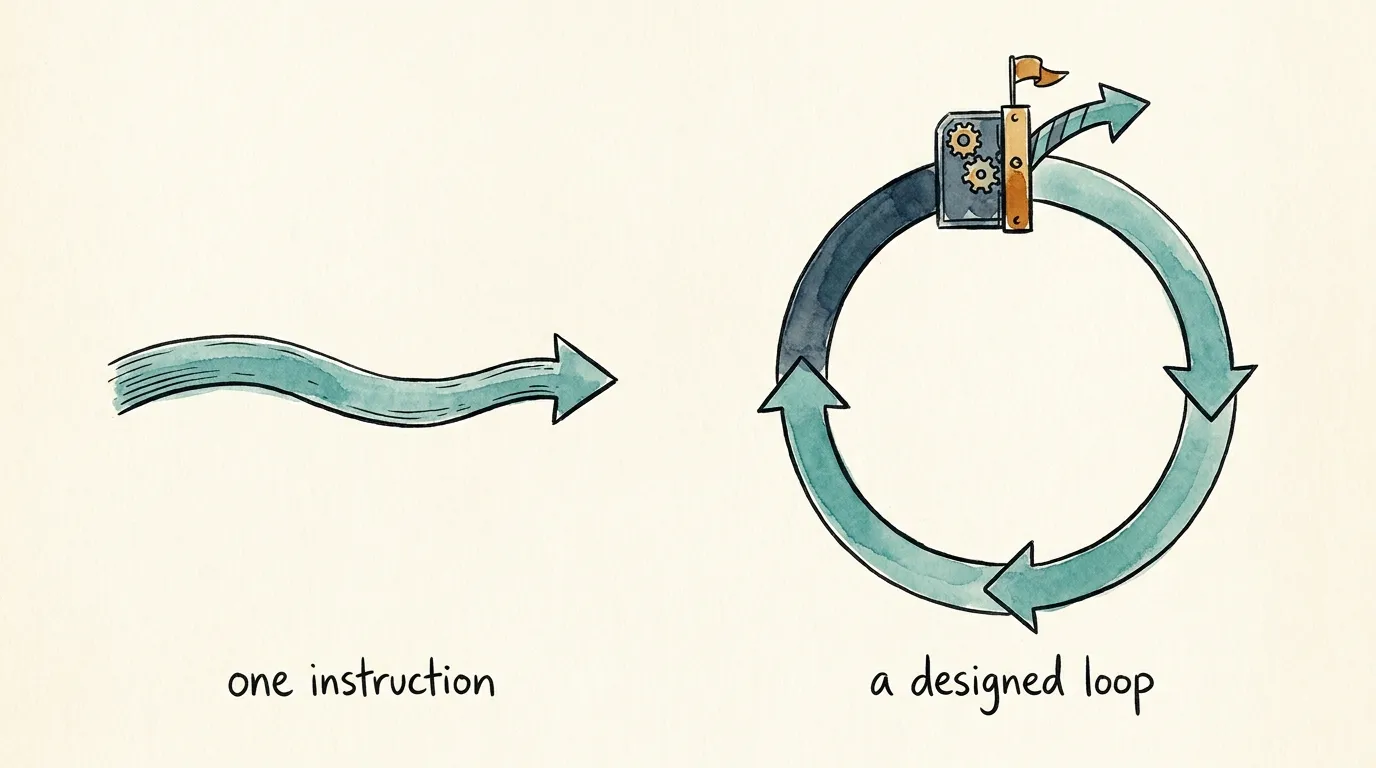
The shift underneath the name is real, even where the name oversells it. AI work is moving from prompting one instruction at a time to giving the model a job with a rhythm and a definition of done. What earns the unattended part is the design — an honest answer to six questions: what starts it, what it sees, what stops it, what’s in scope, what it can spend, and what it shows. Three design the loop; three let you walk away from it. Whether the job is reconciling the books, keeping a site indexable, or triaging support, the discipline is the same, and none of it takes a computer-science background. If you can fill in the card, you can design a loop — and, just as useful, tell when a job doesn’t deserve one.
And a loop designed this way pays a dividend beyond any single run. Because it shows its work, every run leaves a record — what it fixed, what it couldn’t, where you stepped in — and read a few of those records together and the next version of the loop practically writes itself: a boundary widened once it’s earned, a check tightened where it got gamed, a budget trimmed to what the work turned out to need. Work that runs without you is the start; work that gets better each round is the point. That’s what the design buys you — a loop built to be trusted is also a loop built to be improved.
That’s the work we do at Agenteer: sitting with you to find the jobs worth handing off, designing the loop around each one so it’s safe to leave running, and keeping a human on the decisions that need one. If there’s a task you’re tired of being the loop for, that’s where to start.