
When I started loading multiple MCP servers into Claude Code, something strange happened. I was hitting context limits far sooner than usual.
Running /context revealed the culprit: tool definitions had already consumed a significant portion of my context before I'd typed a single word. The problem scales quickly—with many MCP servers connected, tool definitions alone could consume over two-thirds of a typical 200K context window before any conversation begins.
This isn't unique to Claude Code—any similar agentic toolkit faces the same constraint. In addition to tool definitions bloating context at startup, there is another common cause of context bloat - intermediate tool results accumulating during execution. Understanding this distinction is important—because each problem requires a different solution.
The Two Problems Explained
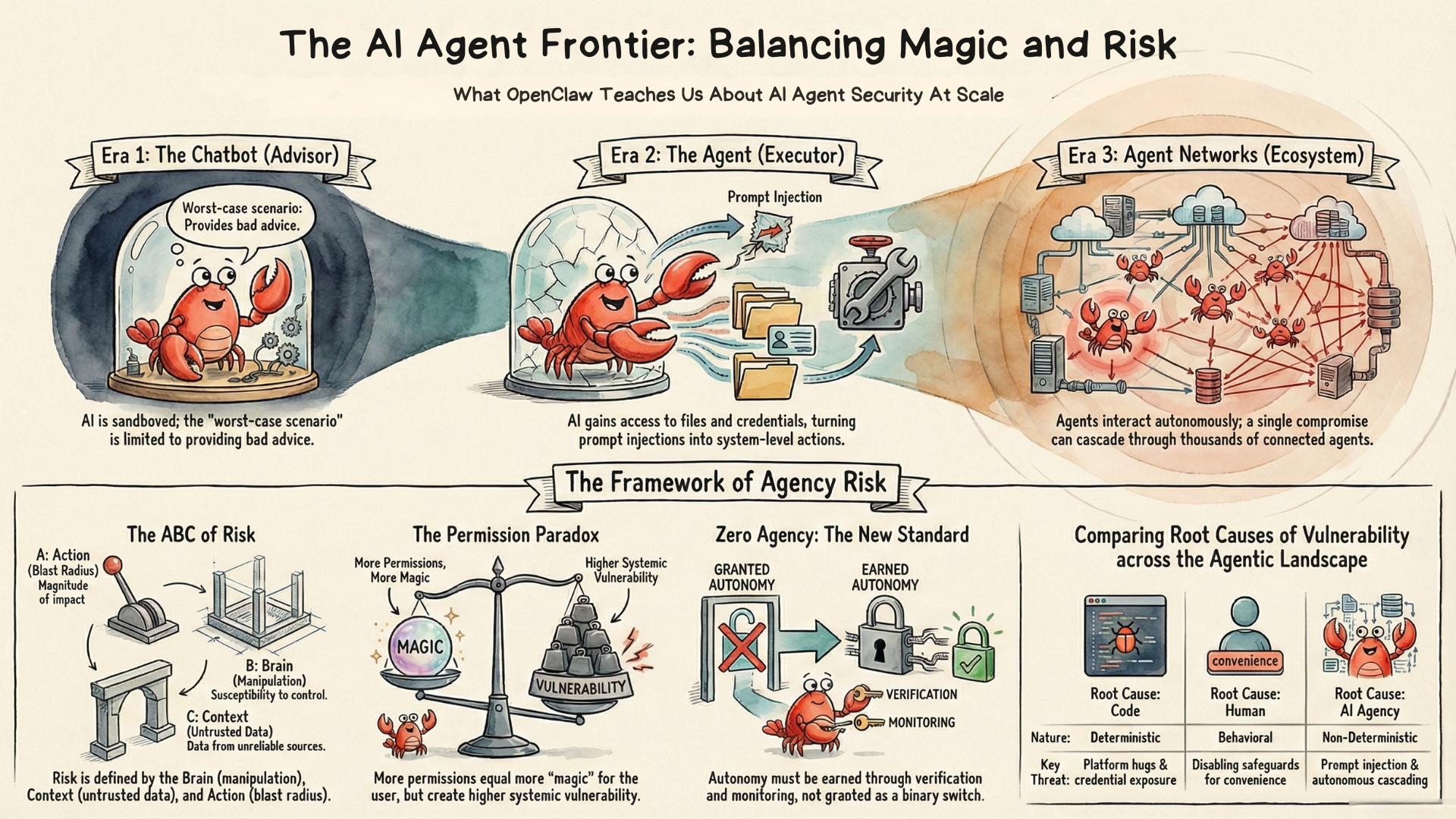
In the ABC Framework for AI Agent Engineering, I emphasized that "Context is King"—the information you provide to an AI agent directly determines the quality of its actions. The problem of context bloat is exactly a manifestation of the interplay among the three pillars of agentic AI systems: the tools powering Actions consume Context that needs to be processed by the Brain. When tool infrastructure consumes a significant portion of that context, agent performance suffers.
Let's examine each problem in detail.
Problem 1: Tool Definition Bloat
What it is: When agents have access to many tools (e.g., via MCP), all tool definitions—the schemas, descriptions, and parameters—must be loaded into context before any work begins.
When it occurs: At session initialization, before the first message.
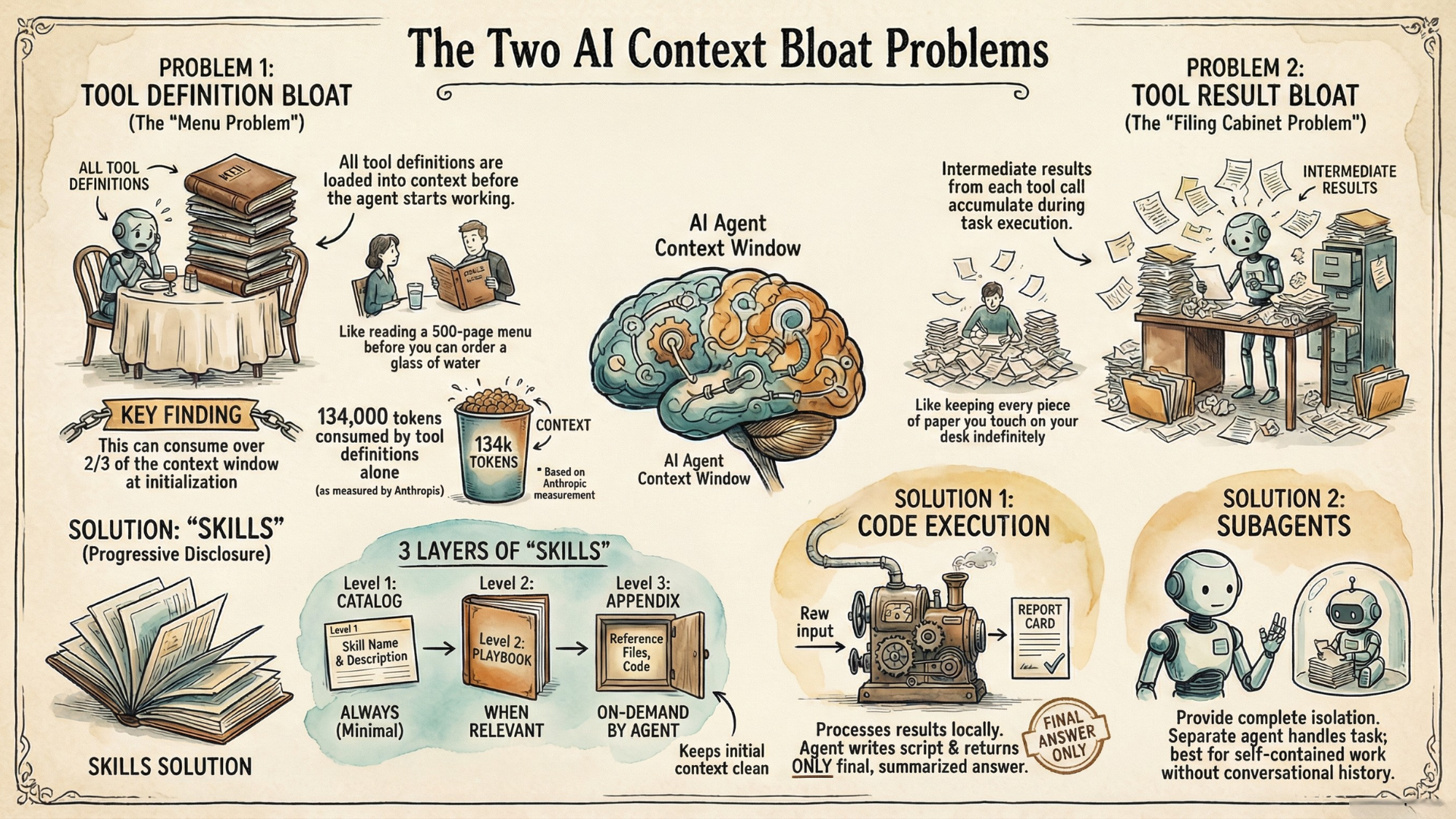
How bad can it get? Consider a typical enterprise setup: 58 tools across services like GitHub, Slack, Jira, and monitoring platforms. According to Anthropic's Advanced Tool Use research, those definitions alone consume approximately 55,000 tokens—before any conversation starts. Jira integration alone adds roughly 17,000 tokens. In their own systems, overall, they've seen 134,000 tokens (67% of a typical 200K context window) consumed by definitions before agents could even start working.
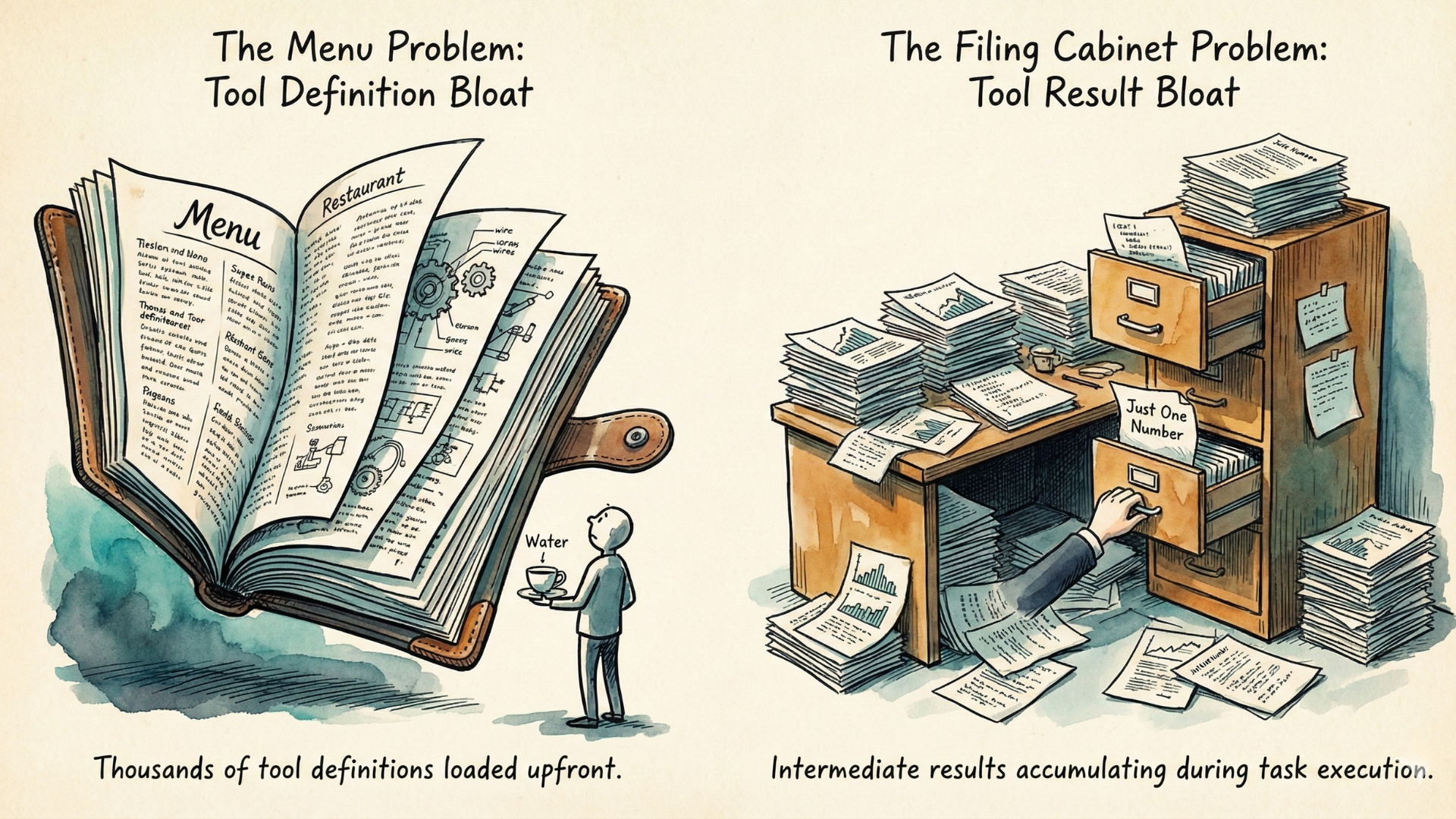
This is the "menu problem." Imagine walking into a restaurant and having to read a 500-page menu before you can order a glass of water. That's what we're doing to our agents.
Problem 2: Tool Result Bloat
What it is: When agents execute tools, the tool results enter the context window. For multi-step workflows, intermediate results accumulate and consume massive context.
When it occurs: During task execution, as tools return data.
The impact compounds quickly. Anthropic's Code Execution with MCP research illustrates good examples: a single 2-hour meeting transcript can add over 50,000 tokens to context—even when the agent only needs to extract action items. Analyzing log files means loading entire files when only error patterns matter. Large documents may exceed context limits entirely, breaking workflows before they complete.
This is the "filing cabinet problem." Every piece of paper you touch stays on your desk, even if you only needed one number from it.
The consequences are severe. Bloated context doesn't just waste tokens—it actively degrades agent performance. Research on context rot shows that as context windows fill, model attention becomes diluted. The agent struggles to find relevant information, makes poorer tool choices, and generates lower-quality responses.
So how do we solve these two different problems? With different solutions.
Skills: An Elegant Solution for Tool Definition Bloat
Skills emerged from a simple question: what if we could give agents access to vast capabilities without loading everything upfront?
Originally proposed by Anthropic for Claude Code, Skills have since become an emerging open standard adopted by other leading providers including OpenAI's Codex. The principle is universal: progressive disclosure.
A Skill packages a capability—everything needed to perform a particular type of task: tool definitions, instructions, code, and reference material bundled together. Progressive disclosure means loading this capability in layers, from minimal metadata to full detail, based on relevance.
The Three Levels of Progressive Disclosure
Think of Skills like a well-organized reference library:
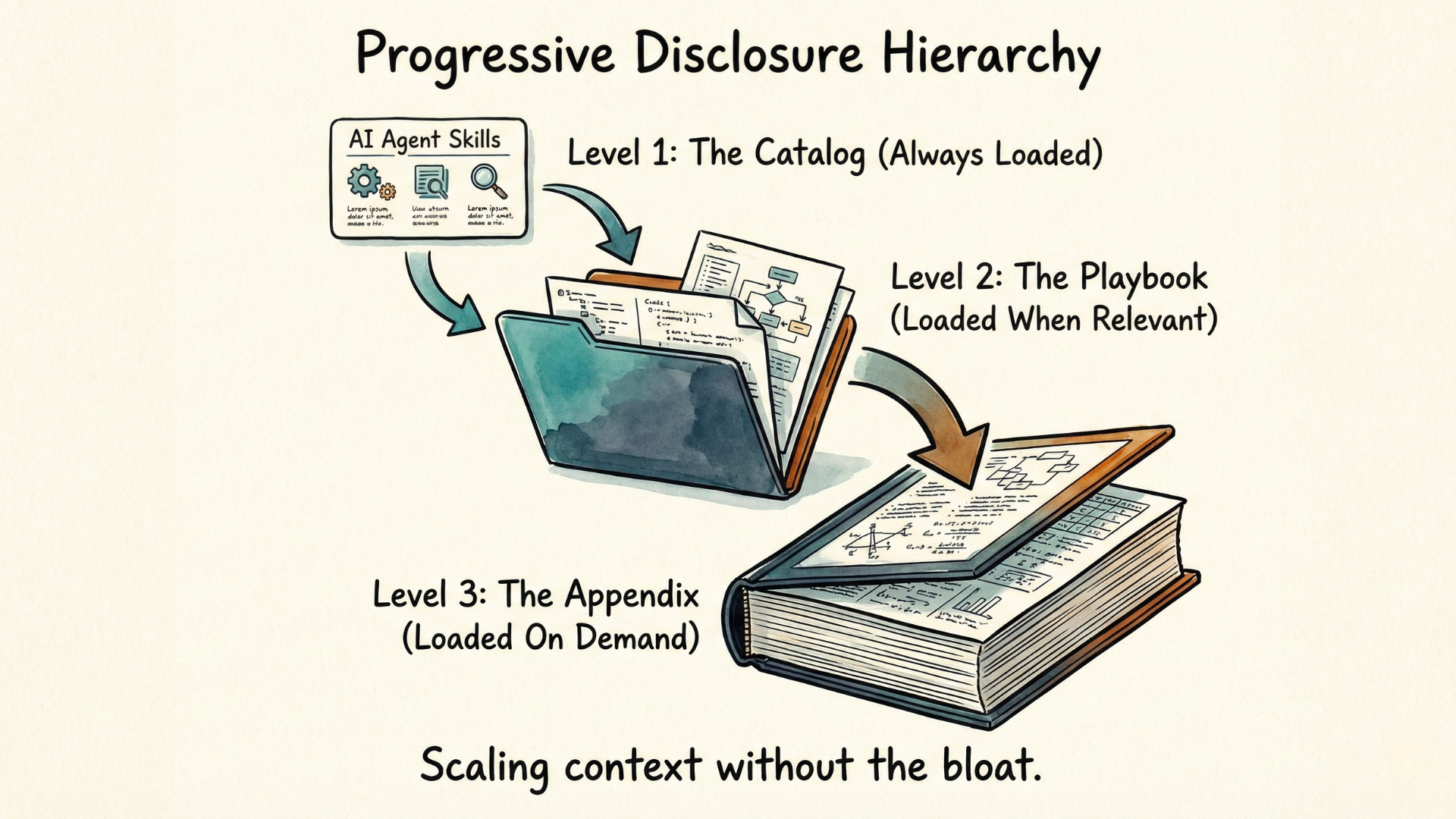
Level 1: The Catalog (Always Loaded)
Only the name and brief description of each skill loads into context. This is the minimal information the agent needs to know a capability exists.
name: "pdf-processing"
description: "Use this skill when working with PDF files—reading,
              extracting text, manipulating pages, or converting formats."
This consumes minimal tokens—a fraction of what full tool definitions would require.
Take our Market Mind tutorial as an example, where we used the foundational approach—defining tools directly in the agent system prompt—so you understand the mechanics before adding any higher-layer abstractions:
- get_stock_price: Retrieve the latest trading price for a stock ticker.
- get_stock_history: Get historical closing prices over a specified number of days.
- get_company_info: Provide a company profile, including sector, industry, and description.
- get_financial_metrics: Display key financial metrics such as market cap, P/E ratio, and revenue.
If we are to re-write it as a skill, we would add a metadata description:
name: "stock-analysis"
description: "Use this skill when analyzing stocks or researching companies—
              retrieving current prices, historical price data, company
              profiles, and key financial metrics."
Level 2: The Playbook (Loaded When Relevant)
When the agent determines a skill might be useful, it loads the full skill body—detailed instructions, tool definitions, and usage patterns.
Back to our Market Mind Agent example, its level 2 data could be like this:
## Available Tools
- get_stock_price: Retrieve the latest trading price for a stock ticker.
- get_stock_history: Get historical closing prices over a specified period.
...

## Usage Examples
price = get_stock_price("AAPL")
metrics = get_financial_metrics("AAPL")
Level 3: The Appendix (Loaded On Demand)
What if you need even more context? Custom calculation methods, edge case handling, extensive examples? Skills support unlimited additional files that the agent can reference as needed:
For custom financial metrics calculations, see ./custom-metrics.md
For handling international markets, see ./international-exchanges.md
These resources are considered level 3. The agent can explore these resources when specific situations demand it, without loading them preemptively.
The Counterintuitive Insight
Traditional tool integration forces a choice: either give agents limited capabilities (less bloat) or comprehensive capabilities (massive bloat). Skills break this tradeoff.
In fact, Skills enable MORE context to be available while requiring LESS context to be loaded.
Here is a summary for the boundaries inside the Skills level architecture:
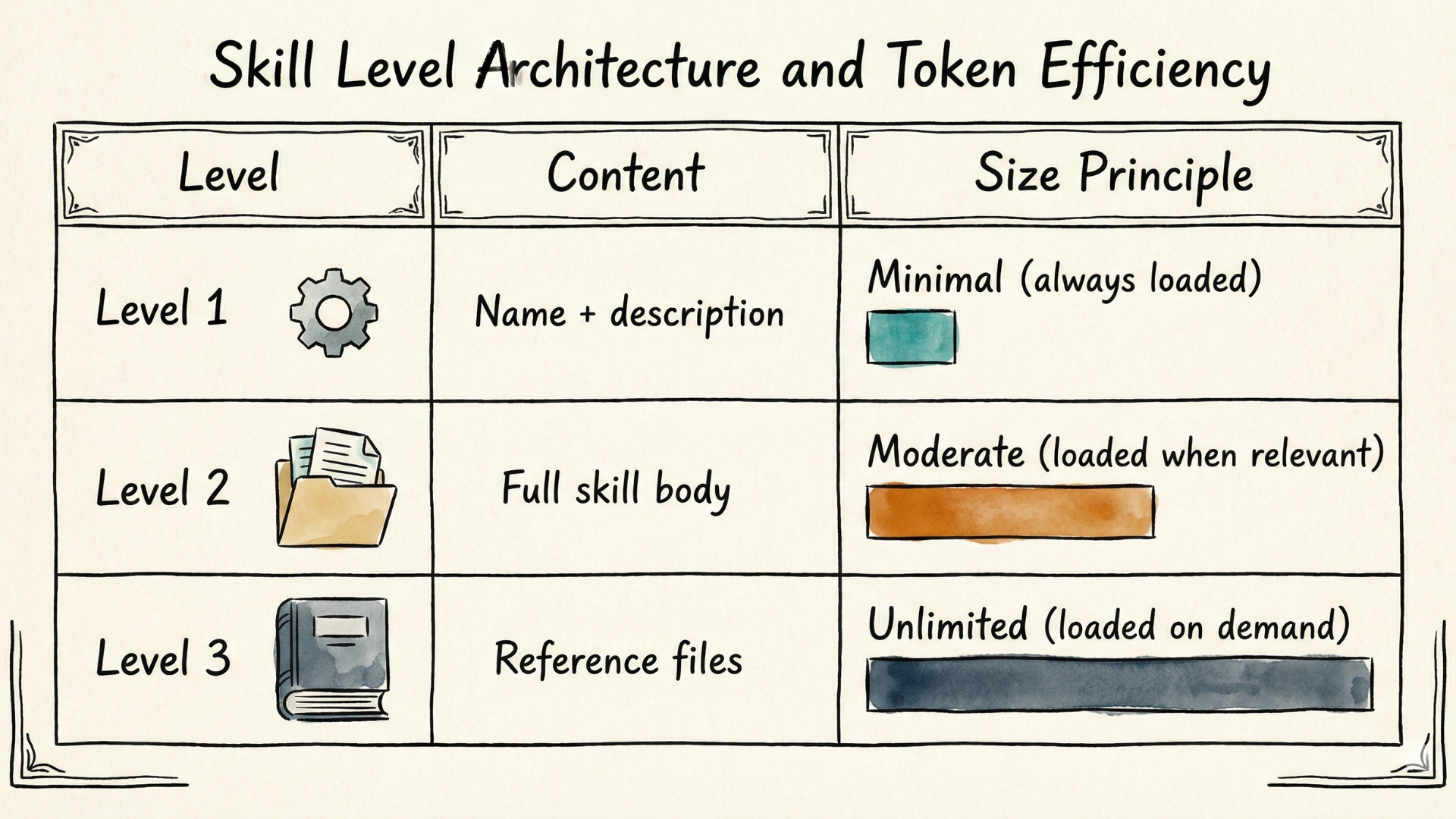
The agent navigates this hierarchy intelligently, loading only what's needed for the current task. A session focused on stock analysis loads financial tools. A session about document processing loads PDF capabilities. Neither loads both unless needed.
Note that progressive disclosure does NOT mean unlimited loading—the agent still has finite context capacity.
Skills enable unlimited available context, but intelligent selection determines what actually loads. The agent chooses what to load based on task relevance. This is why good Level 1 metadata matters so much—it guides the agent's selection. Poor metadata leads to poor selection, regardless of how comprehensive Level 2 and 3 content might be.
From Text to Code, Data, and Bundled Resources
Skills aren't limited to markdown text instructions. They can include code, images, data files, and configuration files as part of their capability definition.
This enables a powerful workflow: once you develop working code for a task, you can save it as a Skill for future reuse. Claude's PDF skill, for example, bundles a Python script that reads PDFs and extracts form fields.
Why include code in Skills?
- Reliability: Deterministic scripts always produce predictable results, unlike non-deterministic LLM inference.
- Reusability: Working code can be saved and invoked consistently across sessions, with progressive disclosure guiding when to use it.
Creating Effective Skills
Creating effective skills means treating your agent as your customer. You're designing the skill for the agent to use—so think from the agent's perspective. The metadata (Level 1) must clearly signal when this skill is relevant—not too broad, not too narrow. If the agent can't tell from the metadata whether to load this skill, it won't use it effectively.
Here's a practical workflow I've found effective and aligned with Anthropic's guidance:
1. Start Without Skills
Run the task with your agent before defining the skill. Observe where it struggles, what context it needs, what patterns emerge.
2. Ask the Agent to Reflect
When the agent goes off track, ask it to reflect on what went wrong. Have it analyze its own successes and failures—what information did it need? What was missing?
3. Organize Into Reusable Context
Take those reflections and structure them into the three-level hierarchy. What's essential to know a capability exists? What's needed to use it well? What's only needed for edge cases?
4. Iterate Based on Performance
Monitor how the agent uses the skill in real scenarios. Refine based on observations—the agent itself can help identify what was helpful, confusing, or missing.
This process leverages what LLMs do well (reflecting on patterns, organizing information) while creating durable artifacts that compound over time as "Building Blocks".
Beyond Skills: Solving Tool Result Bloat
Skills elegantly solve tool definition bloat by default for tools wrapped in capabilities. But two questions remain: What about raw tools that aren't wrapped in Skills? And what about tool result bloat—the intermediate results that accumulate during task execution?
The answer lies in extending Skills' core principle—and adding a second dimension to it.
Extending On-Demand Loading to Raw Tools
Skills implement on-demand loading at the capability level: tool definitions load as part of Level 2, only when the capability is relevant. But what about raw MCP tool definitions that aren't packaged as Skills?
Anthropic's Tool Search Tool extends the same on-demand principle directly to raw tools. Only the search capability itself loads upfront—about 500 tokens. When the agent needs a tool, it searches, retrieves just that definition, and proceeds. This isn't just more efficient; it's more accurate. In MCP evaluations with large tool libraries, Opus 4's tool selection accuracy improved from 49% to 74% when searching for relevant tools rather than parsing all definitions at once.
The tradeoff is latency—each search adds round-trip time. For small, frequently-used tool libraries, preloading may still make sense.
A Second Dimension: Processing Results
Skills' progressive disclosure principle and the Tool Search Tool both address WHEN tool definitions load. But neither addresses a different question: HOW are tool results processed?
Traditional tool calling returns results directly into context. For a budget compliance task—checking 20 team members' expenses against spending limits—every line item would enter the context window. With 50-100 expenses per person, that's thousands of items consuming context.
Programmatic Tool Calling introduces a new dimension. Instead of receiving raw results, the agent writes code that can be executed through a Code Execution sandbox to call the tools, aggregate the data, and return only the final outcomes—employees who exceeded their limits. Thousands of items get filtered down to a handful of flagged violations. Across complex research tasks requiring similar multi-step tool orchestration, the average token consumption could drop from 43,588 to 27,297—a 37% reduction.
The tradeoff is complexity. For simple operations where you need the full result, direct calling remains simpler.
Execution With Complete Context Isolation Through Subagents
A subagent is a specialized agent that operates in its own separate context window. The main agent spawns it with a specific task, the subagent works independently—loading whatever tools it needs, processing whatever data it encounters—and returns only a condensed summary to the main agent. Neither the tool definitions it loads nor the intermediate results it processes have to touch the main context.
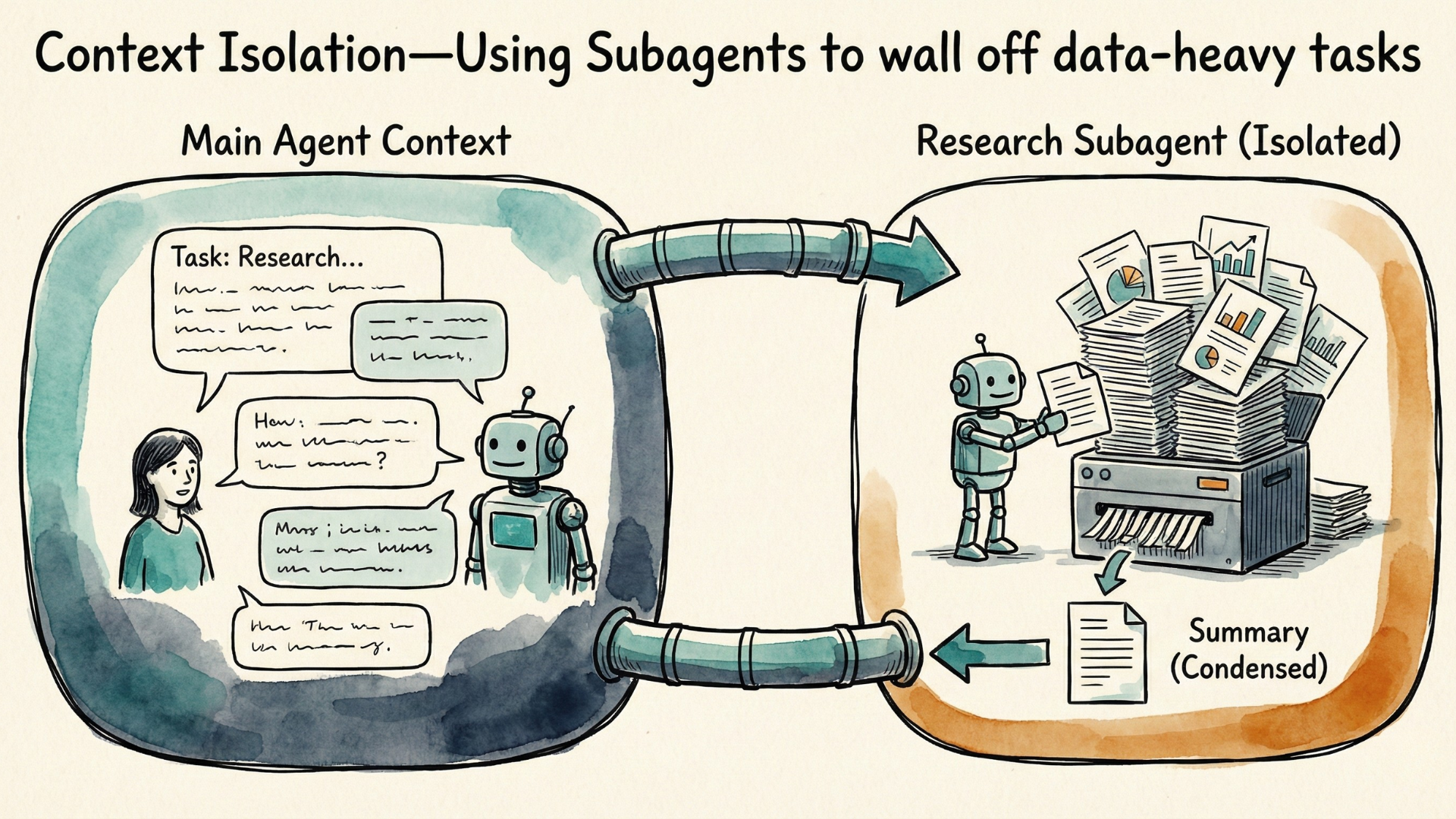
Some good examples for using subagents are: Research tasks exploring many documents where you only need conclusions; Analysis work processing large datasets where only summary findings matter; or Investigation tasks requiring deep exploration that would bloat main context.
But why not use subagents for everything and how is it related to programmatic tool calling with tool search?
Subagents add overhead—spawning a new agent, establishing context, and returning results takes time. For a quick task, this overhead isn't worth it.
They require explicit context passing—and this matters more for subagents. Both Programmatic Tool Calling and Subagents work with limited context: neither the code sandbox nor the subagent has access to the full conversation history. The main agent must explicitly pass what's needed. The difference is that code execution is deterministic once written, while subagents perform LLM reasoning on whatever context they receive. If your task depends on nuances from earlier conversation, you must include them in the task description—and even then, the subagent may interpret things differently than the main agent would.
Finally, there's coordination complexity. Managing multiple subagents, combining their outputs, handling partial failures—this adds orchestration burden. Programmatic Tool Calling also has its complexity such as infrastructure for sandboxing and security.
When deciding whether to use subagents, it is important to ask: can this task stand alone, or does it need the main conversational context?
- If the task is self-contained—"research competitor pricing models" or "summarize this document"—a subagent works well. The task doesn't depend on prior conversational context; it can be fully described in the task prompt.
- If the task depends on prior conversational context—references to "what we discussed," implicit understanding built up over many messages, or nuanced preferences expressed earlier—a subagent may struggle. You'd have to explicitly pass all that context, and even then, nuance can be lost.
This isn't just about whether token savings are "worth it." If the task genuinely needs conversational context, you can't save those tokens—the subagent would fail without them.
Solve Both Context Bloat Problems Together
We've so far discussed separate ways to solve either the tool definition or the tool result bloat problems. It is only natural to think about how we can then combine them to really solve both of them simultaneously. Let's dive in.
Programmatic Tool Calling with Tool Search
An intuitive combination is dynamic tools search plus programmatic tool calling, with the former handling the tool definition bloat and the latter addressing tool results bloat.
Code Execution with MCP is an example of this direction. Tools are presented as files in a filesystem rather than loaded as definitions. The agent discovers what's available by exploring directories, reading only the specific definitions it needs—extending on-demand loading to its fullest. An agent needing Google Drive and Salesforce tools could see consumption drop from 150,000 to 2,000 tokens.
For execution, the agent writes TypeScript or Python that calls tools, processes results locally, and returns only the final output—adding the result processing dimension. Intermediate data never enters the main context window.
The entire process runs in a sandboxed environment with strict filesystem and network boundaries.
The tradeoff is infrastructure complexity. Running agent-generated code needs a sandbox execution environment with proper security, resource limits, and monitoring. This engineering investment pays off at scale—but for simple tasks, the overhead may not be worth it.
Back to Skills - With Subagents and Code Execution
Subagents offer another way to solve tool result context bloat. Since it operates in a completely separate context window from the main agent, any tool definitions loaded for the subagent do not have to be loaded into the main agent. Does that mean it already solves both the tools definition and tools results bloat problem? Not if you think deeper. If there is a task that the main agent wants the subagent to perform, and it knows there are good tools that the subagent would rely on to do a good job. Those tools will need to be loaded to the subagent for the purpose of accomplishing the task. In essence, these tool definitions are part of the context that has to be loaded to achieve the goal of resolving the task. Therefore, if they bloat the context window of the subagent, it sabotages the goal of the main agent as well. In other words, the effective context window is extended by the subagent's context window, but the overall context size is still limited and needs to be preserved as much as possible.
Fortunately, there is another key benefit of Skills that we have not talked about, and it can come in handy to rescue this situation. Skills are packaged for portability and reusability. So if we combine subagents with skills, we got the best of both worlds. Subagents got capabilities that are progressively loaded "just-in-time", and it therefore solves both the tool definition and tool results bloat problems for the main agent. And making skills work with separate subagents is also straightforward, you just need to set its context property to fork.
So now we are ready to answer this common question:
Do Skills solve both context bloat problems?
Skills directly solve tool definition bloat through progressive disclosure. For tool result bloat, Skills can be combined with Subagents and code execution to address both.
Here's the distinction: Tool definition bloat happens when tool schemas load upfront—Skills solve this by loading definitions only when relevant. Tool result bloat happens when tool results accumulate during task execution—Subagents solve this by isolating results in a separate context window.
Furthermore, Skills can bundle executable code (Python scripts, for example) that processes results locally. When a Skill includes code that the agent executes in a separate code execution environment, you also get both progressive disclosure and local result processing. In this sense, Skills become more than just definitions—they pave the way for the various execution efficiency solutions too.
Connecting Everything Together
We've covered several approaches—Skills, Tool Search, Programmatic Tool Calling, and Subagents. How do they relate?
The key insight is that context efficiency has two independent dimensions: how tool definitions load, and how tool results are processed. Different approaches optimize different dimensions; together they can optimize both.
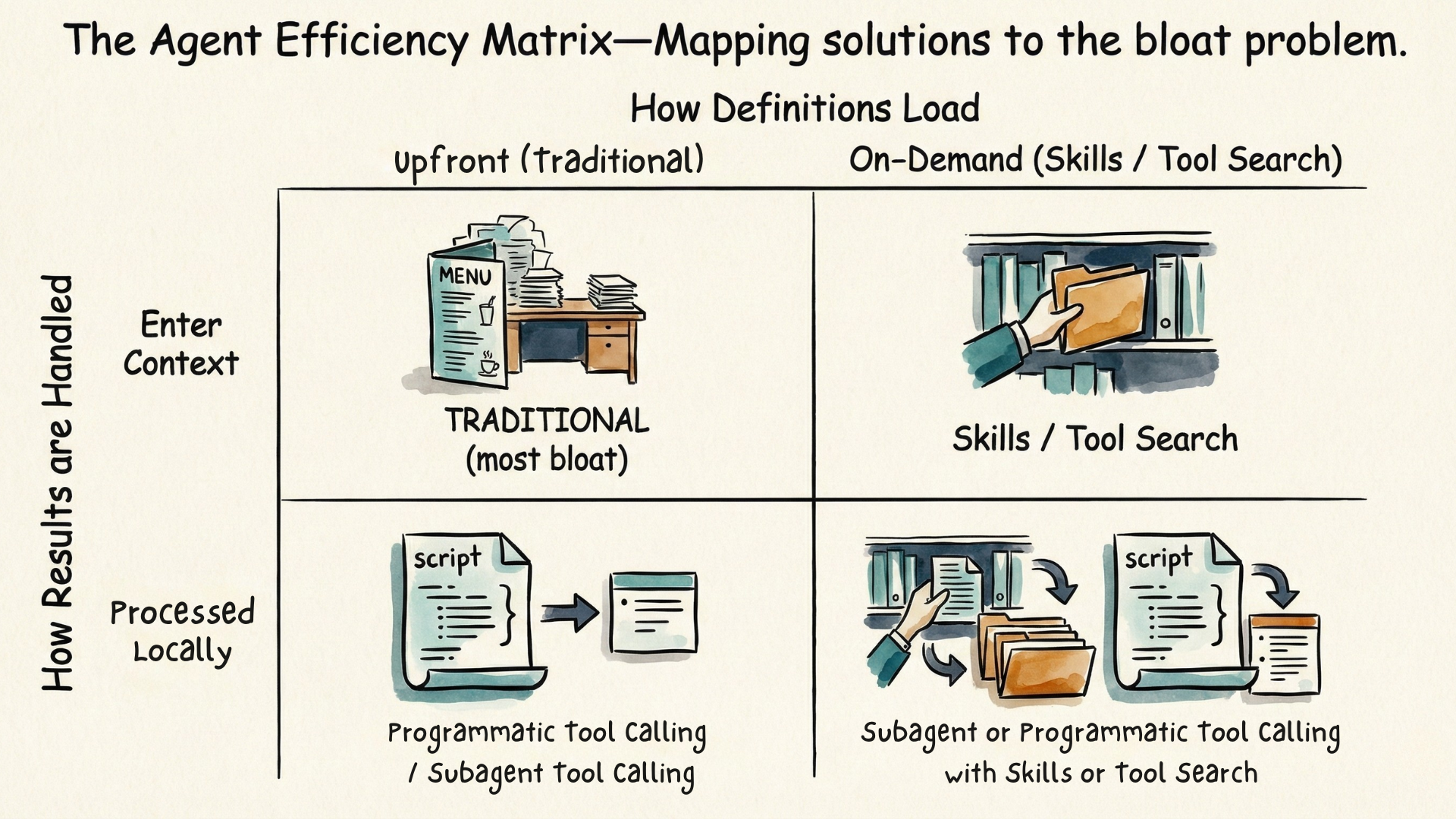
The top-left quadrant is traditional tool use—all definitions load upfront, all results enter context. This is where most agents start, and it works fine for small tool sets and simple tasks.
Moving right means adopting on-demand loading. Skills enable this through progressive disclosure—metadata loads first, full instructions load when relevant, reference files load on demand. Tool Search achieves this through dynamic discovery—tools marked with defer_loading stay hidden until the agent searches for them. Either way, you're no longer paying the upfront cost of loading everything.
Moving down means processing results locally rather than dumping them into context.
Programmatic Tool Calling lets the agent write code to execute in a sandboxed environment. The orchestration logic lives in code—loops, conditionals, aggregations—making execution deterministic once the script is written. This works best when the workflow is structured: fetch these records, filter by this condition, aggregate that way.
Subagents achieve similar isolation differently—The orchestration logic is still large language model-based—the subagent reasons through each step, making judgments along the way. But it operates with its own context window, so their intermediate processing never enters the main context. Only a condensed summary returns. This works best when the task requires flexibility: research this topic (what sources matter?), analyze these logs (what patterns are significant?), summarize this document (what's important?).
The bottom-right quadrant optimizes both dimensions simultaneously. Combining the progressive disclosure of portable Skills or using dynamic tool search, with Programmatic Tool Calling that processes results in their code sandbox or Subagents that execute in a separate context window.
How do you choose between them? If you can specify the logic upfront—"fetch, filter, aggregate, return"—use Programmatic Tool Calling. If each step requires judgment—"what's relevant? what matters? what's the pattern?"—use Subagents. Both require the main agent to explicitly pass what's needed—neither the sandbox nor the subagent has access to the full conversation history in the main context window.
Conclusion
Why must every AI agent builder understand the two context bloat problems? Because they arise from a fundamental challenge in agent design.
"Context is King"—it directly determines the quality of agent behavior. Tools are essential for Actions—without them, the Brain cannot act on the world. But here's the tension: loading and using tools consumes the very context that enables intelligent behavior.
This issue manifests as two distinct problems: Tool definition bloat happens before work begins; Tool result bloat accumulates during work.
To solve them, you start by identifying which problem you're facing. For tool definition bloat, adopt progressive disclosure through Skills, or extend it to tools with Tool Search. For tool result bloat, process results in a code sandbox with Programmatic Tool Calling or isolate entire context with Subagents. For both problems simultaneously, combine both of them and choose between them depending on whether it's more of structured workflows (Code orchestration) or judgment-heavy tasks (Subagent orchestration).
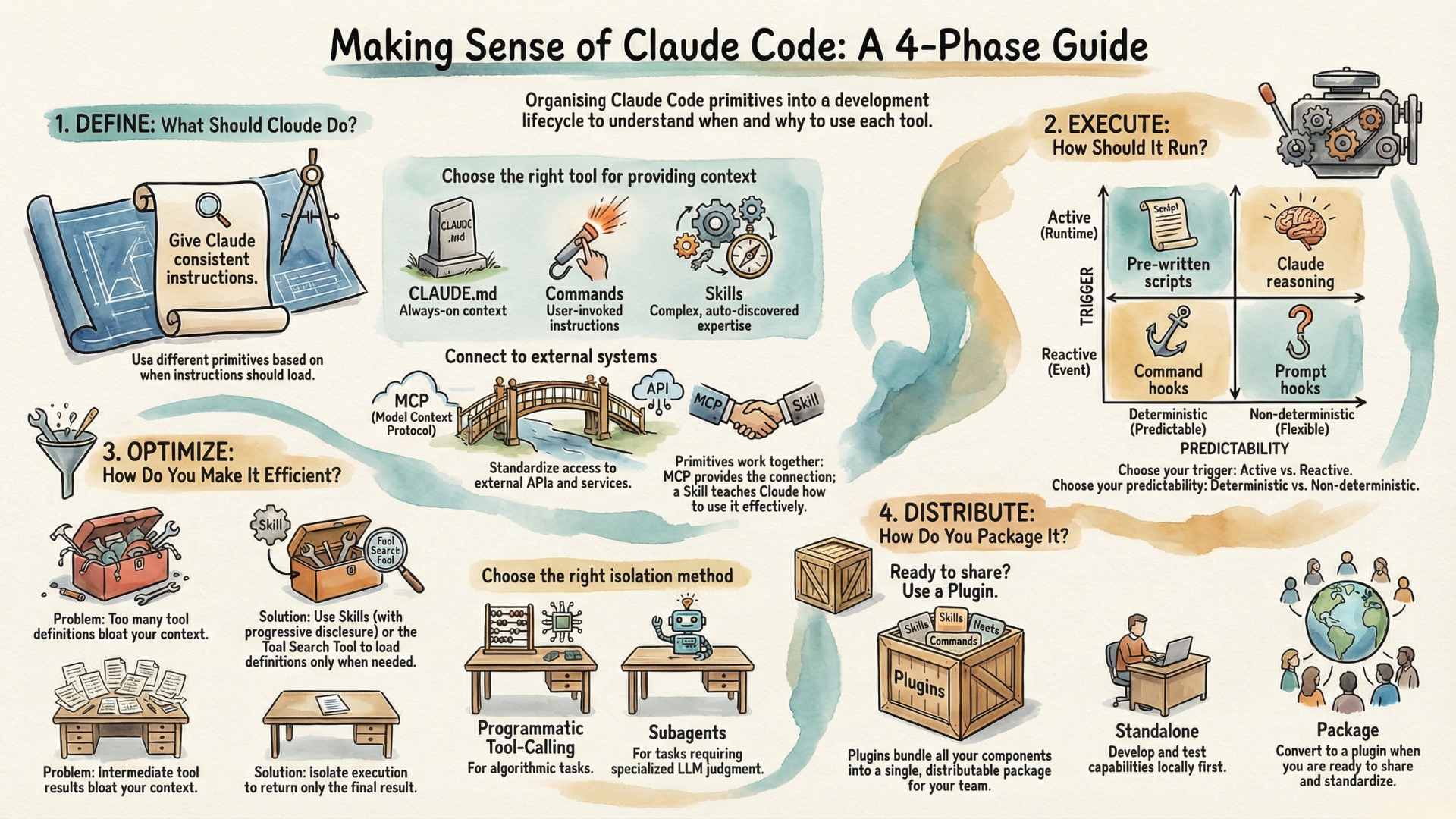
These mechanisms are part of a larger architectural puzzle. In a companion article, I explore the complete Claude Code architecture—how Skills relate to Commands, Subagents, Hooks, and Plugins, and when to use each by introducing the concept of Capability Lifecycle.
The agents that scale successfully are those designed with context efficiency as a first-class concern. Understanding these two problems—and their solutions—is where that design begins.
For the foundational principles of AI agent engineering, see my ABC Framework article. For MCP fundamentals, read my Demystifying MCP guide.
Additional Readings
- Unlock Claude Code's Power through the Capability Lifecycle — Agenteer
- Equipping agents for the real world with Agent Skills — Anthropic Engineering
- Code Execution with MCP — Anthropic Engineering
- Advanced Tool Use — Anthropic Engineering
- Effective Context Engineering for AI Agents — Anthropic Engineering
- Context Rot Research — Chroma Research
- OpenAI Codex Skills — OpenAI Developers
- Agent Skills Open Standard