
Video Overview With Live Demos
The Promise
What if your AI agent could persist through failures for hours—without you having to keep re-prompting it?
Watch it like a fireplace, or let it run while you sleep. Either way, it keeps trying until it works.
This is what Ralph Wiggum Loop promises. And when it works, it delivers.
Geoffrey Huntley built a new programming language using this technique. At Y Combinator hackathons, teams have generated 6 repositories overnight.
The name comes from Ralph Wiggum—a Simpsons character who is dim-witted but relentlessly optimistic and undeterred. That’s the philosophy: naive persistence. Keep smashing against the problem until something works.
The Confusion
I tried the official Ralph Wiggum plugin. Ran the example from the README:
/ralph-loop "Build a REST API for todos. Requirements: CRUD operations, input validation, tests. Output <promise>COMPLETE</promise> when done." --completion-promise "COMPLETE" --max-iterations 50Used Haiku—not even Opus or Sonnet. Claude built the entire thing in a single pass without looping. Maybe a fluke? I tested more—expense trackers, flowchart builders. Each completed without iteration.
The loop mechanism was there. But the “loop” never looped.
I decided to look into what I did wrong—but inadvertently discovered something more fundamental: there are two different architectures being called “Ralph,” and their differences have significant implications.
Two Architectures
Huntley’s original mechanism is elegantly simple:
while :; do cat PROMPT.md | claude-code ; doneA bash loop that spawns Claude, feeds it a prompt, and when that instance terminates, spawns another. Each iteration is a fresh process with clean context.
While Huntley welcomed Claude Code’s official Ralph Wiggum plugin, in a conversation with Dexter Horthy, he also expressed concerns about it—because it implements something different from the original bash approach. The distinction comes down to architecture.
Original Bash
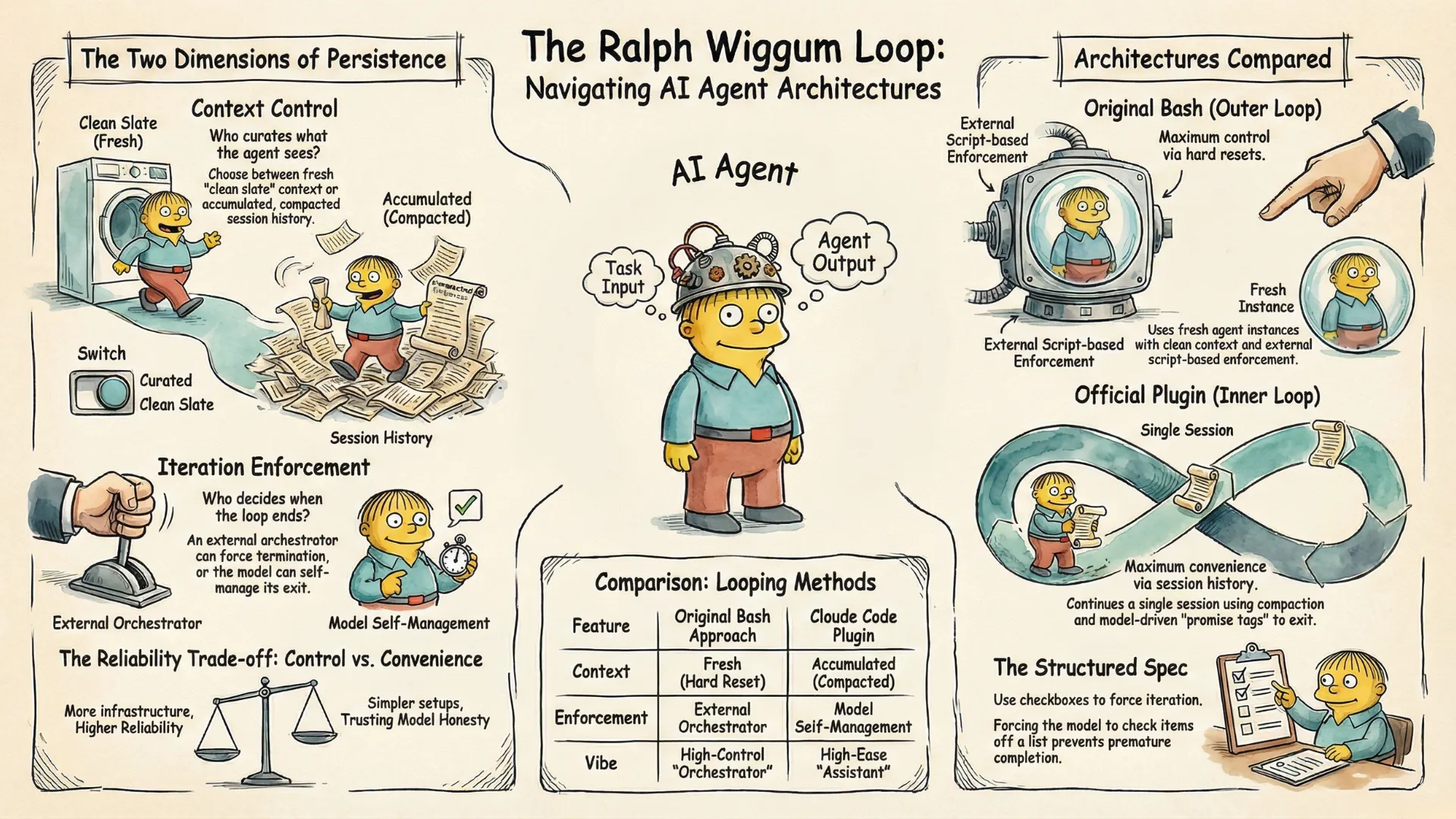
The original bash approach operates like an outer orchestrator:
- Bash script spawns fresh agent instances
- Each instance gets one goal, one context window
- Process terminates after task completes
- Hard reset between iterations—no accumulated context
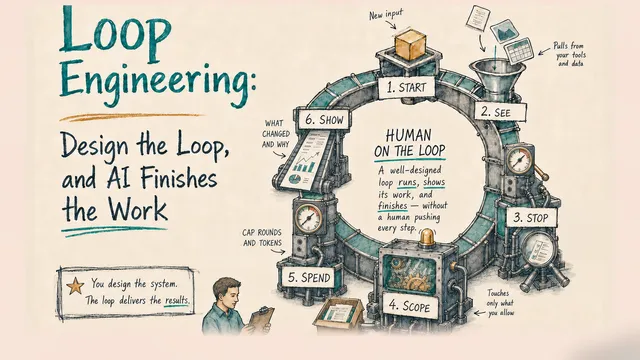
- Human watches, verifies, intervenes if needed (“human on the loop” NOT “human in the loop”)
Plugin
The Claude Code plugin operates more like an inner loop:
- Same Claude Code session continues across iterations
- Auto-compaction when context fills—session history compressed
- Context carries forward (summarized)
- Model self-manages continuation
- Model outputs a promise tag to signal completion
Neither is “wrong.” They represent different tradeoffs.
A key difference lies in the control over what the agent sees on each iteration.
Human on the Loop: Context Control
The pure bash approach emphasizes fresh context for each model iteration—whether it’s the PROMPT, specification, or git commits, all are inspectable and modifiable. Each iteration receives exactly what you chose to include in the context window. You control the context. You decide what the agent sees.
With the plugin approach, you can still read files each iteration—and edit them between runs. But it’s harder. You don’t control timing. You don’t know exactly when the agent will read the file. Compaction adds complexity: it may remove what you wanted to keep, or keep what you wanted gone. You’re nudging context within accumulated history, not curating a clean slate.
In both approaches, you can also have the model write learnings to memory files that persist across iterations. These are the model’s self-managed memories, and they are subject to the same context control dynamics depending on the approach.
The difference is degree, not kind. Fresh context gives you full control. The plugin gives you partial control—harder to predict or intervene, but easier to operate.
Therefore, the deeper insight beneath the architectural difference is who curates what the agent sees. When the human plays a critical role in this curation, it’s essentially what Huntley called “human on the loop.” I expect this pattern to become increasingly important—more so than the well-known “human in the loop”—in the agentic AI era. This also aligns perfectly with what I discussed earlier about Human-AI Synergy in the ABC Framework: Context is King
The Iteration Enforcement Problem
When Does The Loop Actually Loop?
Now we know that context control is a key difference between the two architectures. But we still have a problem to solve—why don’t we see actual iterative loops when testing the official plugin?
No, this is not a bug. In fact, it shows the model we are using, even Haiku, is impressive for the tasks we tested. This is because the plugin delegates to the model to decide when the loop should finish:
═══════════════════════════════════════════════════════════
CRITICAL - Ralph Loop Completion Promise
═══════════════════════════════════════════════════════════

To complete this loop, output this EXACT text:
  <promise>COMPLETE</promise>

STRICT REQUIREMENTS (DO NOT VIOLATE):
  ✓ Use <promise> XML tags EXACTLY as shown above
  ✓ The statement MUST be completely and unequivocally TRUE
  ✓ Do NOT output false statements to exit the loop
In these cases, the model believed it was able to complete everything in one go—so it just did it and declared COMPLETE.
But if you have used these models enough, you know that they can be wrong and overly confident about what they can do in one turn. To be fair, the latest models are actually able to plan step-by-step and decompose complex work, which makes them much better than legacy models that do vanilla one-shot completion. Even so, it still depends on how you define the “one thing,” and that one thing could exceed the model’s capability to plan, execute, and deliver in a single round.
So what if we actually want to elicit the multi-iteration Ralph Loop behavior? One way is to introduce more structure in our context.
A Hybrid Bash Approach
A great example is Ryan Carson’s implementation, which runs Amp. It uses a hybrid architecture that combines fresh context (bash terminates each iteration) with model-managed continuation. The key innovation: a structured PRD containing a list of stories. Each iteration is required to work on one story—aligning with what Huntley has written about “one task per loop.” The model marks it complete, and outputs a promise tag when all stories are done to exit the loop.
The Batching Problem
The structured approach does help, with visible progress, clear tasks, and iteration boundaries. In my tests, I started to see the Ralph loop actually iterate in multiple steps for multiple stories.
However, I also observed scenarios where the agent completed some iterations correctly—one task each, properly yielding control—then suddenly batched all the remaining tasks together in one iteration. So even with structured specs, model behavior was unpredictable.
Why? The model is designed to be helpful. When it sees multiple remaining tasks, it may decide that completing them all is more efficient. The “one task per iteration” instruction is a prompt—probabilistic, not enforced. Specific prompt engineering efforts can help alleviate this issue, which we’ll show in our demo.
The Second Dimension: Iteration Enforcement
This reveals a second axis beyond context control that is equally important in understanding Ralph architecture:
Who enforces the loop iterations?
- External enforcement: An external orchestrator determines when an iteration ends.
- Model self-management: The model running the loop decides itself whether to declare an iteration done.
Note that this is not just about feeding one goal per iteration. Even if the model does not see additional goals, there’s still a difference between the model running the loop considering it done versus an external entity making the call. What makes it more interesting is that external enforcement does not mean it has to be manual or deterministic—it’s possible to run a separate model instance to provide the judgment—but it does allow more control.
Making It Actually Loop
Strong prompt enforcement improved reliability significantly. Here’s what worked.
The Spec Structure
Checkboxes create visible progress. Each iteration reads the spec, finds the first unchecked item, completes it, marks it done, and stops. The loop spawns the next iteration, which continues with the next item.
## Status
- [x] Iteration 1: Canvas
- [ ] Iteration 2: Connections
- [ ] Iteration 3: Execution Animation
These patterns improved reliability—but didn’t guarantee it. The model may still batch. This is the fundamental limitation of prompt-based enforcement.
A Worked Example That Actually Loops
Let’s put these patterns together and show a simple app that actually loops. We’ll first run the Claude Code plugin approach, then the hybrid bash approach. The pure bash approach can be easily derived from there.
The Spec File
We’ll build a very simple, drag-and-drop workflow designer app called AgentFlow. We’ll ask the model to visually verify that each step works via Claude Code’s Chrome integration.
Here’s ralph/spec.md:
# AgentFlow Builder - Requirements

## Status
- [ ] Iteration 1: Canvas
- [ ] Iteration 2: Connections
- [ ] Iteration 3: Execution Animation

## Iteration 1: Canvas
**Build:** Dark-themed canvas with sidebar. Drag node types onto canvas.
**Test:** Open in Chrome. Drag an Agent node onto canvas. Verify it appears.

## Iteration 2: Connections
**Build:** Click-drag from output port to input port creates bezier connection.
**Test:** Create 3 nodes. Connect them in sequence. Verify curves render.

## Iteration 3: Execution Animation
**Build:** Run button triggers animated pulse through connections. Nodes glow when executing.
**Test:** Click Run. Watch animation flow through entire graph.
Each iteration has Build (what to implement) and Test (how to verify). The agent doesn’t just write code—it opens Chrome, interacts with the UI, and confirms it works.
The Prompt—And the Key That Makes It Work
Remember, a structured spec isn’t enough. You need a prompt that reinforces one-task-per-iteration behavior. Here’s what actually worked (ralph/prompt.md) after iterations:
# Ralph Agent Instructions

You are building AgentFlow Builder - a visual AI agent workflow designer.

## Your Task
1. **Read** `ralph/spec.md` to see all iterations
2. **Find** the first iteration NOT marked complete
3. **Implement** ONLY that one iteration
4. **Test** using Chrome - open index.html and verify visually
5. **Update** `ralph/spec.md` to mark iteration complete with [x]
6. **STOP** - End your response immediately

## Completion Signal
After updating spec.md, check all iterations:
- If ANY are still [ ] (incomplete) → End normally (no promise tag)
- If ALL are [x] (complete) → Output exactly: <promise>COMPLETE</promise>

═══════════════════════════════════════════════════════════
CRITICAL: ONE ITERATION ONLY - THIS IS MANDATORY
═══════════════════════════════════════════════════════════

You MUST complete exactly ONE iteration, then STOP.

- After implementing ONE iteration and updating spec.md, END YOUR RESPONSE
- Do NOT continue to the next iteration
- Do NOT "be efficient" by doing multiple iterations

WHY: The loop will AUTOMATICALLY spawn another iteration.
Each iteration = one task. This is BY DESIGN. Trust the process.

═══════════════════════════════════════════════════════════
Specifically, pay attention to the bottom part:
- Visual Separators as Attention Anchors
═══════════════════════════════════════════════════════════
CRITICAL: ONE ITERATION ONLY - THIS IS MANDATORY
═══════════════════════════════════════════════════════════
These aren’t decoration—they’re harder to skip in a long context.
- Addressing the Agent’s Instinct
- Do NOT continue to the next iteration
- Do NOT "be efficient" by doing multiple iterations
Directly override the helpfulness instinct.
- Providing Reassurance
WHY: The loop will AUTOMATICALLY spawn another iteration.
Each iteration = one task. This is BY DESIGN. Trust the process.
The agent might feel “anxious” about leaving work unfinished. Explaining that another iteration WILL happen reduces the urge to do everything now.
Running AgentFlow with Claude Code Plugin
Now let’s run it with the Ralph Wiggum plugin.
I chose the smaller Haiku model. Why? A more capable model might be more likely to complete everything in one pass (although a counter-argument might be that it could be better at following instructions).
Start Claude Code with the Haiku model and the Chrome MCP tool enabled:
claude --model haiku --chromeThen run it:
/ralph-loop:ralph-loop "Read ralph/prompt.md for your full instructions. Follow them exactly." --completion-promise "COMPLETE" --max-iterations 5What Happens
Iteration 1: The agent reads the spec, finds “Canvas” incomplete. Builds the dark-themed canvas with draggable nodes. Opens Chrome, drags a node onto the canvas, verifies it appears where expected. Updates spec.md: [x] Iteration 1: Canvas. Stops—even though it can see iterations 2 and 3 waiting.
Iteration 2: Fresh prompt fed back by the loop. Agent re-reads spec (now showing iteration 1 complete), finds “Connections” incomplete. Adds bezier curve logic. Opens Chrome, connects three nodes, verifies the curves render correctly. Updates spec. Stops.
Iteration 3: Agent finds “Execution Animation” incomplete. Adds the “Run Flow” button with animation logic. Opens Chrome, clicks the button, watches the pulse travel along connections. All three iterations now complete—outputs <promise>COMPLETE</promise>. Loop detects the promise and exits.
Three iterations, no human intervention. Each iteration verified its own work before moving on.
This demonstrates that the plugin approach CAN iterate reliably—with the right task structure and prompt enforcement, because we’re working with the architecture, not against it.
Under the Hood: How the Plugin Works
Let’s dive into how the plugin actually makes that happen behind the scenes.
Step 1: You Launch the Loop
When you run /ralph-loop:ralph-loop, a setup script (setup-ralph-loop.sh) runs once. It creates a state file tracking that a loop is active, and prints instructions your agent sees:
═══════════════════════════════════════════════════════════
CRITICAL - Ralph Loop Completion Promise
═══════════════════════════════════════════════════════════

To complete this loop, output this EXACT text:
  <promise>COMPLETE</promise>

STRICT REQUIREMENTS (DO NOT VIOLATE):
  ✓ Use <promise> XML tags EXACTLY as shown above
  ✓ The statement MUST be completely and unequivocally TRUE
  ✓ Do NOT output false statements to exit the loop
Your agent now knows: “To exit the loop, I need to output <promise>COMPLETE</promise>. And I should only do that when I’m actually done.”
Step 2: Your Agent Works
The agent reads your prompt, reads the spec file, implements one iteration, and eventually tries to finish its response.
Step 3: The Stop Hook Intercepts
Every time your agent tries to exit, a stop hook (stop-hook.sh) runs. It examines the agent’s output:
# Extract text between <promise> tags
PROMISE_TEXT=$(echo "$LAST_OUTPUT" | perl -0777 -pe 's/.*?<promise>(.*?)<\/promise>.*/\1/s')

# Compare against expected value
if [[ "$PROMISE_TEXT" = "$COMPLETION_PROMISE" ]]; then
    exit 0  # Allow exit
fi

# No match - block exit, feed prompt back
echo '{"decision": "block", "reason": "...", "systemMessage": "..."}'
String matching. If the promise tag contains your completion phrase, allow exit. Otherwise, block and continue.
Step 4: Block or Allow
If strings match, the loop ends. If not, the hook outputs JSON telling Claude Code to block the exit and inject a system message for the next iteration:
🔄 Ralph iteration 3 | To stop: output <promise>COMPLETE</promise> (ONLY when statement is TRUE - do not lie to exit!)The Trust Architecture
From the code, we can clearly see: the script is deterministic; the completion decision is not.
The hook can only do string matching. It checks: “Did the output contain <promise>COMPLETE</promise>?” If yes, exit. If no, continue.
But the decision to OUTPUT that promise tag is up to your agent’s judgment. When the setup script says “ONLY when statement is TRUE,” that’s a prompt—an instruction—not enforcement.
The architecture trusts your agent to be honest. If your agent outputs the promise after iteration 1 without doing any work, or if it does ALL the work in iteration 1, the script lets it exit. It can’t verify truth. It can only match strings.
Running AgentFlow with Hybrid Bash
Running It
We can run the hybrid bash version with the following:
cd ~/projects/ralph-wiggum-loop-demo/agentflow
./reset.sh                    # Clean slate
./ralph/run.sh 5              # Max 5 iterations
Under The Hood: How The Bash Runner Works
The bash version uses the exact same project files as the plugin—same spec.md, same prompt.md, same Chrome MCP testing. Only the loop mechanism differs. Here’s the core of our runner:
for i in $(seq 1 $MAX_ITERATIONS); do
    # Pipe prompt to fresh Claude instance
    cat prompt.md | claude --print --chrome --model haiku \
        --dangerously-skip-permissions 2>&1 | tee "$TEMP_OUTPUT"

    # Check for completion signal
    if grep -q "<promise>COMPLETE</promise>" "$TEMP_OUTPUT"; then
        echo "✅ COMPLETE!"
        exit 0
    fi
done
Note that we used the --print mode, which runs non-interactively—output goes to stdout, no prompts. We also enabled --dangerously-skip-permissions, which bypasses permission checks since print mode can’t prompt. Use a sandbox, VM, or isolated container to run it for security.
The Complete Picture
Two dimensions define the Ralph landscape.
The first is context: what does each iteration see? In the pure bash approach, each iteration starts fresh—a hard reset, clean context, no accumulated history. In the plugin approach, context compounds and compacts—the session continues, history summarizes, previous work carries forward in compressed form.
The other is iteration enforcement: who controls when an iteration ends? External enforcement means an orchestrator decides—feeding one goal, verifying completion, triggering the next iteration only when satisfied. Model self-management means the running agent decides itself—outputting a final promise tag when it believes all work is complete.
These two dimensions create a spectrum of approaches. At one end, pure bash: fresh context and external enforcement. Maximum control, maximum reliability, but you’re building infrastructure. At the other end, the plugin: compacted context and model self-management. Maximum convenience, minimum setup, but you’re trusting the model more and accepting variability. In between, the hybrid approach: fresh context with model self-management. You get clean context control while keeping the simpler promise-based completion.
Neither dimension has a “right” answer. They represent tradeoffs between control and convenience, reliability and simplicity.
The Takeaway
When I first ran the plugin and it completed in one pass, I thought I was doing something wrong. I wasn’t. The loop mechanism was working exactly as designed—there just wasn’t anything to loop about.
The promise of Ralph is real. Your agent can work for hours while you sleep. But making the loop actually loop requires understanding what you’re asking for.
If your task completed in one pass, that’s not failure in Ralph. That’s either a capable model meeting a well-scoped task (if the results worked) or an overly-eager model trying to complete things in one turn without knowing its limitations (if the results don’t work).
If you want more predictable iteration, use bash with fresh context, use structured specs with checkboxes. Consider external verification. The more control you want, the more infrastructure you build.
If you want maximum convenience, use the plugin, accept some variability, and use strong prompt enforcement to improve reliability. You’re trading control for ease—just know the tradeoff you’re making.
The loop mechanism is always there. What matters is understanding what’s happening inside it: who curates the context, and who decides when an iteration ends.
That understanding is what separates “I tried Ralph and it didn’t work” from “I tried Ralph and now I know which approach fits my task.”
Try both approaches with the same project: ralph-wiggum-loop-demo